型号:
Dell Precision 5750
Background
The Dell Precision 5750 is a 17-inch mobile workstation that belongs to Dell’s Precision line of professional laptops. Mobile workstations are a category of laptops designed to support tasks that require more processing power than typical consumer laptops. These tasks often include computer-aided design (CAD), engineering simulations, data analysis, and professional media work. Over time, mobile workstations have become an alternative to desktop workstations by offering similar performance in a portable form.
The Precision line is Dell’s workstation-focused product family, which also includes other models such as the Precision 3000, 5000, and 7000 series. The Precision 5750 falls within the 5000-series, which generally balances performance and portability. Compared to standard laptops, devices in this category often include higher-capacity memory options, faster storage configurations, and dedicated graphics hardware to support sustained workloads.
Like many high-performance laptops, the Dell Precision 5750 may experience hardware wear over time due to regular use. Common issues can include reduced battery capacity, thermal performance concerns, fan noise, or storage-related problems. Because of the cost of the device, users often choose to repair or replace individual components rather than replace the entire system. To support this, Dell provides official service documentation that explains safety precautions, recommended disassembly order, and the internal layout of the device, helping users determine whether a repair is appropriate and prepare to work on the Precision 5750 safely.
Identification
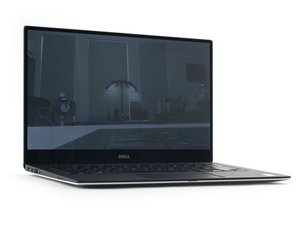
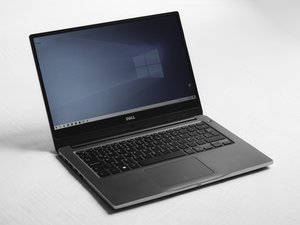
The Dell Precision 5750 is a notably slim 17-inch laptop, typically found in a dark silver aluminum chassis, with its most distinctive feature being an infinity-edge display that has very thin borders on all four sides. To positively identify your model, first check the bottom case where the model name "Precision 5750" is stamped or etched, and locate the adjacent white regulatory label containing the unique 7-character Service Tag. If the label is missing or worn, you can find this information in the BIOS by restarting the laptop and pressing F2 repeatedly at startup; the Service Tag and product model will be displayed on the main system information screen.
Source: Dell instructions for locating service tag
Technical Specifications
- Display: 17.0-inch FHD+ (1920 × 1200) or UHD+ (3840 × 2400)
- Processor Options: Intel® Core™ or Intel® Xeon® processors (configuration dependent)
- Memory (RAM): Up to 64 GB DDR4
- Storage: Two internal M.2 NVMe SSD slots (2230 or 2280 form factor)
- Graphics: Integrated graphics with optional discrete GPU
- Battery: Internal 97 Wh rechargeable battery
- Networking: Wi-Fi 6 and Bluetooth
- Ports: USB-C with Thunderbolt™, HDMI, audio jack
Sources:
Additional Information
- Dell Precision 5750 Service Manual – Official disassembly instructions, safety precautions, and component diagrams.
- Dell Precision 5750 Support Page – Manufacturer specifications, product information, and support resources.
- iFixit Precision 5750 Parts Page – Replacement parts available through iFixit, including batteries and storage components.
- Youtube video for disassembly - Disassembly, cleaning of dust and replacement of thermal pastes.