RAM
此翻译由机器生成,尚未经过人工审核。会说这种语言吗? 审核此翻译。
|
1个答案 0 分 |
Laptop not booting but fan spins and keyboard lights up |
|
1个答案 0 分 |
Can you upgrade the memory in this laptop? |
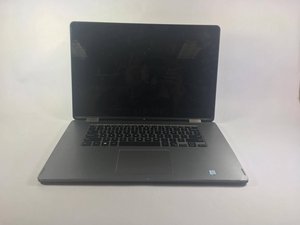
Dell Inspiron 7568 是一款二合一笔记本电脑,也是一款触屏设备,主要用于对处理器负载要求较低的日常网页浏览,是一款多功能设备。该设备于 2015 年 10 月下旬作为 Dell Inspiron 7000 系列产品线的一部分发布。该设备随 Windows 10 操作系统系列一同推出。该设备的发布定位是作为戴尔的一个过渡性机型,因为它是一款既拥有大屏幕,又具备折叠和触摸功能的设备。这是一款非独占设备,可在全球范围内使用,并在美国、加拿大和欧盟地区公开发售。其核心机箱和内部设计在全球范围内通用,但某些型号可能会呈现出不同的配置,例如显示屏。该设备最初旨在满足主流日常用户对多功能性和媒体消费的需求,同时保持了亲民的价格。
该设备在市场上的引入经过精心安排,成为许多消费者眼中的一大卖点,因为它价格实惠且易于获取。初始售价为 749 美元,使其成为极少数零售价如此低廉的产品之一,且其高端配置版本仅贵出约 100 美元。除了价格优势外,它还是首批允许 360 度铰链的大屏幕计算机之一,这在当时具有革命性意义。其具备触控显示屏的同时又是一款二合一设备,且尺寸更大、质量更高,这使其在发布的一代中备受瞩目。该设备从未收到过制造召回通知,但其已知的硬件问题包括“幽灵触控”和屏幕无响应、铰链问题、充电问题和设备过热。
All Dell Inspiron 7568’s should have a model number label, a service tag, and a form factor. At the bottom base cover of the laptop, there should be a printed sticker or etched text that shows the model number(ex: Inspiron 7568) or regulatory model(P55F002). The form factor can be told by how it looks: a 15.6-inch convertible laptop that features a 360 degree hinge. The system and software itself has identifiable factors that allow you to recognise what you’re using while you use it. By using the built in command prompt you can retrieve the BIOS serial number or by retrieving the system name, you could access the BIOS/UEFI settings to look for the system information, or you can download and use Dell SupportAssist that can detect and display the system model and service tag.
Dell Inspiron 7568 采用第 6 代 Intel Core 架构,依然是一款功能强大的可翻转中端笔记本电脑。其官方技术硬件规格如下:
如需更全面、更详细的技术规格信息,请访问 戴尔官方 Inspiron 15 7000 系列手册。
如果你的设备遇到技术问题,请查看我们的 Dell Inspiron 7568 故障排除 页面。
Dell Inspiron 15 7000 Series (7568) 服务手册
Dell Inspiron 15 7000 Series 15-7568 服务手册
Dell Inspiron 15 7000 Series 15-7568 服务手册
Dell Inspiron 15 7000 Series (15-7568) 快速入门指南 (EN, NL, DE, RO, TR)
Dell Inspiron 15 7000 Series 快速入门指南 (EN, HR, SL, VI, AR)
Dell Inspiron 15 7000 Series (15-7568) 快速入门指南 (EN, CS, HU, PL, SK)
Dell Inspiron 15 7000 Series (15-7568) 服务手册
Dell Inspiron 15 Série 7000 (15-7568) 规格
Dell Inspiron 15 Seria 7000 (15-7568) 规格
Dell Inspiron 15 7000 Series 维护指南
Inspiron 15 7000 Series (15-7568) 服务手册
Inspiron 15 Serija 7000 7568 视图与规格
Dell Inspiron 15-7568 快速入门指南 (EN, ZH, JA, KO)
Inspiron 15-7568 7000 Series 服务手册
Inspiron 15 7000 Series 服务手册 (7568)
Dell Inspiron 15-7568 快速入门指南 (EN, DA, FI, NO, SV)
Dell Inspiron 15 7000 Series (15-7568) 服务手册
Dell Inspiron 15-7568 Série 7000 规格
Dell Inspiron 15-7568 7000 Serisi 规格
Inspiron 15-7568 7000 Series 维修手册
Inspiron 15-7568 Serie 7000 规格
Dell Inspiron 15 7000 (7568) 视图与规格
Dell Inspiron 15 7000 (7568) 技术数据
Inspiron 15 7000 sorozat 7568 技术数据
Dell Inspiron 15 7000 Series (7568) — 视图与规格
Dell Inspiron 15-7568 7000-serien 规格
Inspiron 15 7000 Series (15-7568) 维护手册
Dell Inspiron 15-7568, serija 7000 — 规格
Dell Inspiron 15 7000 Series (7568) 服务指南
Dell Inspiron 15-7568 7000 Series 服务手册
Inspiron 15-7568 7000-serie 规格
Dell Inspiron 15-7568 7000-serie 视图与规格
Inspiron 15 7000 Series 15-7568 服务手册
Dell Inspiron 15 7000-serien 7568 规格
Dell Inspiron 15 7000 Series 15-7568 服务手册
过去 24 小时: 4
过去 7 天: 9
过去 30 天: 63
总计 3,071