跳转到主内容
加入维修社区 - 创建账户

Steam Controller (2nd Gen, 2026) Main Board Replacement

你所需要的

  1. Steam Controller (2nd Gen, 2026) Main Board Replacement, Before you begin: 步骤 1 中的图像 1,3 Steam Controller (2nd Gen, 2026) Main Board Replacement, Before you begin: 步骤 1 中的图像 2,3 Steam Controller (2nd Gen, 2026) Main Board Replacement, Before you begin: 步骤 1 中的图像 3,3
    • Let your controller's battery drain below 25% before starting this repair.

    • Unplug all cables and accessories from the controller, including the Steam Controller Puck.

    • During your repair, it can be helpful to lay the Steam Controller on a clean, soft cloth for stabilization and to prevent scratches.

  2. Steam Controller (2nd Gen, 2026) Main Board Replacement, Remove the back cover screws: 步骤 2 中的图像 1,2 Steam Controller (2nd Gen, 2026) Main Board Replacement, Remove the back cover screws: 步骤 2 中的图像 2,2
    在这个步骤中使用的工具:
    TR6 Torx Security Screwdriver
    $5.99
  3. Steam Controller (2nd Gen, 2026) Main Board Replacement, Remove the back cover: 步骤 3 中的图像 1,2 Steam Controller (2nd Gen, 2026) Main Board Replacement, Remove the back cover: 步骤 3 中的图像 2,2
    • Remove the back cover.

  4. Steam Controller (2nd Gen, 2026) Main Board Replacement, Remove the battery: 步骤 4 中的图像 1,3 Steam Controller (2nd Gen, 2026) Main Board Replacement, Remove the battery: 步骤 4 中的图像 2,3 Steam Controller (2nd Gen, 2026) Main Board Replacement, Remove the battery: 步骤 4 中的图像 3,3
    • If your battery is swollen, take appropriate precautions. Never reinstall a swollen battery—replace it with a new one.

    • Lift the right edge of the battery to remove it.

    • During reassembly, first slide the left side of the battery into place so its connector is fully seated. Then, press the right side into place to secure it.

  5. Steam Controller (2nd Gen, 2026) Main Board Replacement, Remove the mounting bracket screws: 步骤 5 中的图像 1,2 Steam Controller (2nd Gen, 2026) Main Board Replacement, Remove the mounting bracket screws: 步骤 5 中的图像 2,2
    • During the rest of your repair, don't forcefully push the controller down onto your work surface—you may damage the thumbsticks and trackpads.

    • Use a T6 Torx screwdriver to remove the four 7.4 mm‑long screws securing the battery mounting bracket.

  6. Steam Controller (2nd Gen, 2026) Main Board Replacement, Remove the mounting bracket: 步骤 6 中的图像 1,2 Steam Controller (2nd Gen, 2026) Main Board Replacement, Remove the mounting bracket: 步骤 6 中的图像 2,2
  7. Steam Controller (2nd Gen, 2026) Main Board Replacement, Disconnect the rumble motors: 步骤 7 中的图像 1,3 Steam Controller (2nd Gen, 2026) Main Board Replacement, Disconnect the rumble motors: 步骤 7 中的图像 2,3 Steam Controller (2nd Gen, 2026) Main Board Replacement, Disconnect the rumble motors: 步骤 7 中的图像 3,3
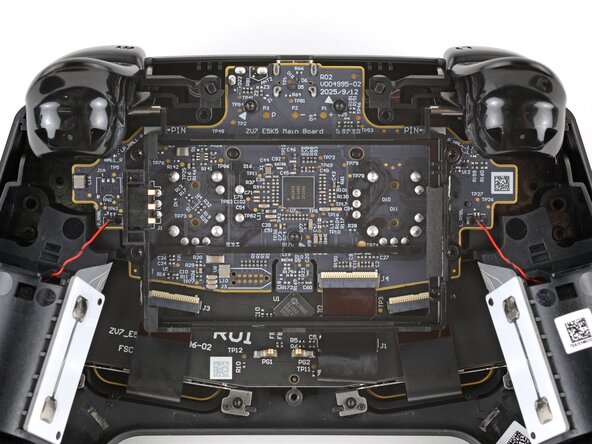
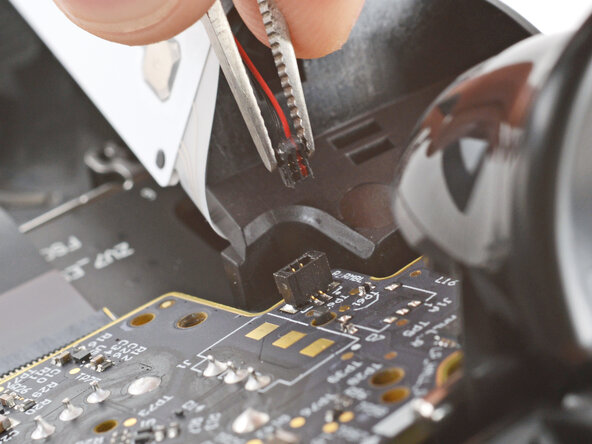
    • Don't pull on the rumble motor's delicate wires—they're easily damaged. Be careful not to pinch the wires with your tweezers, and only pull on the connector itself.

    • Firmly grip the short edges of one rumble motor connector with a pair of tweezers and pull straight up to disconnect it

    • Grip the tweezers as close to the tip as possible to get a better hold on the connector.

  8. Steam Controller (2nd Gen, 2026) Main Board Replacement: 步骤 8 中的图像 1,3 Steam Controller (2nd Gen, 2026) Main Board Replacement: 步骤 8 中的图像 2,3 Steam Controller (2nd Gen, 2026) Main Board Replacement: 步骤 8 中的图像 3,3
    • Repeat to disconnect the other rumble motor.

  9. Steam Controller (2nd Gen, 2026) Main Board Replacement, Disconnect the interconnect cable: 步骤 9 中的图像 1,3 Steam Controller (2nd Gen, 2026) Main Board Replacement, Disconnect the interconnect cable: 步骤 9 中的图像 2,3 Steam Controller (2nd Gen, 2026) Main Board Replacement, Disconnect the interconnect cable: 步骤 9 中的图像 3,3
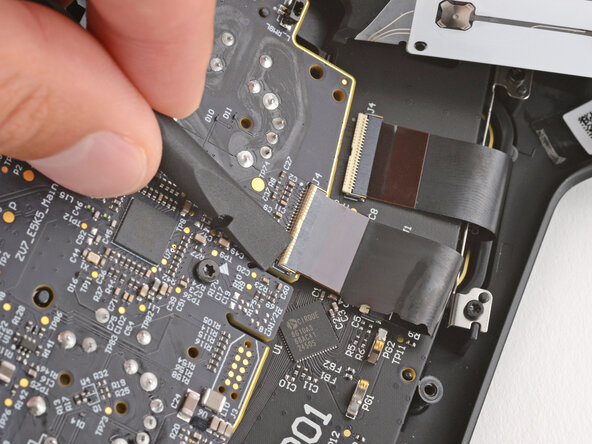
    • Be careful not to damage any of the small, surface-mounted components on the main board.

    • Use a spudger to lift the hinged locking flap on the interconnect cable ZIF connector, located on the bottom edge of the main board.

  10. Steam Controller (2nd Gen, 2026) Main Board Replacement: 步骤 10 中的图像 1,2 Steam Controller (2nd Gen, 2026) Main Board Replacement: 步骤 10 中的图像 2,2
    • Use tweezers to grip the cable by its plastic pull tab and slide it out of the socket.

  11. Steam Controller (2nd Gen, 2026) Main Board Replacement, Remove the main board screws: 步骤 11 中的图像 1,3 Steam Controller (2nd Gen, 2026) Main Board Replacement, Remove the main board screws: 步骤 11 中的图像 2,3 Steam Controller (2nd Gen, 2026) Main Board Replacement, Remove the main board screws: 步骤 11 中的图像 3,3
    • Use a T6 Torx screwdriver to remove the three 7.4 mm‑long screws securing the main board.

    • When reinstalling the screws, raise the controller so the thumbsticks aren't pressed against your work surface—pressure on the thumbsticks can cause improper alignment and seating.

  12. Steam Controller (2nd Gen, 2026) Main Board Replacement, Remove the main board: 步骤 12 中的图像 1,3 Steam Controller (2nd Gen, 2026) Main Board Replacement, Remove the main board: 步骤 12 中的图像 2,3 Steam Controller (2nd Gen, 2026) Main Board Replacement, Remove the main board: 步骤 12 中的图像 3,3
    • Pull the main board down so the top corners clear the triggers.

    • You should be able to remove the board without removing the triggers. If you're having trouble, check out this guide to remove them.

    • Remove the main board, guiding the thumbsticks through their cutouts.

    • During reassembly, make sure the two rumble motor wires don't get trapped underneath the board. Use the four alignment posts to ensure the board is properly positioned.

  13. Steam Controller (2nd Gen, 2026) Main Board Replacement, Rubber piece information: 步骤 13 中的图像 1,3 Steam Controller (2nd Gen, 2026) Main Board Replacement, Rubber piece information: 步骤 13 中的图像 2,3 Steam Controller (2nd Gen, 2026) Main Board Replacement, Rubber piece information: 步骤 13 中的图像 3,3
    • The rubber piece above the status LED may have been dislodged when removing the main board.

    • If the rubber piece is out of place, remove it and set it aside.

    • During reassembly, place the rubber piece so the two tabs are on the bottom and towards the back.

结论

To reassemble your device, follow these instructions in reverse order.

Take your e-waste to an R2 or e-Stewards certified recycler.

Repair didn’t go as planned? Try some basic troubleshooting, or ask our Answers community for help.

另外一个人完成了本指南。

Spencer Day

于09/14/22注册

184,128 声望

创作了1,166篇指南

0指南评论

添加评论

浏览统计数据:

过去 24 小时: 63

过去 7 天: 623

过去 30 天: 1,440

总计 1,441