跳转到主内容
加入维修社区 - 创建账户

How to Reinstall the iFixit Digital Multimeter Outer Cover

  1. How to Reinstall the iFixit Digital Multimeter Outer Cover, Install the outer cover: 步骤 1 中的图像 1,2 How to Reinstall the iFixit Digital Multimeter Outer Cover, Install the outer cover: 步骤 1 中的图像 2,2
    • Firmly push the top edge of the multimeter into the cover's top cutout.

    • Try to get the top edge well aligned and seated. This will give you enough room to pull the cover's bottom edge in place.

    询问修复机器人
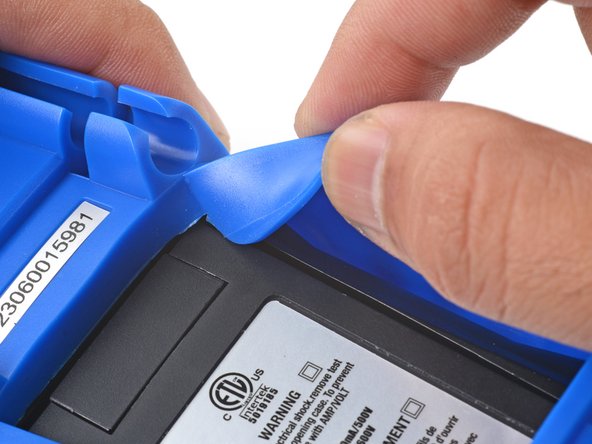
  2. How to Reinstall the iFixit Digital Multimeter Outer Cover: 步骤 2 中的图像 1,3 How to Reinstall the iFixit Digital Multimeter Outer Cover: 步骤 2 中的图像 2,3 How to Reinstall the iFixit Digital Multimeter Outer Cover: 步骤 2 中的图像 3,3
    • Flip the multimeter over.

    • The cover has a lip that needs to seat into the groove around the multimeter's kickstand.

    • Align and press the cover lip into the groove above the kickstand.

    询问修复机器人
  3. How to Reinstall the iFixit Digital Multimeter Outer Cover: 步骤 3 中的图像 1,3 How to Reinstall the iFixit Digital Multimeter Outer Cover: 步骤 3 中的图像 2,3 How to Reinstall the iFixit Digital Multimeter Outer Cover: 步骤 3 中的图像 3,3
    • Lift and tuck the cover lip into the groove near the top right corner of the kickstand.

    • Repeat the procedure for the top left corner of the kickstand.

    询问修复机器人
  4. How to Reinstall the iFixit Digital Multimeter Outer Cover: 步骤 4 中的图像 1,2 How to Reinstall the iFixit Digital Multimeter Outer Cover: 步骤 4 中的图像 2,2
    • Guide and press the cover lip into the grooves along the sides of the kickstand.

    • Pull the cover over the bottom edge of the multimeter and press the bottom lip into the groove under the kickstand.

    • Carefully check to make sure the cover lip sits completely in the groove around the kickstand.

    询问修复机器人
  5. How to Reinstall the iFixit Digital Multimeter Outer Cover: 步骤 5 中的图像 1,3 How to Reinstall the iFixit Digital Multimeter Outer Cover: 步骤 5 中的图像 2,3 How to Reinstall the iFixit Digital Multimeter Outer Cover: 步骤 5 中的图像 3,3
    • Flip the multimeter over so that the front is facing up.

    • Squeeze the cover along the right edge to pop the cover lip into the groove along the side of the multimeter.

    • Repeat the process along the left edge of the multimeter.

    • Carefully check to make sure the cover is properly seated along the perimeter of the multimeter.

    询问修复机器人
结论

For more information on how to use your iFixit multimeter, check out this page.

Arthur Shi

于01/03/18注册

335,774 声望

创作了848篇指南

团队

iFixit iFixit 的会员

Staff

123 名成员

创作了25,713篇指南

0指南评论

添加评论

浏览统计数据:

过去 24 小时: 1

过去 7 天: 9

过去 30 天: 19

总计 148