此翻译由机器生成,尚未经过人工审核。 会说这种语言吗? 查看评论。
简介
本指南将带你逐步确认维修成功的可能性,并介绍具体的操作方法。
你所需要的
-
-
-
使用万用表或通断测试仪检查引脚是否短路。
-
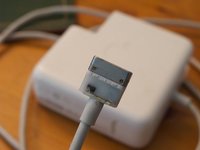
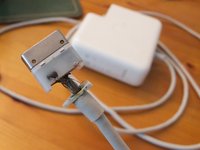
插头端共有五个引脚。中心引脚用于信号传输,而其他四个引脚用于为 Mac 供电。由于 MagSafe 电源适配器设计为可以以任何方向使用,因此外侧引脚(1 号和 5 号)是等效的,使用万用表测量时应显示为连接状态。
-
中间的引脚(2 号和 4 号)也应具有相同的特性。
-
但是,如果其他任何引脚显示为已连接,则说明存在短路。在这种情况下,1 号和 2 号引脚发生了短路。
-
-
-
-
收尾工作;
-
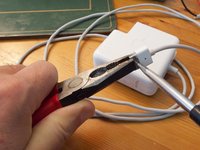
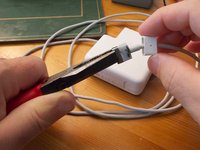
将密封圈滑回线缆末端,并使用一把钳子轻轻将金属夹重新夹紧。
-
你也可以选择用环氧树脂(Areldite)或热熔胶密封 PCB,不过即便不这样做也没关系。
-
将塑料盖板滑回原位盖住你的维修区域——它应该足够紧,可以卡回原位;如果不行,滴几滴强力胶水就足够了。
-

 询问修复机器人






如果一切顺利,你心爱的充电器应该还能再为你服务很多年。
49等其他人完成本指南。

11指南评论
I have the newer cylindrical adapter, can that be repaired as well in a similar way?
Did anyones MBP get insanely hot after doing this to the charger?
angelventura - 回复 分享
i just want to thank you for the guide. I had the same problem and got it fixed.
Thien Chau - 回复 分享
On www.magsafetester.com you can find a device with which you can test your adapter.
Dear author,
I would like to know if it is possible that there are two mistakes in your guide that you might have missed. Both are very little things, or perhaps I am just completely mistaken.
1) In step 14, shouldnt it be that pins 1 and 5 do not short with 2 and 4, instead of 2 and 3?
2) In step 15, isnt it “Araldite” the product you use instead of “Areldite”?
Thanks in advance for checking that. I just want the highest of qualities for your guide, so that no one gets confused when using it. Have a great day.
