
跳转到主内容

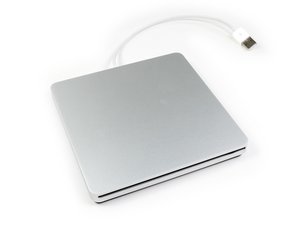
苹果的外置光驱,本质上是MacBook Air SuperDrive的重塑。

How do I open the casing?

I have this external disc drive. There is a CD or DVD in it that wont eject. I hear it trying to catch the cd/dvd, yet I don't hear the spinning sound. Is there any way I can open the casing? I don't see any screws on t at all...

已回答! 显示答案 我也有这个问题

这是一个好问题吗?

得分 3
添加一条评论

3个答案

已选择的解决方案

Steven, take a look at this guide.

这个答案有帮助吗?

得分 2
添加一条评论

use a big suction cup to lift the bottom plate up so you will not damage the casing. this is what the official apple service manual says

这个答案有帮助吗?

得分 2
添加一条评论

Without the suction cup, there are three simple snap tabs on either side of the case which can be pushed back with playing cards to open the case. You then need a Torx 10 and Phillips #00 or #000 drivers to remove three screws which hold down the drive in the case. After pivoting the drive up, you need to remove the two side Torx screws that fasten a mounting plate and 4 small Phillips screws to lift up the top plate and remove the stuck disk.

I was going to grant access to the paperclip eject hole I expected to find, but THERE IS NONE! If software won’t eject a disk in this drive, there is no option but DISASSEMBLY!

Jim

这个答案有帮助吗?

得分 1

1条评论:

Thank you very much

完成的

添加一条评论

添加你的答案

steven 将永远感激不已
浏览统计数据:

过去 24 小时: 2

过去 7 天: 7

过去 30 天: 82

总计 12,374
