跳转到主内容
加入维修社区 - 创建账户

Samsung PL20 LCD Replacement

你所需要的

  1. Samsung PL20 LCD Replacement, LCD: 步骤 1 中的图像 1,3 Samsung PL20 LCD Replacement, LCD: 步骤 1 中的图像 2,3 Samsung PL20 LCD Replacement, LCD: 步骤 1 中的图像 3,3
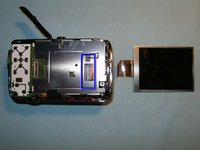
    • Here is the broken LCD. The spider crack in the glass, as well as the discoloration of the screen, is clearly visible.

    • Remove the battery and the memory card from the device, if so equipped.

    • Remove the two screws on the left side.

    询问修复机器人

    添加评论

  2. Samsung PL20 LCD Replacement: 步骤 2 中的图像 1,3 Samsung PL20 LCD Replacement: 步骤 2 中的图像 2,3 Samsung PL20 LCD Replacement: 步骤 2 中的图像 3,3
    • Remove one screw from the bottom

    • Remove the two screws on the right side.

    • Use a plastic opening tool, or your fingernails, to split the casing apart. Start from the battery compartment and work your way around the case. The case should split easily.

    询问修复机器人

    添加评论

  3. Samsung PL20 LCD Replacement: 步骤 3 中的图像 1,3 Samsung PL20 LCD Replacement: 步骤 3 中的图像 2,3 Samsung PL20 LCD Replacement: 步骤 3 中的图像 3,3
    • Once the back of the case is removed, the LCD becomes immediately visible.

    • Remove the LCD from its holder to gain access to the connector.

    • Open the connector, and flip the black clip upwards, freeing the LCD. It can now be removed and the new one installed.

    询问修复机器人

    添加评论

结论

To reassemble your device, follow these instructions in reverse order.

取消:我没有完成这个指南。

7等其他人完成本指南。

oldturkey03

于09/29/10注册

856,555 声望

创作了123篇指南

1指南评论

Great help! Screen replaced no problem. Thank you

EE61 - 回复 分享

添加评论

浏览统计数据:

过去 24 小时: 4

过去 7 天: 18

过去 30 天: 103

总计 4,679