跳转到主内容
加入维修社区 - 创建账户

Asus ROG G20CB CPU Replacement

你所需要的

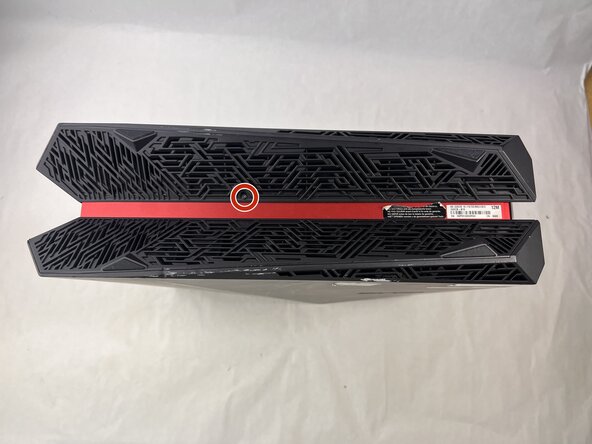
  1. Asus ROG G20CB CPU Replacement, Fan: 步骤 1 中的图像 1,2 Asus ROG G20CB CPU Replacement, Fan: 步骤 1 中的图像 2,2
    • Remove each of the two 4.6 mm Phillips screws on the top and bottom of the tower.

  2. Asus ROG G20CB CPU Replacement: 步骤 2 中的图像 1,1
    • Slide the front panel to the left and lift gently.

    • There is a cable connecting the panel to the computer. Handle it gently and avoid straining the connected panel.

  3. Asus ROG G20CB CPU Replacement: 步骤 3 中的图像 1,1
    • Disconnect the cable carefully by pulling gently on both sides of the connector.

  4. Asus ROG G20CB CPU Replacement: 步骤 4 中的图像 1,1
    • Remove the five 4.6 mm Phillips screws holding down the fan tray and then pull the fan tray out of the system.

    • The fans are connected by a thin cable, be gentle when removing tray.

  5. Asus ROG G20CB CPU Replacement: 步骤 5 中的图像 1,1
    • Carefully unplug the two fan cables from the motherboard by pulling straight up from the base of the connector.

  6. Asus ROG G20CB CPU Replacement: 步骤 6 中的图像 1,1
    • Remove the six 4.6 mm Phillips screws connecting the fans to the fan tray.

  7. Asus ROG G20CB CPU Replacement, CPU Cooler: 步骤 7 中的图像 1,1
    • Remove the 4.6 mm Phillips screw that secures the optical drive.

  8. Asus ROG G20CB CPU Replacement: 步骤 8 中的图像 1,1
    • Push the optical drive out of the chassis.

  9. Asus ROG G20CB CPU Replacement: 步骤 9 中的图像 1,1
    • Pull back the tape on the heat sink and use a long-neck Phillips screwdriver to remove the four screws securing the heat sink.

    • There is a number next to each screw, when taking the cooler off, loosen in descending order (4-3-2-1). When installing a cooler, tighten in ascending order.

  10. Asus ROG G20CB CPU Replacement: 步骤 10 中的图像 1,1
    • Remove the 4.6 mm Phillips screw from the heatsink at the top of the case.

    • Lift the CPU cooler out of the system.

    • Be sure to apply fresh thermal paste before reinstalling a cooler.

  11. Asus ROG G20CB CPU Replacement, CPU: 步骤 11 中的图像 1,1
    • Locate the CPU socket retention arm next to the processor.

    • Push the arm down and out, then lift it upward to release the CPU cover.

  12. Asus ROG G20CB CPU Replacement: 步骤 12 中的图像 1,1
    • Gently lift the CPU straight out of the socket.

    • Handle the CPU by its edges. Do not touch the bottom pins or contacts to avoid damage.

  13. Asus ROG G20CB CPU Replacement: 步骤 13 中的图像 1,1
    • Reassembly tip: When installing a new CPU make sure to align the gold triangle with the white circle on the motherboard.

结论

To reassemble your device, follow the above steps in reverse order.
Take your e-waste to an R2 or e-Stewards certified recycler.
Repair didn’t go as planned? Try some basic troubleshooting or ask our Answers community for help.

Kimber-Starr

于03/21/25注册

319 声望

创作了3篇指南

团队

UMass Dartmouth, Team 3-3, Botvin Spring 2025 UMass Dartmouth, Team 3-3, Botvin Spring 2025 的会员

UMASSD-BOTVIN-S25S3G3

3 名成员

创作了5篇指南

0指南评论

添加评论

浏览统计数据:

过去 24 小时: 2

过去 7 天: 4

过去 30 天: 32

总计 264