跳转到主内容
加入维修社区 - 创建账户

8BitDo Ultimate Wireless Battery Replacement

你所需要的

  1. 8BitDo Ultimate Wireless Battery Replacement, Case: 步骤 1 中的图像 1,2 8BitDo Ultimate Wireless Battery Replacement, Case: 步骤 1 中的图像 2,2
    • Insert an opening pick into the seam between the left controller grip and main controller body.

    • Pry the grip off.

    • Repeat for the right grip.

    询问修复机器人
  2. 8BitDo Ultimate Wireless Battery Replacement: 步骤 2 中的图像 1,2 8BitDo Ultimate Wireless Battery Replacement: 步骤 2 中的图像 2,2
    • Remove the six 8 mm T6 Torx screws securing the rear case to the front case.

    询问修复机器人
  3. 8BitDo Ultimate Wireless Battery Replacement: 步骤 3 中的图像 1,3 8BitDo Ultimate Wireless Battery Replacement: 步骤 3 中的图像 2,3 8BitDo Ultimate Wireless Battery Replacement: 步骤 3 中的图像 3,3
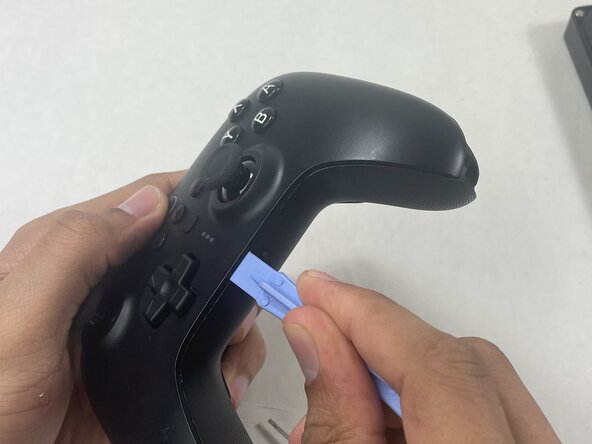
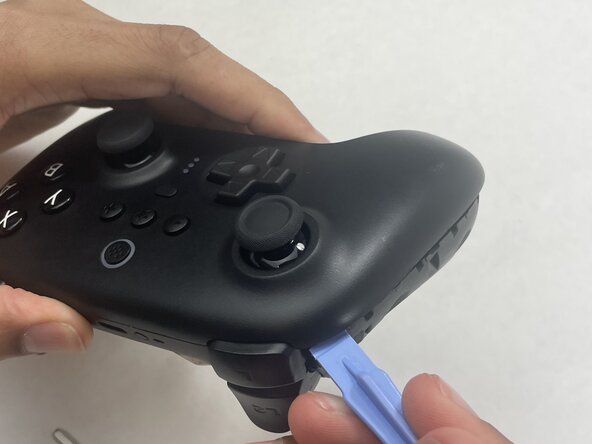
    • Insert an opening tool into seam at the bottom of the device and carefully pry the front and back shells apart.

    • Set the halves next to each other with care not to strain the connected ribbon cables.

    询问修复机器人
  4. 8BitDo Ultimate Wireless Battery Replacement: 步骤 4 中的图像 1,3 8BitDo Ultimate Wireless Battery Replacement: 步骤 4 中的图像 2,3 8BitDo Ultimate Wireless Battery Replacement: 步骤 4 中的图像 3,3
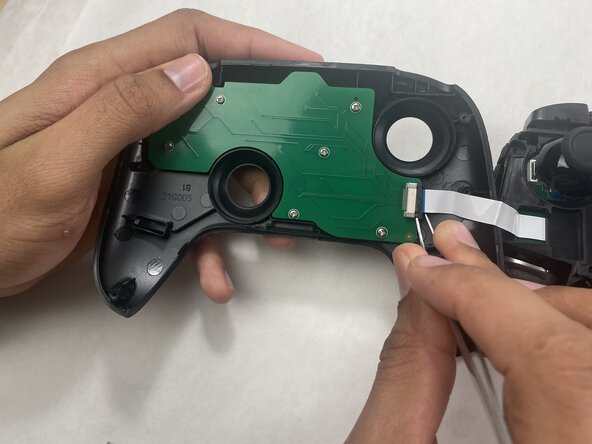
    • The ribbon cable is secured with a locking tab connector.

    • Use tweezers to unlock the locking tab on the ribbon cable connector, then gently disconnect the ribbon cable.

    询问修复机器人
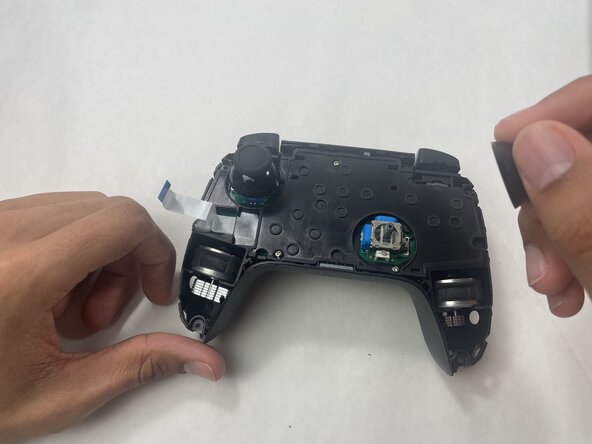
  5. 8BitDo Ultimate Wireless Battery Replacement, Battery: 步骤 5 中的图像 1,1
    • Grip each analog stick cap firmly and pull straight up to remove them.

    询问修复机器人
  6. 8BitDo Ultimate Wireless Battery Replacement: 步骤 6 中的图像 1,2 8BitDo Ultimate Wireless Battery Replacement: 步骤 6 中的图像 2,2
    • Remove the three 5 mm Phillips #00 screws securing the midframe to the back shell, then lift it straight out.

    询问修复机器人
  7. 8BitDo Ultimate Wireless Battery Replacement: 步骤 7 中的图像 1,2 8BitDo Ultimate Wireless Battery Replacement: 步骤 7 中的图像 2,2
    • Remove the two 1 mm Phillips #00 screws securing the plastic battery cover to the circuit board, then lift the plate away to expose the battery.

    询问修复机器人
  8. 8BitDo Ultimate Wireless Battery Replacement: 步骤 8 中的图像 1,1
    询问修复机器人
结论

To reassemble your device, follow the above steps in reverse order.
For optimal performance, after completing this guide, calibrate your newly installed battery.
Take your e-waste to an R2 or e-Stewards certified recycler.
Repair didn’t go as planned? Try some basic troubleshooting or ask our Answers community for help.

团队

UMass Dartmouth, Team 1-3, Biswokarma Spring 2026 UMass Dartmouth, Team 1-3, Biswokarma Spring 2026 的会员

UMASSD-BISWOKARMA-S26S1G3

5 名成员

创作了5篇指南

0指南评论

添加评论

浏览统计数据:

过去 24 小时: 0

过去 7 天: 18

过去 30 天: 34

总计 98