跳转到主内容
加入维修社区 - 创建账户

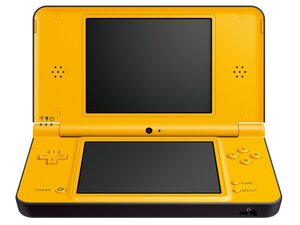
更大尺寸的 Nintendo DSi,北美市场于2010年3月开售。大多数维修只需要一个螺丝刀和塑料撬具即可完成。

DSIXL charging light flashing irregularly

When I connect my NDSiLL to the charger it showed no signs of being charged at all. The motherboard looked almost new, it has no signs of corrosion, no missing components and no damage at all. I tried a new cable, cleaning the port, bridging both fuses, replacing the battery, but nothing worked. Out of desperation I updated the system and miraculously the light began flashing. However, it's irregular, unlike the blinking light that other people encounter. The charging icon is also shown briefly when the charging light comes on but vanishes just as fast. I checked and there's a constant current passing through the charging port to the motherboard, which eliminated the charging cable and charging port, but I have no idea what went wrong.


I also plugged the cable into a mac and somehow the light was constantly on for a short time, but disappeared after a while as thought the mac refused to charge it.
Now, the issue could be that I wasn't using the stock power block but a charging cable, which could have different charging voltages or whatever, but the cable worked on my 3DS and on a broken motherboard. I suspect that it's an issue with the charging cable but I need to know for sure. Did anyone else came across this ridiculous issue?

已回答! 显示答案 我也有这个问题

这是一个好问题吗?

得分 0
添加一条评论

1个答案

已选择的解决方案

Hi!

Usually caused by the battery or a broken power board.

First I would test with the original charger and see what happens, this is the most easy test (and having the original charger is a plus).

If it's still failing, then replace the power board and see what happens.

If it's still failing after this, there is something going on, on the motherboard.

Guide for replacing the power board: Nintendo DSi XL Power Board Replacement

Please let us know how it goes!

这个答案有帮助吗?

得分 1

4条评论:

I actually ordered a new charging block and it's on the way. However, both fuses are bridged so I don't think the issue's caused by them. Are there any components on the motherboard that could be failing? Right now I have almost zero knowledge on how to check components so what should I start with?

Thanks for helping me out again btw!

完成的

Alright! Hopefully that is it :)!

Yes. The component is the EM10 filter that is soldered on the motherboard. It's just next to the charge port! If this one is broken, it won't charge, but everything else is working fine.

So you can also bridge those connections to let it work, but it's recommended to replace the EM filter.

Hopefully the new charger will solve it!!

完成的

@dan0 Yep, a new charger fixed it. Thanks again!

完成的

Yes! Good news!! Have a nice day and take care!

完成的

添加一条评论

添加你的答案

Leooooo1061 将永远感激不已
浏览统计数据:

过去 24 小时: 1

过去 7 天: 2

过去 30 天: 23

总计 78