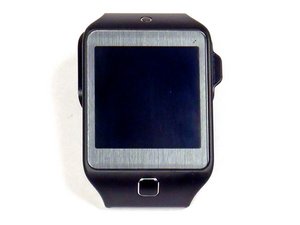
学生贡献的维基
此维基页面由我们教育项目的学生团队编写。
Samsung Gear 2 Neo 设备无法开机
“你尝试唤醒它,但似乎没有任何反应。” 以下是导致此问题的可能原因。
电池电量耗尽/损坏
请按照以下说明检查是否仅仅是电池问题。
• 首先尝试为手表充电,可能是电池电量不足。
• 如果充电后无效,则可能是内部问题,原因可能如下:
- 电池损坏
- 内部连接不良
• 无论哪种情况,你都可以在此处找到检查指南:Samsung Gear 2 Neo 电池更换。
• 在某些情况下,问题并非出在电池上,而是显示屏故障。有关检查显示屏的故障排除指南,请参阅“显示屏问题”。
主板
如果电池和显示屏都没有问题,则可能需要更换主板。请按照主板更换说明操作:Samsung Gear 2 Neo 主板更换。
设备卡死/运行缓慢
这种情况通常是因为运行了太多的应用程序。以下是导致此问题的几种可能原因。
• 首先尝试关闭一些应用程序,RAM 可能已满,需要清理。
• 如果问题仍然存在,或者因设备卡死无法关闭应用程序,请尝试手动关闭手表。按压电源按钮并保持,直到显示屏完全关闭。这通常需要 4 – 6 秒。
• 如果以上方案均无效,则必须重置设备。如果能够备份设备上的数据,请务必执行备份,因为手动重置后将无法恢复数据。要重置 Gear 2 Neo,请按照以下说明操作:
- 在主菜单中,滑动并进入“设置”。
- 向下滚动,直到看到“重置 Gear”选项。
- 等待过程完成。完成后,手表将恢复到购买当天的初始状态。系统会要求你下载最新的“Gear Manager”应用程序。请下载以确保设备始终保持最新状态。
• 如果设备仍无法正常工作,则必须更换 RAM 或主板。请按照此处的指南操作:Samsung Gear 2 Neo 主板更换。
显示屏问题
“你尝试唤醒它,但似乎没有任何反应。”
显示屏延迟
这可能只是常见的屏幕问题,为了确保不是严重故障,请针对以下可能原因按照步骤操作:
• 清洁显示屏,可能只是污渍太多,需要清理。
• 如果清洁无效,请检查软件是否已更新到最新版本。
• 如果以上方法都无法解决问题,请检查屏幕是否有破损或划痕。如有,则需要更换。请前往此处:Samsung Gear 2 Neo 屏幕更换。
显示屏错误
如果屏幕出现变色、有明显的无法通过清洁解决的问题,或者在尝试重置等修复手段后依然损坏,则需要进行更换。请查看我们的指南:Samsung Gear 2 Neo 屏幕更换。
蓝牙连接问题
如果你的 Gear 2 Neo 无法通过蓝牙连接到其他设备,以下是一些可能的原因。
蓝牙已开启吗?
在主屏幕上,向左滑动以进入设置。选择手表上的蓝牙设置。开始配对并在你正连接的另一台设备上完成配对过程。
Gear Manager 应用程序是否为最新版本?
将手表上的 Gear Manager 应用程序更新到最新版本。
• 在你的设备上启动 Samsung Gear Manager
• 选择你的 Samsung Gear 2 Neo 智能手表
• 选择软件更新并更新你的设备
是否超出有效范围?
• 确保你尝试连接的设备相互距离在 10 米/30 英尺以内。
• 墙壁可能会导致连接问题,请缩短设备之间的距离。
扬声器问题
“你的扬声器出问题了吗?”
扬声器声音没有平时大?
• 如果设备受潮,请将其放在生大米中过夜。
• 如果设备无法识别你的声音,请用纸巾蘸取酒精擦拭扬声器/麦克风。
• 如果这些方法都无法解决问题,请按照此处的更换说明进行操作:Samsung Gear 2 Neo 扬声器更换。
主屏幕按钮
如果你的主屏幕按钮卡住、损坏或有其他问题,请遵循此更换指南:Samsung Gear 2 Neo 主屏幕按钮更换。

团队

USF Tampa, Team 5-6, Blackwell Fall 2015 USF Tampa, Team 5-6, Blackwell Fall 2015 的会员
USFT-BLACKWELL-F15S5G6
3 名成员
创作了60篇指南

9条评论
Under Display Issues, the links that are supposed to point to replacing the screen actually point to replacing the battery.
David Lender - 回复 分享
My Neo turns on and boots, and the display works during the boot process. Once it is booted, the display will not light. From the vibrations, it’s working properly but can’t troubleshoot it because I can’t see what I’m doing.
Any ideas?
spooky031959 - 回复 分享
same problem.
My Neo turns on and boots, and the display works during the boot process. Once it is booted, the display will not light. From the vibrations, it’s working properly but can’t troubleshoot it because I can’t see what I’m doing.
Any ideas?
spooky031959 - February 3
josef mc - 回复 分享
My Gear 2 Neo sat for a year because of a broken body where the strap connects. It still worked during that time. Just before ordering a body, I noticed the watch wouldn't turn on, so I got a new body & new battery (thinking the aged battery was dead). Now, changed up with new battery, the watch still won't turn on… or even indicate that it's charging (even overnight). What next?
theaudiopost - 回复 分享
My Neo will only show the Samsung Gear 2 screen. I can get into the screen where you can download or recovery or power off, and I can select each of those options, but none of those changes anything. The battery is fine the phone isn't perfect condition and there's only been warned about six or eight times., if that. So far it's an extremely expensive paperweight. Course it's well past any warranty but you would think a device this mega-expensive would be able to be used more than a handful of times
Michael Lauinger - 回复 分享