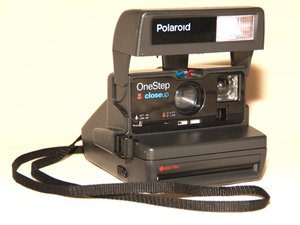
学生贡献的维基
此维基页面由我们教育项目的学生团队编写。
闪光灯无法工作
闪光灯未充电或电池电量耗尽
- 每个相纸盒中都内置了一块高能电池,用于闪光灯的供电。闪光灯充电需要 5 秒,你必须等待取景器中的红灯熄灭,闪光灯才能工作,相机也才能拍出照片。如果闪光灯没有完全充好电,相机将无法成像。
- 如果取景器中的红灯已熄灭,相机已准备好拍照,但仍然没有闪光,你可能需要更换包含电池的相纸盒。
照片模糊或空白
相纸故障,或者镜头脏污及损坏
- 如果照片总是模糊,可能确实是 Impossible 相纸本身有问题。试着更换一盒相纸,看看是否是相纸本身故障。Impossible 项目的相纸在显影时也需要尽可能避光。如果没有遮挡外部光线,可能会影响相纸显影,导致照片模糊。
- 也可能是相机镜头刮伤或损坏。请查阅更换相机镜头的指南。Polaroid One-Step 600 镜头更换
环境温度不适合照片显影
- Impossible 项目的相纸对显影所需的温度非常敏感。Impossible 项目相纸的使用说明书指出,照片在约 70 华氏度(或 21 摄氏度)的环境下需要 10 分钟才能显影。
遇到其他问题
- 如果照片极其模糊甚至是一片空白,请尝试相纸无法显影故障排除维基中的解决方案。
快门开关卡住
弹簧可能卡住,或塑料外壳损坏
- 在开关的背面有一个弹簧。这个弹簧可能只是被内部组件挂住,导致无法弹回原位。相机内部有许多尖锐的物体和组件,可能会钩住连接在开关上的弹簧。轻轻拨动开关,看看能否让弹簧恢复自由。
- 如果开关仍然卡住,可能是开关的塑料外壳损坏了。引导开关的外壳如果破裂,会使开关无法自由移动。请参阅更换快门开关的指南。Polaroid Onestep Close Up 快门开关更换
照片无法弹出
相机中没有相纸
- 如果相机没有拍出照片,可能是相纸用完了。你需要更换相纸盒。
照片过暗或过亮
亮度控制未居中
- 这些相机上有一个称为亮度控制的小塑料件,应将其放置在黑色和白色箭头之间。如果该控制件完全偏向黑色箭头一侧,照片会非常暗;如果完全偏向白色箭头一侧,照片会非常亮。用户手册指示,只有在拍摄后觉得需要调整光线时,才可将控制件滑动到更亮或更暗的设置。

团队

USF Tampa, Team 3-5, Brown Fall 2014 USF Tampa, Team 3-5, Brown Fall 2014 的会员
USFT-BROWN-F14S3G5
3 名成员
创作了72篇指南

9条评论
You have some problems with the formatting here:
- You need a table of contents.
- For each primary heading (problem), you need to include second-level subheadings (possible causes). For example, for the top-level heading "Flash isn't working," instead of two bullet points, you would have two subheadings that identify a reason for why the flash might not be working.
- You need to provide links to your repair guides
Also, one minor point, I believe Impossible Film should be capitalized because it's a brand name, right?
Dan Brown - 回复 分享
Somehow, the links to the repair guides redirect me to a different device page.
Dan Brown - 回复 分享
Can you discuss the best temperature to store the film (before and after use)?
and why do some photos come out pink and kinda blurry?
Namar Tarabzoni - 回复 分享
Hi, my camera shoots out the photo fine but the plastic casing stays stuck over the photo. when i take the photo out the plastic bit shoots back into the camera. But by doing this causes a mark over the photo and this then appears on each photo :( is it broken??
vbramwell - 回复 分享
I have the same problem, did you ever figure out what was causing that??
camarena.allison - 回复 分享