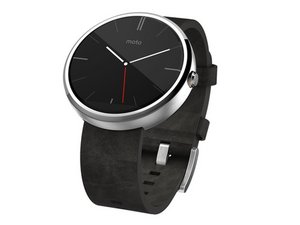
学生贡献的维基
此维基页面由我们教育项目的学生团队编写。
手表无法保持电量
Moto 360 的电池续航时间已大不如前。
手表无法充电
检查手表是否已正确放置在充电底座上。放置手表时,电源按钮应朝上。
如果手表位置正确但仍无法充电,则可能需要更换充电底座。
手表过充
与其他充电设备一样,如果 Moto 360 长时间留在充电器上,其电池续航时间可能会缩短。请注意,在设备电量达到 100% 后,请勿继续将其留在充电器上。如果电池续航时间过差,请参阅此 电池更换指南 以获取有关更换 Moto 360 电池的信息。
屏幕无法点亮
按下电源按钮时,屏幕无法打开。
电池没电
将手表放在充电底座上,并使电源按钮朝向天空。屏幕应会亮起,显示时间和手表的充电指示。
电源按钮失灵
确保没有任何东西阻碍按钮被完全按下。检查按钮周围是否有污垢或灰尘,并尽量将其清理掉。请注意,不要在手表开口处使用水或其他液体。如果这不能解决问题,则可能需要清洁或更换电源按钮。
屏幕显示异常
屏幕大部分区域可以亮起,但有一处或几处小点不显示。
屏幕坏点
确保屏幕上没有污垢或其他小物体。如果屏幕清洁后仍有坏点,请用一个小的钝器对坏点施加压力。注意不要划伤或损坏屏幕。如果这仍不能解决问题,请参阅 屏幕更换指南 以获取有关更换屏幕的信息。
手表无法接收语音命令
“我一直在对着手表说话,但它对我的声音没有反应。难道没有人爱我吗?!”
有污垢或其他阻碍物
彻底清洁设备外部。确保设备上没有污垢或灰尘。用清晰、坚定的语调说话。如果设备仍无响应,请 拆下后盖 并清洁设备内部。注意不要让任何电子元件受潮。压缩空气是清洁 Moto 360 内部的最佳方式。
电脑无法识别手表
Moto 360 无法与我的电脑连接或同步。
USB 端口无法工作
如果 USB 端口损坏,将无法识别插入其中的设备。请插入闪存驱动器或其他 USB 设备以确保端口正常工作。
驱动程序缺失
如果设备驱动程序过期需要更新,电脑将无法识别该设备,并且无法进行数据传输。请在 Google 上搜索以查找最新且更新后的驱动程序。

团队

Cal Poly, Team 17-32, Amido Winter 2015 Cal Poly, Team 17-32, Amido Winter 2015 的会员
CPSU-AMIDO-W15S17G32
4 名成员
创作了60篇指南

17条评论
USB port? Is this the new Moto 360 they havent announced yet?
subvertz - 回复 分享
Hello. Im having a problem with my moto 360 cognac leather won't work. I was using the chronometer and suddenly it is not working. I did not noticed it until a I tried to checked the chronometer.
It seems to be off and the battery was good
dilindaother2004 - 回复 分享
Hello, can anyone tell me why my screen went from blue to red while it's on the charger. I am talking about the charging screen that has time and the circle that indicates how much charge is left has turned red.
James Farias - 回复 分享
If you swipe down, the color changes and cycles through the 5 or 6 colors.
Elijah Roberts - 回复 分享
moto 360 1st gen. will not stay on for more than 5minutes after it show a full charge
won7045 - 回复 分享