NVRAM 存储外围设备数据,如音量、显示分辨率和亮度、启动磁盘选择以及时间设置。重置 NVRAM 是排查 Mac 故障的一种快速简便的方法——它不会删除你存储驱动器中的任何数据,也不需要任何工具或维修经验。如果你遇到与扬声器、显示屏或其他外围设备相关的问题,可以按照以下说明尝试自行重置 NVRAM。[/summary]
常见的 NVRAM 相关问题
- Mac 启动前短暂出现闪烁的问号图标。
- Mac 的显示屏冻结或无响应(未显示旋转的轮子图标)。
- Mac 的扬声器断断续续地停止播放声音,即使音量已调大。
- Mac 连接外置显示屏困难。
如何重置 NVRAM
- 关闭你的 Mac。
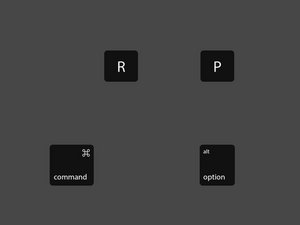
- 按下并松开电源按钮,然后立即按住以下组合键:option、command、P 和 R。
- 按住这四个键约 20 秒,或者直到你的 Mac 重启两次(在 Apple 标志出现两次后)。
如果你按下了正确的组合键而 Mac 正常启动,则可能是系统未记录你的按键操作。尝试使用有线键盘(或 Mac 笔记本电脑的内置键盘),并断开任何其他 USB 和蓝牙连接。
Apple Silicon Mac
采用 Apple Silicon 处理器的 Mac 不会执行 NVRAM 重置,因为逻辑板的架构大不相同。以前存储在 NVRAM 中的设置现在可能已成为处理器本身的一部分。在这种情况下,只需关闭或重启你的 Mac 即可。
更多信息
- 重置 NVRAM 后,你可能需要进入“系统偏好设置”并恢复已重置的任何设置(例如音量和显示屏亮度级别)。
- 一些 Mac 有一块专门为 NVRAM 供电的小电池。如果你的台式机 Mac 每次拔掉电源或者笔记本电脑 Mac 电池耗尽后设置都会重置,你可能需要更换 PRAM 电池。
- 如果你遇到睡眠、唤醒、充电或其他与电源相关的症状,你可能需要重置你的 系统管理控制器 (SMC)。


17条评论
My powerbook g4 has a grey image with a blinking carpet icon with “?” Sign. What can i do? I tried resetting Pram and Nvram but nothing took out the blinking icon
Nahim González - 回复 分享
If you are not worked about losing all the data, reinstall the OS. That can spring it back to life quite easily, if you have seen PlainrockVlog’s vlog about fixing an iBook Clamshell.
DJ is pro - 回复 分享
My MacBook Pro 15 inch suddenly cannot turn on the keyboard backlight. What should i do instead replacing the keyboard backlight matrix?
Adi Purba - 回复 分享
My apple lap top is blinking a ? Mark when I turn it on. I don't see anything but the ? Mark.. how do I fix this
candilocke11 - 回复 分享
That does not associate with the NVRAM and PRAM. Here are my guesses:
A: The hard drive is dead
B: There is no operating system installed.
Try booting into Recovery Mode (command R) and go to Disk Utility. If there is no hard drive, it means it is dead.
If you don’t have any important data, just re-format the drive. And then start installing OS X again.
If none of these work, replace the hard drive with a cheap Kingston SSD. That will imorove the speeds of booting up and installing OS X again is easy.
DJ is pro - 回复 分享