跳转到主内容
加入维修社区 - 创建账户

Vtech Kidizoom Smart Watch DX Buttons Replacement

你所需要的

  1. Vtech Kidizoom Smart Watch DX Buttons Replacement, Master Switch: 步骤 1 中的图像 1,1
    • Make sure the master switch is "OFF" before disassembly, to avoid an electric shock.

    • Flip the watch over with the back facing up.

  2. Vtech Kidizoom Smart Watch DX Buttons Replacement: 步骤 2 中的图像 1,1
    • Remove the four 6.0 mm screws on the back plate with the Phillips #00 screwdriver.

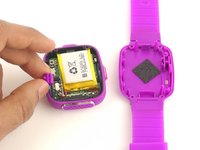
  3. Vtech Kidizoom Smart Watch DX Buttons Replacement: 步骤 3 中的图像 1,1
    • Gently pull the back plate from the watch casing.

    询问修复机器人
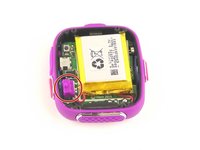
  4. Vtech Kidizoom Smart Watch DX Buttons Replacement: 步骤 4 中的图像 1,2 Vtech Kidizoom Smart Watch DX Buttons Replacement: 步骤 4 中的图像 2,2
    • Lift the master switch from the circuit board.

  5. Vtech Kidizoom Smart Watch DX Buttons Replacement, Circuit Board: 步骤 5 中的图像 1,2 Vtech Kidizoom Smart Watch DX Buttons Replacement, Circuit Board: 步骤 5 中的图像 2,2
    • The speaker wires are fragile. They may break if excessive force is used to remove the circuit board.

    • Removal of the circuit board requires soldering.

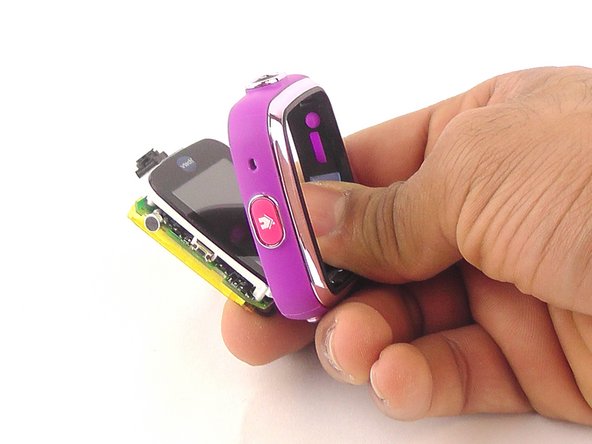
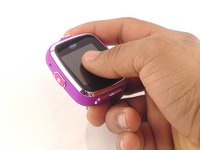
    • Gently push on the display from the front, near the camera. The circuit board and display will pop out through the back.

  6. Vtech Kidizoom Smart Watch DX Buttons Replacement: 步骤 6 中的图像 1,1
    • Lift the circuit board carefully from the casing, without breaking or detaching the speaker wires at the bottom of the circuit board.

    询问修复机器人
  7. Vtech Kidizoom Smart Watch DX Buttons Replacement: 步骤 7 中的图像 1,1
    • Note which wire is connected to which lead before continuing. There are no markers on the circuit board to indicate where each wire belongs.

    • De-solder the black speaker wire from the circuit board.

    询问修复机器人
  8. Vtech Kidizoom Smart Watch DX Buttons Replacement: 步骤 8 中的图像 1,1
    • De-solder the red speaker wire, as in the previous step.

    询问修复机器人
  9. Vtech Kidizoom Smart Watch DX Buttons Replacement: 步骤 9 中的图像 1,1
    • Wait for the solder to cool down and solidify, then remove the circuit board from the casing.

    询问修复机器人
  10. Vtech Kidizoom Smart Watch DX Buttons Replacement, Buttons: 步骤 10 中的图像 1,1
    在这个步骤中使用的工具:
    Tweezers
    $4.99
    • Use the the tweezers to pull off the blue rubber cover behind the button.

    • The blue cover is adhesive, so you can stick it back onto the back of the buttons after replacement.

    询问修复机器人
  11. Vtech Kidizoom Smart Watch DX Buttons Replacement: 步骤 11 中的图像 1,1
    • Use tweezers to separate the backside tab from the front side of the button.

    询问修复机器人
  12. Vtech Kidizoom Smart Watch DX Buttons Replacement: 步骤 12 中的图像 1,1
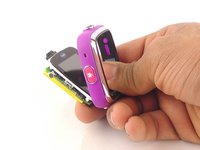
    • Push the other half of the button out of the casing.

    • Repeat steps 11 and 12 for all buttons.

    询问修复机器人
结论

To reassemble your device, follow these instructions in reverse order.

2等其他人完成本指南。

团队

USF Tampa, Team 10-6, Remmell Spring 2016 USF Tampa, Team 10-6, Remmell Spring 2016 的会员

USFT-REMMELL-S16S10G6

4 名成员

创作了12篇指南

1指南评论

Where can you buy the replacement cover?

Katrina Nullatamby - 回复 分享

添加评论

浏览统计数据:

过去 24 小时: 2

过去 7 天: 6

过去 30 天: 71

总计 6,412