跳转到主内容

ThinkPad T420 Keyboard reinstallation Replacement

仅作为前提条件
本指南仅提供前提条件!本指南是另一个程序的一部分,不能单独使用。
  1. ThinkPad T420 Keyboard reinstallation Replacement, Keyboard reinstallation: 步骤 1 中的图像 1,3 ThinkPad T420 Keyboard reinstallation Replacement, Keyboard reinstallation: 步骤 1 中的图像 2,3 ThinkPad T420 Keyboard reinstallation Replacement, Keyboard reinstallation: 步骤 1 中的图像 3,3
    • If you are upgrading the RAM this will be done last. Once both modules are installed, perform this step without reinstalling the screw, then reinstall the screw once the module is accepted and working.

    • Reconnect the keyboard to the motherboard. Once connected, slide the top (volume controls) in first.

    • Once the top of the keyboard is pushed in, slide the keyboard down to re-engage the lower clips until they are not visible.

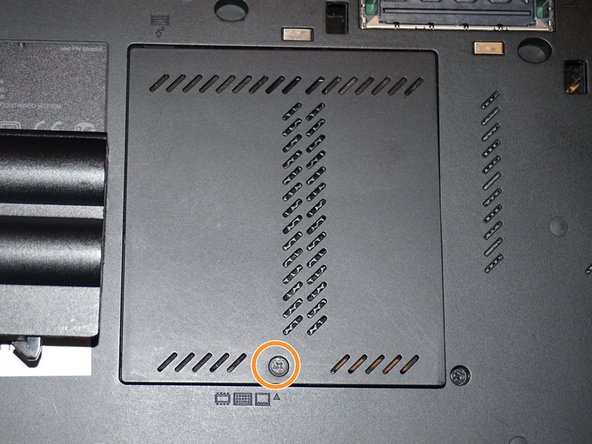
    • Replace the silver screw and RAM door.

  2. ThinkPad T420 Keyboard reinstallation Replacement, Reinstall the keyboard screw: 步骤 2 中的图像 1,3 ThinkPad T420 Keyboard reinstallation Replacement, Reinstall the keyboard screw: 步骤 2 中的图像 2,3 ThinkPad T420 Keyboard reinstallation Replacement, Reinstall the keyboard screw: 步骤 2 中的图像 3,3
    • Reinstall the keyboard screw.

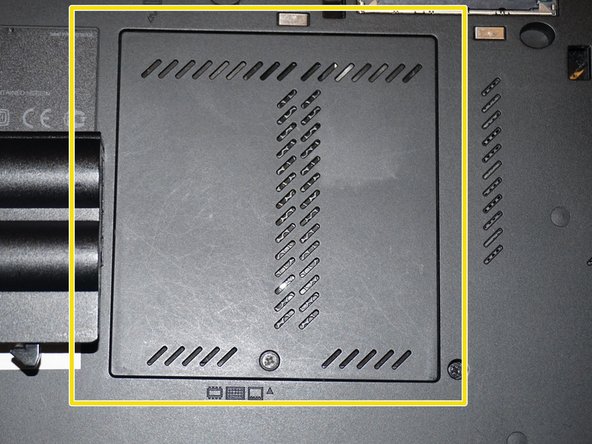
    • Reinstall the RAM door.

    • When the cover is properly reinstalled, it will be flush with the laptop.

结论

To reassemble your device, follow these instructions in reverse order.

Nick

于11/10/09注册

98,614 声望

创作了63篇指南

团队

Master Techs Master Techs 的会员

Community

329 名成员

创作了1,451篇指南

0指南评论

添加评论

浏览统计数据:

过去 24 小时: 0

过去 7 天: 4

过去 30 天: 12

总计 181