跳转到主内容
加入维修社区 - 创建账户

SuperSonic Matrix Mid SC-999 Microphone Replacement

你所需要的

    1. SuperSonic Matrix Mid SC-999 Microphone Replacement, Back Cover: 步骤 1 中的图像 1,1
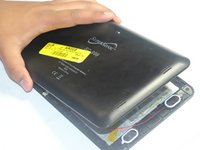
      • Wedge the plastic opening tool between the back cover of the device and the front panel.

      • You will hear a snapping sound as the cover is separated from the body of the device.

      询问修复机器人

      添加评论

    2. SuperSonic Matrix Mid SC-999 Microphone Replacement: 步骤 2 中的图像 1,1
      • Slide the opening tool along the seam between the front panel and the back cover to un-clip the remaining connections around the device.

      • Again, you will hear a snapping sound as the cover is separated from the body of the device.

      询问修复机器人

      添加评论

    3. SuperSonic Matrix Mid SC-999 Microphone Replacement: 步骤 3 中的图像 1,2 SuperSonic Matrix Mid SC-999 Microphone Replacement: 步骤 3 中的图像 2,2
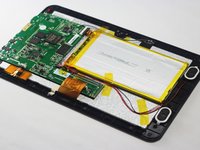
      • Lift the back cover from the body of the device to expose the internal components.

      询问修复机器人

      添加评论

    1. SuperSonic Matrix Mid SC-999 Microphone Replacement, Microphone: 步骤 4 中的图像 1,1
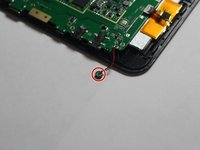
      • Remove the microphone from its compartment.

      • The microphone is located toward the bottom left corner of the device (assuming the speakers are located on the right side of you).

      询问修复机器人

      添加评论

    2. SuperSonic Matrix Mid SC-999 Microphone Replacement: 步骤 5 中的图像 1,2 SuperSonic Matrix Mid SC-999 Microphone Replacement: 步骤 5 中的图像 2,2
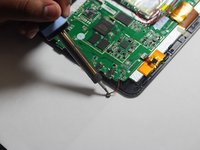
      • Use the soldering iron to remove the wires connected to the microphone.

      • If you're unfamiliar with soldering or desoldering, check out this guide.

      • Be sure to wear protective eye wear. Also, keep in mind that the soldering iron will become extremely hot.

      询问修复机器人

      添加评论

结论

To reassemble your device, follow these instructions in reverse order.

取消:我没有完成这个指南。

团队

Dr Shaverz boyz Dr Shaverz boyz 的会员

Community

3 名成员

创作了14篇指南

0指南评论

添加评论

浏览统计数据:

过去 24 小时: 2

过去 7 天: 10

过去 30 天: 24

总计 402