跳转到主内容
加入维修社区 - 创建账户

Sony Walkman D-E356CK Back Panel Replacement

你所需要的

  1. Sony Walkman D-E356CK Back Panel Replacement, Back Panel: 步骤 1 中的图像 1,1
    • Open the battery compartment.

    • Remove the AA batteries from within the compartment.

  2. Sony Walkman D-E356CK Back Panel Replacement: 步骤 2 中的图像 1,3 Sony Walkman D-E356CK Back Panel Replacement: 步骤 2 中的图像 2,3 Sony Walkman D-E356CK Back Panel Replacement: 步骤 2 中的图像 3,3
    • Press the button located in the bottom left corner of the device labeled "open."

    • Remove the three 11 mm-long Phillips screws.

  3. Sony Walkman D-E356CK Back Panel Replacement: 步骤 3 中的图像 1,2 Sony Walkman D-E356CK Back Panel Replacement: 步骤 3 中的图像 2,2
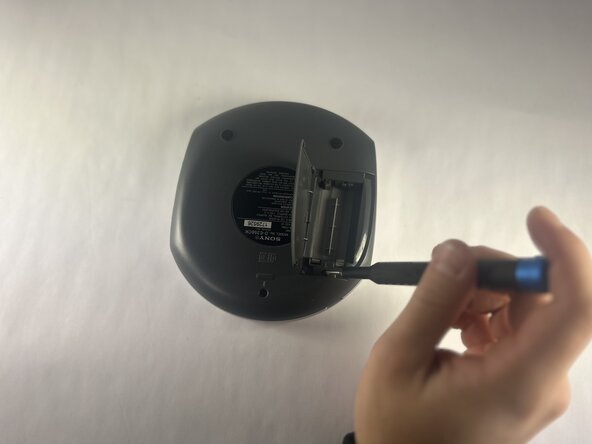
    • Open the battery compartment.

    • Remove the two 11 mm-long Phillips screws on the back side of the Walkman.

  4. Sony Walkman D-E356CK Back Panel Replacement: 步骤 4 中的图像 1,2 Sony Walkman D-E356CK Back Panel Replacement: 步骤 4 中的图像 2,2
    • Insert an opening tool into the seam between the back panel and chassis.

    • Pry around the perimeter until the back panel releases.

    • Remove the back panel.

结论

To reassemble your device, follow the above steps in reverse order.
Repair didn’t go as planned? Try some basic troubleshooting or ask our Answers community for help.

另外一个人完成了本指南。

Aiden Pacheco

于10/15/25注册

136 声望

撰写一个指南

团队

UMass Dartmouth, Team 1-1, Botvin Fall 2025 UMass Dartmouth, Team 1-1, Botvin Fall 2025 的会员

UMASSD-BOTVIN-F25S1G1

4 名成员

创作了5篇指南

0指南评论

添加评论

浏览统计数据:

过去 24 小时: 1

过去 7 天: 4

过去 30 天: 19

总计 57