跳转到主内容
加入维修社区 - 创建账户

Sony Vaio PCG-F420 Keyboard Replacement

你所需要的

  1. Sony Vaio PCG-F420 Keyboard Replacement, Battery: 步骤 1 中的图像 1,1
    • The battery is located on the left side of the laptop, as shown by the red circle.

    • Make sure the laptop is disconnected and turned completely off.

  2. Sony Vaio PCG-F420 Keyboard Replacement: 步骤 2 中的图像 1,1
    • Remove the battery by following these steps.

    • Pull the plastic cover down (indicated by the arrow on the cover) and then swing it upwards to reveal the battery compartment.

    • The battery can now be removed by pulling it.

  3. Sony Vaio PCG-F420 Keyboard Replacement, Keyboard: 步骤 3 中的图像 1,1
    • Use your Philips #00 screwdriver to unscrew the small screw counterclockwise. This screw is for the audio/visual jacks on the left side of the laptop.

  4. Sony Vaio PCG-F420 Keyboard Replacement: 步骤 4 中的图像 1,1
    • Unlock the cover between the keyboard and screen.

    • Gently slide it to the right and lift it up.

    • Exercise caution to avoid excessive force, as wires are connected.

    • Be mindful not to pull the keyboard too forcefully as it remains connected to wires, which we will address in the next step.

  5. Sony Vaio PCG-F420 Keyboard Replacement: 步骤 5 中的图像 1,1
    • Lift up the cover and lean it against the display so it is out of the way for the rest of the process.

    • Remove the small screw above the F6 key on the keyboard. Place screw in container to ensure it wont be lost.

  6. Sony Vaio PCG-F420 Keyboard Replacement: 步骤 6 中的图像 1,1
    • Find the green ribbon as indicated in the picture by the red circle. This is what connects the keyboard to the motherboard.

  7. Sony Vaio PCG-F420 Keyboard Replacement: 步骤 7 中的图像 1,1
    在这个步骤中使用的工具:
    Tweezers
    $4.99
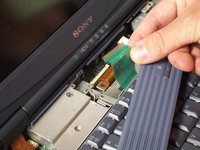
    • Carefully unplug the ribbon cable using a pair of tweezers.

    • Lift up the white bar near the connection to the motherboard, and lightly lift the ribbon to release it from the motherboard.

  8. Sony Vaio PCG-F420 Keyboard Replacement: 步骤 8 中的图像 1,2 Sony Vaio PCG-F420 Keyboard Replacement: 步骤 8 中的图像 2,2
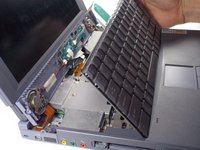
    • Now, pull on the ribbon cable, and it will detach from the motherboard.

    • Your keyboard is now safely detached, allowing for necessary repairs or replacements.

  9. Sony Vaio PCG-F420 Keyboard Replacement: 步骤 9 中的图像 1,1
    • Your keyboard is now safety detached. Necessary repairs or replacements can be made from here.

结论

To reassemble your device, follow these instructions in reverse order.

另外一个人完成了本指南。

团队

Cal Poly, Team 29-77, Johann Spring 2010 Cal Poly, Team 29-77, Johann Spring 2010 的会员

CPSU-JOHANN-S10S29G77

5 名成员

创作了12篇指南

0指南评论

添加评论

浏览统计数据:

过去 24 小时: 3

过去 7 天: 20

过去 30 天: 84

总计 2,870