跳转到主内容
加入维修社区 - 创建账户

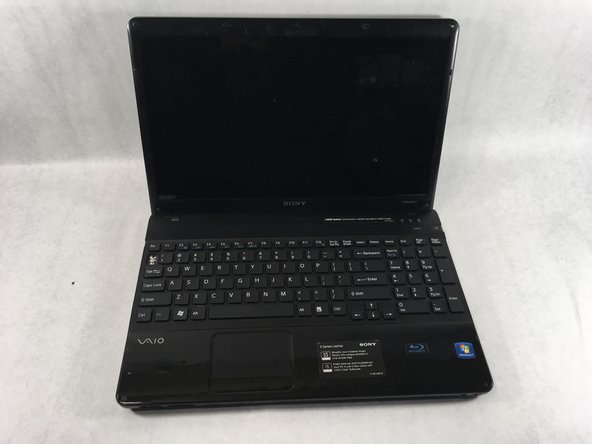
Sony VAIO VPCEE26FX Keyboard Replacement

你所需要的

    1. Sony VAIO VPCEE26FX Keyboard Replacement, Battery: 步骤 1 中的图像 1,2 Sony VAIO VPCEE26FX Keyboard Replacement, Battery: 步骤 1 中的图像 2,2
      • Ensure that the laptop is powered off before disconnecting the battery.

      • Flip the laptop over so the underside of the laptop is facing up.

      询问修复机器人

      添加评论

    2. Sony VAIO VPCEE26FX Keyboard Replacement: 步骤 2 中的图像 1,2 Sony VAIO VPCEE26FX Keyboard Replacement: 步骤 2 中的图像 2,2
      • Slide the two tabs towards each other until the battery disconnects slightly from its position.

      • Carefully lift the battery out of its position away from the laptop.

      • The battery is not pictured here, since it is missing from this particular device.

      询问修复机器人

      添加评论

    1. Sony VAIO VPCEE26FX Keyboard Replacement, Keyboard: 步骤 3 中的图像 1,2 Sony VAIO VPCEE26FX Keyboard Replacement, Keyboard: 步骤 3 中的图像 2,2
      • Flip the laptop back over so it is face up.

      • Open up the laptop.

      询问修复机器人

      添加评论

    2. Sony VAIO VPCEE26FX Keyboard Replacement: 步骤 4 中的图像 1,1
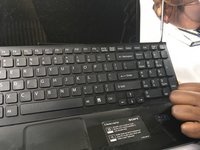
      • Using a plastic opening tool, pry along the seam between the keyboard and case to help in separating the two.

      • Continue to lift up gently using the plastic opening tool until the keyboard begins to separate from the case.

      询问修复机器人

      添加评论

    3. Sony VAIO VPCEE26FX Keyboard Replacement: 步骤 5 中的图像 1,2 Sony VAIO VPCEE26FX Keyboard Replacement: 步骤 5 中的图像 2,2
      • Continue lifting up and moving down starting on the left side of the keyboard moving towards the right side of the computer.

      询问修复机器人

      添加评论

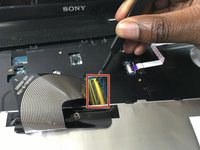
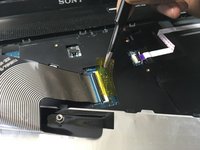
    4. Sony VAIO VPCEE26FX Keyboard Replacement: 步骤 6 中的图像 1,2 Sony VAIO VPCEE26FX Keyboard Replacement: 步骤 6 中的图像 2,2
      在这个步骤中使用的工具:
      Tweezers
      $4.99
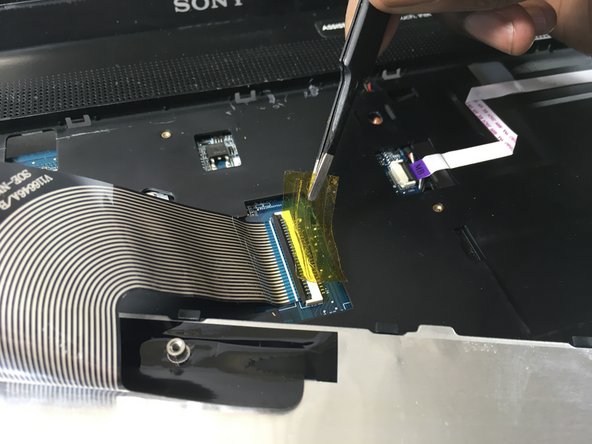
      • Carefully tilt the top of the keyboard towards you ensuring the ribbon cable is not under too much tension.

      • Use a pair of tweezers to help remove the plastic adhesive film covering the adapter/port for the ribbon cable.

      询问修复机器人

      添加评论

    5. Sony VAIO VPCEE26FX Keyboard Replacement: 步骤 7 中的图像 1,1
      询问修复机器人

      添加评论

    6. Sony VAIO VPCEE26FX Keyboard Replacement: 步骤 8 中的图像 1,1
      • Lift the keyboard up and away from the computer.

      询问修复机器人

      添加评论

结论

To reassemble your device, follow these instructions in reverse order.

取消:我没有完成这个指南。

团队

UMass Dartmouth, Team S2-G3, Bailey Spring 2019 UMass Dartmouth, Team S2-G3, Bailey Spring 2019 的会员

UMASSD-BAILEY-S19S2G3

3 名成员

创作了45篇指南

0指南评论

添加评论

浏览统计数据:

过去 24 小时: 3

过去 7 天: 12

过去 30 天: 26

总计 1,611