跳转到主内容
加入维修社区 - 创建账户

Samsung NX Mini Button Panel Replacement

你所需要的

    1. Samsung NX Mini Button Panel Replacement, Battery: 步骤 1 中的图像 1,3 Samsung NX Mini Button Panel Replacement, Battery: 步骤 1 中的图像 2,3 Samsung NX Mini Button Panel Replacement, Battery: 步骤 1 中的图像 3,3
      • Orient the camera so the button panel and LCD are facing you.

      • Use a spudger or fingernail to open the battery compartment on the right side of the camera.

      询问修复机器人

      添加评论

    2. Samsung NX Mini Button Panel Replacement: 步骤 2 中的图像 1,2 Samsung NX Mini Button Panel Replacement: 步骤 2 中的图像 2,2
      • Push the blue trapdoor to the left to release the battery, and remove the battery.

      • There is no battery shown in this photo.

      添加评论

    1. Samsung NX Mini Button Panel Replacement, Front Case: 步骤 3 中的图像 1,1
      • Use a Phillips #00 screwdriver to remove the 4 mm screw inside the battery compartment.

      询问修复机器人

      添加评论

    2. Samsung NX Mini Button Panel Replacement: 步骤 4 中的图像 1,1
      • Remove the 4 mm Phillips #00 screw hiding in the external flash port.

      添加评论

    3. Samsung NX Mini Button Panel Replacement: 步骤 5 中的图像 1,1
      • Remove the four 5 mm Phillips #00 screws from the lens assembly.

      询问修复机器人

      添加评论

    4. Samsung NX Mini Button Panel Replacement: 步骤 6 中的图像 1,1
      在这个步骤中使用的工具:
      Tweezers
      $4.99
      • Remove the metal lens mount by hand or with tweezers.

      • Be careful not to touch the sensor in the center of the lens assembly.

      询问修复机器人

      添加评论

    5. Samsung NX Mini Button Panel Replacement: 步骤 7 中的图像 1,1
      • Use tweezers to remove the inner metal ring.

      询问修复机器人

      添加评论

    6. Samsung NX Mini Button Panel Replacement: 步骤 8 中的图像 1,1
      • Use a Phillips #00 screwdriver to remove the three 4 mm screws from the bottom of the case.

      询问修复机器人

      添加评论

    7. Samsung NX Mini Button Panel Replacement: 步骤 9 中的图像 1,2 Samsung NX Mini Button Panel Replacement: 步骤 9 中的图像 2,2
      • Use your hands to slowly pull the front casing away from the camera.

      • The case is attached with multiple clips that may make a cracking noise as you pull it away from the camera.

      询问修复机器人

      添加评论

    1. Samsung NX Mini Button Panel Replacement, Sensor: 步骤 10 中的图像 1,3 Samsung NX Mini Button Panel Replacement, Sensor: 步骤 10 中的图像 2,3 Samsung NX Mini Button Panel Replacement, Sensor: 步骤 10 中的图像 3,3
      在这个步骤中使用的工具:
      Tweezers
      $4.99
      • Gently flip the sensor cover back to expose the screw attaching the sensor cover to the ribbon cable.

      • Use a Phillips #00 screwdriver to remove the 3 mm screw from the sensor cover.

      • Use tweezers to remove the metal contact cover. Be sure to carefully remove the cover so the gold contacts remain in place.

      • The gold lens contacts lying beneath the ribbon cable become loose when the screw and contact cover are removed.

      询问修复机器人

      添加评论

    2. Samsung NX Mini Button Panel Replacement: 步骤 11 中的图像 1,2 Samsung NX Mini Button Panel Replacement: 步骤 11 中的图像 2,2
      • Remove the four 4 mm Phillips #00 screws holding the sensor mount in place.

      询问修复机器人

      添加评论

    3. Samsung NX Mini Button Panel Replacement: 步骤 12 中的图像 1,3 Samsung NX Mini Button Panel Replacement: 步骤 12 中的图像 2,3 Samsung NX Mini Button Panel Replacement: 步骤 12 中的图像 3,3
      • Remove the four 4 mm Phillips #00 screws securing the battery compartment to the mother board.

      • Remove the battery compartment.

      询问修复机器人

      添加评论

    4. Samsung NX Mini Button Panel Replacement: 步骤 13 中的图像 1,2 Samsung NX Mini Button Panel Replacement: 步骤 13 中的图像 2,2
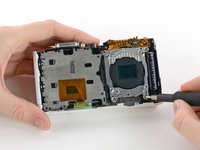
      • Use a spudger to disconnect the ribbon cable connecting the image sensor to the motherboard.

      询问修复机器人

      添加评论

    5. Samsung NX Mini Button Panel Replacement: 步骤 14 中的图像 1,1
      • Gently remove the sensor mount from the camera case.

      询问修复机器人

      添加评论

    1. Samsung NX Mini Button Panel Replacement, Motherboard: 步骤 15 中的图像 1,2 Samsung NX Mini Button Panel Replacement, Motherboard: 步骤 15 中的图像 2,2
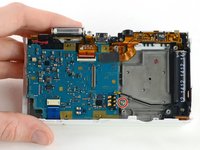
      • Use a Phillips #00 screwdriver to remove the 3 mm screw located below the wifi antenna.

      询问修复机器人

      添加评论

    2. Samsung NX Mini Button Panel Replacement: 步骤 16 中的图像 1,2 Samsung NX Mini Button Panel Replacement: 步骤 16 中的图像 2,2
      在这个步骤中使用的工具:
      Tweezers
      $4.99
      • Use tweezers to disconnect the wifi antenna from the motherboard.

      询问修复机器人

      添加评论

    3. Samsung NX Mini Button Panel Replacement: 步骤 17 中的图像 1,3 Samsung NX Mini Button Panel Replacement: 步骤 17 中的图像 2,3 Samsung NX Mini Button Panel Replacement: 步骤 17 中的图像 3,3
      • Use a spudger to disconnect the LCD ribbon cable by prying it straight up from the motherboard.

      询问修复机器人

      添加评论

    4. Samsung NX Mini Button Panel Replacement: 步骤 18 中的图像 1,3 Samsung NX Mini Button Panel Replacement: 步骤 18 中的图像 2,3 Samsung NX Mini Button Panel Replacement: 步骤 18 中的图像 3,3
      • Use a spudger to unlock the topmost ZIF connector by flipping open the black flap.

      询问修复机器人

      添加评论

    5. Samsung NX Mini Button Panel Replacement: 步骤 19 中的图像 1,2 Samsung NX Mini Button Panel Replacement: 步骤 19 中的图像 2,2
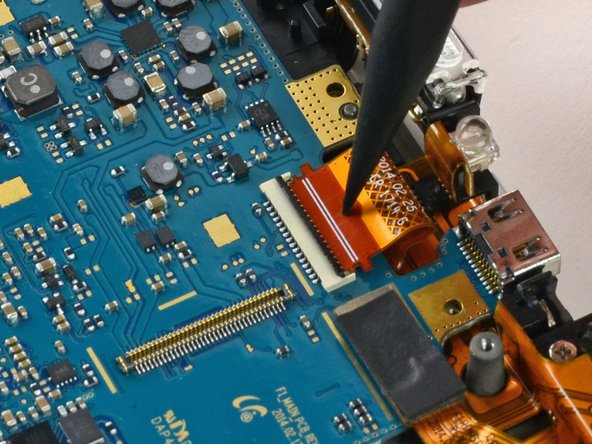
      • Insert the pointed end of a spudger into the hole in the middle of the ribbon cable.

      • Gently pull the spudger back to slide the ribbon cable out of its connector.

      询问修复机器人

      添加评论

    6. Samsung NX Mini Button Panel Replacement: 步骤 20 中的图像 1,3 Samsung NX Mini Button Panel Replacement: 步骤 20 中的图像 2,3 Samsung NX Mini Button Panel Replacement: 步骤 20 中的图像 3,3
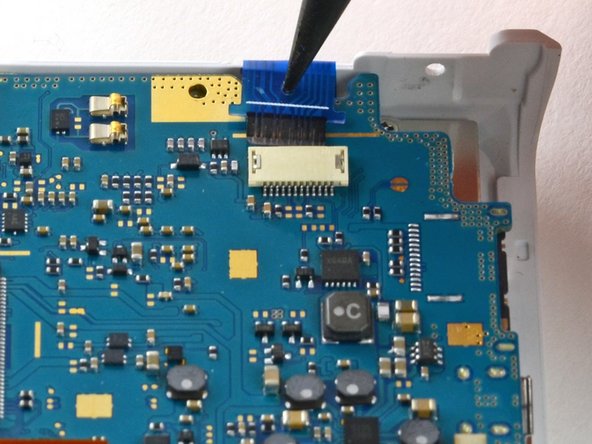
      • Disconnect the blue ribbon cable from the motherboard.

      • Insert the pointed end of a spudger into the hole in the top of the ribbon.

      • Gently pull the ribbon from the connector.

      询问修复机器人

      添加评论

    7. Samsung NX Mini Button Panel Replacement: 步骤 21 中的图像 1,1
      • Remove the motherboard from the camera.

      询问修复机器人

      添加评论

    1. Samsung NX Mini Button Panel Replacement, Button Panel: 步骤 22 中的图像 1,1
      • Remove the three 4 mm Phillips #00 screws securing the button panel to the camera case.

      询问修复机器人

      添加评论

    2. Samsung NX Mini Button Panel Replacement: 步骤 23 中的图像 1,1
      在这个步骤中使用的工具:
      Tweezers
      $4.99
      • Use tweezers to lift the button panel cover away from the case.

      询问修复机器人

      添加评论

结论

To reassemble your device, follow these instructions in reverse order.

取消:我没有完成这个指南。

Kelsea Weber

于11/12/15注册

21,470 声望

创作了32篇指南

0指南评论

添加评论

浏览统计数据:

过去 24 小时: 2

过去 7 天: 5

过去 30 天: 24

总计 849