简介
Use this guide to replace the back cover on your Samsung Galaxy S21+.
Note: Retaining water resistance after the repair will depend on how well you reapply the adhesive, but your device will lose its IP (Ingress Protection) rating.
你所需要的
-
-
Heat an iOpener and apply it to the bottom edge of the back cover for two minutes.
-
-
-
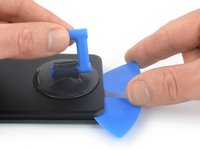
Secure a suction handle to the bottom edge of the back cover, as close to the edge as possible.
-
Lift the back cover with the suction handle to create a small gap between the back cover and the frame.
-
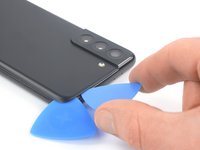
Insert an opening pick into the gap you created.
-
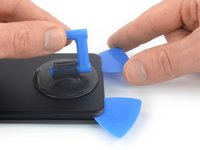
Slide the opening pick to the bottom left corner to slice the adhesive.
-
Leave the opening pick in place to prevent the adhesive from resealing.
-
-
-
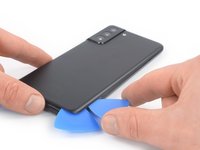
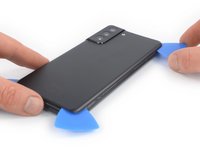
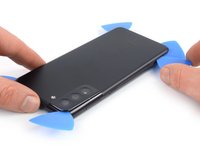
Insert a second opening pick at the bottom edge of your phone.
-
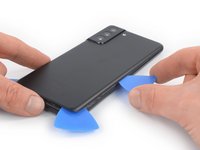
Slide the opening pick to the bottom right corner to slice the adhesive.
-
Leave the opening picks in place to prevent the adhesive from resealing.
-
-
-
Heat an iOpener and apply it to the right edge of the back cover for two minutes.
-
-
-
-
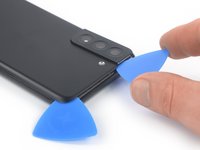
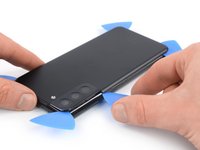
Insert a third opening pick at the bottom right corner of your phone.
-
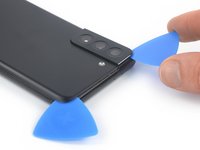
Slide the opening pick along the right edge of your phone to slice the adhesive.
-
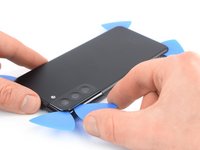
Leave the opening pick in the top right corner to prevent the adhesive from resealing.
-
-
-
Heat an iOpener and apply it to the top edge of the back cover for two minutes.
-
-
-
Heat an iOpener and apply it to the left edge of the back cover for two minutes.
-
-
在这个步骤中使用的工具:Tweezers$4.99
-
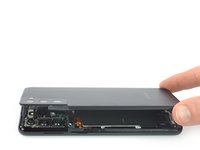
Remove the back cover.
-
This is a good point to power on your phone and test all functions before sealing it up. Be sure to power your phone back down completely before you continue working.
-
Remove any adhesive chunks with a pair of tweezers or your fingers. Apply heat if you're having trouble separating the adhesive.
-
If you're using double-sided tape, follow this guide.
-










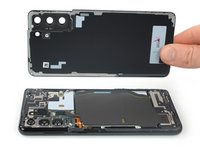
Compare your new replacement part to the original part—be sure to transfer remaining components and remove adhesive backings from the new part before installing.
To reassemble your device, follow these instructions in reverse order.
Take your e-waste to an R2 or e-Stewards certified recycler.
Repair didn’t go as planned? Try some basic troubleshooting, or ask our Answers community for help.
5等其他人完成本指南。



2指南评论
I can't seem to find a good guide on how to affix the new glue for the back of a Galaxy S21+ (Plus). (USA - T-Mobile). The glue on the provided replacement looks different than the glue I removed, it goes around the cameras, whereas before there wasn't any glue there.
In addition, even in your own video I found on YouTube, it shows a completely different adhesive layout being used. (https://www.youtube.com/watch?v=axCXYLE6... / "Samsung Galaxy S21 Plus Battery Replacement!"). Note, I have indeed have a Galaxy S21+ (SM-G996UZKATMB to be exact), but the back is plastic, not glass, like a like of guides for this phone allude to. I'm confused.
Sam C -
