跳转到主内容
加入维修社区 - 创建账户

Philips DVP642 Power Supply Replacement

你所需要的

    1. Philips DVP642 Power Supply Replacement, Top Panel: 步骤 1 中的图像 1,2 Philips DVP642 Power Supply Replacement, Top Panel: 步骤 1 中的图像 2,2
      • Remove four 7.5 mm Phillips screws on the both sides (2 on each side).

      • Remove five 7.5 mm Phillips screws on the back of the player.

      添加评论

    2. Philips DVP642 Power Supply Replacement: 步骤 2 中的图像 1,2 Philips DVP642 Power Supply Replacement: 步骤 2 中的图像 2,2
      • Lift the top panel from the back and remove. It should come off without being forced. There is a lip near the front so you many need to slide the top panel back slightly to remove it.

      询问修复机器人

      添加评论

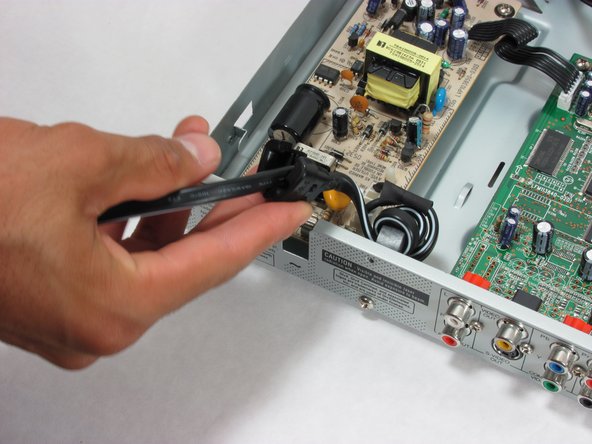
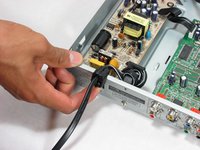
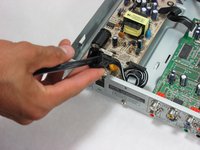
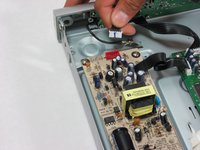
    1. Philips DVP642 Power Supply Replacement, Power Supply: 步骤 3 中的图像 1,2 Philips DVP642 Power Supply Replacement, Power Supply: 步骤 3 中的图像 2,2
      • Slide the power cord out from the case.

      • Be sure not to lose the rubber clip that is wrapped around the cord.

      询问修复机器人

      添加评论

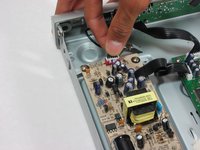
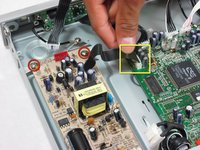
    2. Philips DVP642 Power Supply Replacement: 步骤 4 中的图像 1,1
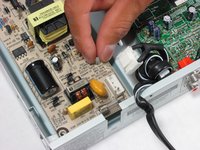
      • Remove the ribbon attached to the power supply by pushing the latch and gently pulling up.

      询问修复机器人

      添加评论

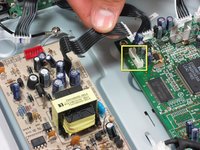
    3. Philips DVP642 Power Supply Replacement: 步骤 5 中的图像 1,2 Philips DVP642 Power Supply Replacement: 步骤 5 中的图像 2,2
      • Now remove this ribbon wire by grasping the white head firmly and pulling up gently.

      询问修复机器人

      添加评论

    4. Philips DVP642 Power Supply Replacement: 步骤 6 中的图像 1,2 Philips DVP642 Power Supply Replacement: 步骤 6 中的图像 2,2
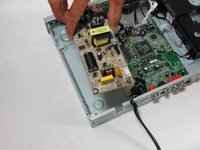
      • Remove these two 7.5m Phillips screws and the matching set at the other end of the supply.

      • Now remove the ribbon that attaches the power supply to the motherboard by grasping the white head and gently pulling up.

      询问修复机器人

      添加评论

    5. Philips DVP642 Power Supply Replacement: 步骤 7 中的图像 1,3 Philips DVP642 Power Supply Replacement: 步骤 7 中的图像 2,3 Philips DVP642 Power Supply Replacement: 步骤 7 中的图像 3,3
      • Remove the last screw.

      • Pinch this plastic prong and slide the power supply up and over it. The power supply should lift free.

      询问修复机器人

      添加评论

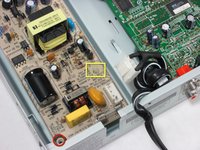
    6. Philips DVP642 Power Supply Replacement: 步骤 8 中的图像 1,2 Philips DVP642 Power Supply Replacement: 步骤 8 中的图像 2,2
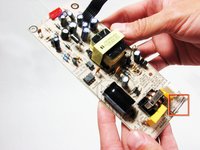
      • Your power supply is now free!

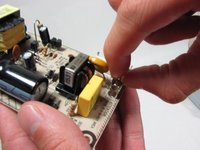
      • If the fuse circled here is blown (the small wire in the glass tube is missing or broken), remove it by pinching it tightly and pulling it straight out.

      • You can find a new fuse here.

      询问修复机器人

      添加评论

结论

To reassemble your device, follow these instructions in reverse order.

取消:我没有完成这个指南。

7等其他人完成本指南。

团队

Cal Poly, Team 21-20, Maness Fall 2011 Cal Poly, Team 21-20, Maness Fall 2011 的会员

CPSU-MANESS-F11S21G20

4 名成员

创作了24篇指南

0指南评论

添加评论

浏览统计数据:

过去 24 小时: 2

过去 7 天: 14

过去 30 天: 57

总计 14,475