简介
First we are going to take apart the headset to get to the LED. Then we are going to use our helping hands and soldering iron to remove the old LED and put the new LED in. WARNING advanced soldering skills needed.
你所需要的
-
-
-
Gently pull off your left and right ear pad. For further instructions on how to carefully do this please go to this guide here.
-
For each of the red circled screws, take your J000 screwdriver and unscrew the screws.
-
This is a picture of what your headset looks like now that you have done the first two steps and have removed the part that you unscrewed.
 询问修复机器人
-
-
-
-
First remove the battery from the headset, for instructions on how to do this correctly go here
-
Now take your J000 screwdriver and unscrew the screws that have a red circle around them.
-
Now remove the circuit board from the headset and flip it to the other side to be able to see the light/LED.
-
-
-
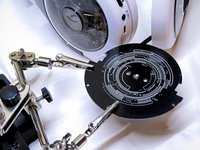
Take your helping hand with alligator clips and put the printed circuit board on it.
-
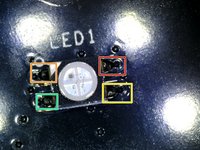
This picture is a close up of the LED with the highlighted areas you need to unsoldered.
-
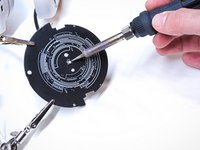
Now take your soldering iron and unsolder those four highlighted areas.
-
Your LED should come loose and you can now put on your new LED.
-
-


To reassemble your device, follow these instructions in reverse order.
另外一个人完成了本指南。

团队

UMass Dartmouth, Team 5-3, Gulbrandsen Fall 2015 UMass Dartmouth, Team 5-3, Gulbrandsen Fall 2015 的会员
UMASSD-GULBRANDSEN-F15S5G3
3 名成员
创作了20篇指南
