跳转到主内容
加入维修社区 - 创建账户

New Nintendo 2DS XL Front Buttons Replacement

你所需要的

  1. New Nintendo 2DS XL Front Buttons Replacement, Prepare for disassembly: 步骤 1 中的图像 1,1
    • Before you begin, power off the console and remove:

    • The stylus

    • Any game cartridge

    • The microSD card

    添加评论

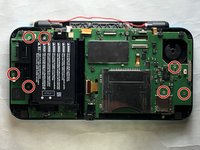
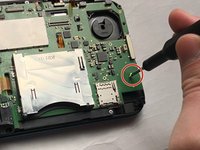
  2. New Nintendo 2DS XL Front Buttons Replacement, Remove the back cover screws: 步骤 2 中的图像 1,1
    • Use a tri‑point Y00 screwdriver to remove the four 6 mm‑long screws located at the four corners of the bottom panel.

    添加评论

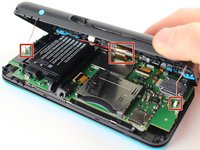
  3. New Nintendo 2DS XL Front Buttons Replacement, Release the back cover clips: 步骤 3 中的图像 1,2 New Nintendo 2DS XL Front Buttons Replacement, Release the back cover clips: 步骤 3 中的图像 2,2
    • Use a spudger to gently pry around the two short edges and front edge (with the stylus cut‑out) to release the clips securing the back cover.

    • Swing the back cover open from its front edge to release the clips along the hinge edge. Don't remove it fully—three cables are connecting it to the motherboard (two on each side and one in the rear).

    添加评论

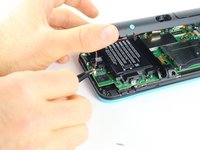
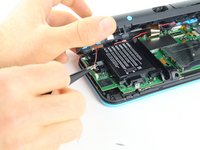
  4. New Nintendo 2DS XL Front Buttons Replacement, Disconnect the back cover: 步骤 4 中的图像 1,3 New Nintendo 2DS XL Front Buttons Replacement, Disconnect the back cover: 步骤 4 中的图像 2,3 New Nintendo 2DS XL Front Buttons Replacement, Disconnect the back cover: 步骤 4 中的图像 3,3
    在这个步骤中使用的工具:
    Tweezers
    $4.99
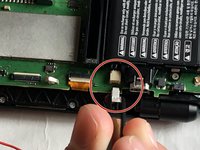
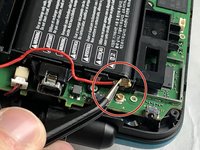
    • Use tweezers to disconnect the two cables that connect the rear buttons on either side to the motherboard by gently pulling them upwards.

    • Fold the back cover over the hinge edge, keeping the cable connected. Don't strain the cable.

    添加评论

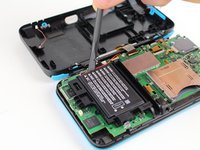
  5. New Nintendo 2DS XL Front Buttons Replacement, Battery Removal: 步骤 5 中的图像 1,2 New Nintendo 2DS XL Front Buttons Replacement, Battery Removal: 步骤 5 中的图像 2,2
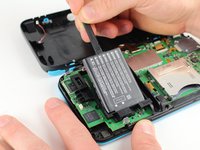
    • The battery is lightly adhered to its enclosure.

    • Use the flat end of a spudger to gently pry the battery out of its plastic enclosure.

    添加评论

  6. New Nintendo 2DS XL Front Buttons Replacement, Motherboard: 步骤 6 中的图像 1,2 New Nintendo 2DS XL Front Buttons Replacement, Motherboard: 步骤 6 中的图像 2,2
    在这个步骤中使用的工具:
    Tweezers
    $4.99
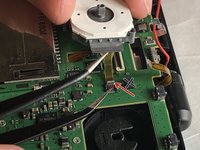
    • There are 8 ribbon cables that need to be removed as shown in the picture.

    • 2 of connectors (in green) are friction fit, unlike the rest of the connectors. Remove the cable by pulling it out gently flat in the arrow direction. Do not attempt to open or unlatch these connectors in any way. Doing so will break them.

    • For the remaining 6 (in red), use a pair of tweezers to flip the latches up and pull the ribbon cable out.

    • Note that the second picture shows a broken ribbon connector next to the joystick ribbon connector (to the right of the red arrow). Do not attempt to unlatch this connector as shown in the picture!

    添加评论

  7. New Nintendo 2DS XL Front Buttons Replacement: 步骤 7 中的图像 1,2 New Nintendo 2DS XL Front Buttons Replacement: 步骤 7 中的图像 2,2
    • Unplug the following wires from the motherboard using a pair of tweezers.

    询问修复机器人

    添加评论

  8. New Nintendo 2DS XL Front Buttons Replacement: 步骤 8 中的图像 1,2 New Nintendo 2DS XL Front Buttons Replacement: 步骤 8 中的图像 2,2
    • Remove the seven 4.4 mm screws using a J00 (or iFixit's Phillips #00) screwdriver bit.

    • Remove the motherboard from the device.

    添加评论

  9. New Nintendo 2DS XL Front Buttons Replacement, Button Removal: 步骤 9 中的图像 1,3 New Nintendo 2DS XL Front Buttons Replacement, Button Removal: 步骤 9 中的图像 2,3 New Nintendo 2DS XL Front Buttons Replacement, Button Removal: 步骤 9 中的图像 3,3
    在这个步骤中使用的工具:
    Tweezers
    $4.99
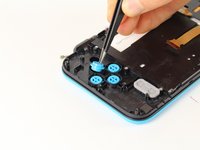
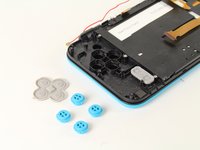
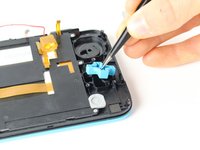
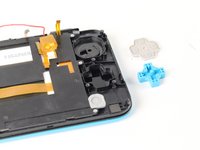
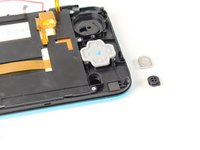
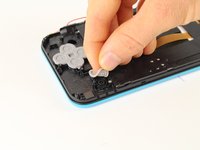
    • Lift off the rubber cover on the A, B, X, and Y buttons.

    • Using tweezers, lift out the buttons.

    询问修复机器人

    添加评论

  10. New Nintendo 2DS XL Front Buttons Replacement: 步骤 10 中的图像 1,3 New Nintendo 2DS XL Front Buttons Replacement: 步骤 10 中的图像 2,3 New Nintendo 2DS XL Front Buttons Replacement: 步骤 10 中的图像 3,3
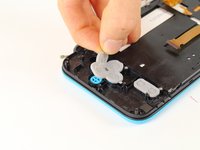
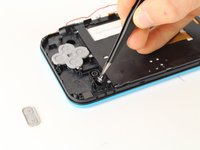
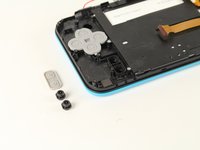
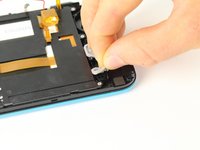
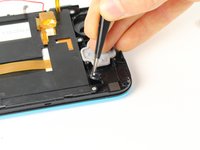
    • Lift off the grey rubber cover on the start and select buttons.

    • Using tweezers, lift out the buttons.

    询问修复机器人

    添加评论

  11. New Nintendo 2DS XL Front Buttons Replacement: 步骤 11 中的图像 1,3 New Nintendo 2DS XL Front Buttons Replacement: 步骤 11 中的图像 2,3 New Nintendo 2DS XL Front Buttons Replacement: 步骤 11 中的图像 3,3
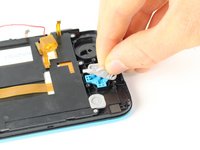
    • Lift off the grey rubber membrane on the D-pad.

    • Using tweezers, lift the D-pad out.

    询问修复机器人

    添加评论

  12. New Nintendo 2DS XL Front Buttons Replacement: 步骤 12 中的图像 1,3 New Nintendo 2DS XL Front Buttons Replacement: 步骤 12 中的图像 2,3 New Nintendo 2DS XL Front Buttons Replacement: 步骤 12 中的图像 3,3
    • Lift off the grey rubber membrane covering the home button.

    • Using tweezers, lift out the button.

    询问修复机器人

    添加评论

结论

To reassemble your device, follow these instructions in reverse order.

取消:我没有完成这个指南。

6等其他人完成本指南。

Tim Newman

于09/25/17注册

2,039 声望

创作了4篇指南

团队

Cal Poly, Team S18-G6, Forte Fall 2017 Cal Poly, Team S18-G6, Forte Fall 2017 的会员

CPSU-FORTE-F17S18G6

5 名成员

创作了24篇指南

4指南评论

after assembly, pressing ZL causes some kind of an electric short, and the console turns off immediately, help !

mos_boum - 回复 分享
This usually occurs when you break the lower screen's power ribbon cable connector. It is not a ZIF connector and "unlatching" it will break it causing a loose fit. The shoulder button presses against the ribbon cable causing it to shift in the connector resulting in the speakers popping and the device turning off.

Mike - 回复 分享

OK. Lets say I can now change the buttons for replacement purposes only. My question is :where on the earth i can find buttons to replace??????

Robert - 回复 分享

Now there is a full set of keys for 2dsxl. If you can't find it, you can google kasynparts

kasynlife - 回复 分享

添加评论

浏览统计数据:

过去 24 小时: 11

过去 7 天: 103

过去 30 天: 395

总计 21,255