跳转到主内容
加入维修社区 - 创建账户

NeuTab N7 Pro Speaker Replacement

你所需要的

  1. NeuTab N7 Pro Speaker Replacement, Speaker: 步骤 1 中的图像 1,1
    • Power off your device before beginning disassembly.

    • Insert plastic opening tool and pry back case away from the device, slowly moving the plastic opening tool along the device.

    询问修复机器人

    添加评论

  2. NeuTab N7 Pro Speaker Replacement: 步骤 2 中的图像 1,2 NeuTab N7 Pro Speaker Replacement: 步骤 2 中的图像 2,2
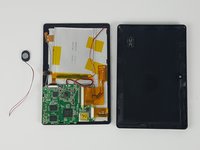
    • The speaker is attached to the back cover of the device.

    • Hold positive and negative wires as close as possible to the speaker. Use small plastic spudger and fingers to simultaneously lift speaker from cover.

    询问修复机器人

    添加评论

  3. NeuTab N7 Pro Speaker Replacement: 步骤 3 中的图像 1,3 NeuTab N7 Pro Speaker Replacement: 步骤 3 中的图像 2,3 NeuTab N7 Pro Speaker Replacement: 步骤 3 中的图像 3,3
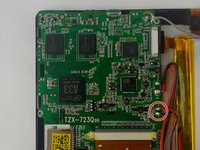
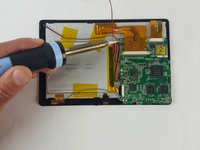
    • Use a soldering gun to remove the positive and negative wires connecting the battery to the circuit board.

    • For a complete guide on how to solder, click here.

    • Be sure not to touch both the positive and negative terminal at the same time.

    询问修复机器人

    添加评论

结论

To reassemble your device, follow these instructions in reverse order.

取消:我没有完成这个指南。

另外一个人完成了本指南。

团队

USF Tampa, Team 7-1, Cheng Spring 2016 USF Tampa, Team 7-1, Cheng Spring 2016 的会员

USFT-CHENG-S16S7G1

3 名成员

创作了10篇指南

0指南评论

添加评论

浏览统计数据:

过去 24 小时: 0

过去 7 天: 0

过去 30 天: 17

总计 509