跳转到主内容
加入维修社区 - 创建账户

Microsoft Surface Book 2 15" Rear Camera Replacement

你所需要的

    1. Microsoft Surface Book 2 15" Rear Camera Replacement, Motherboard: 步骤 1 中的图像 1,1
      • Open the laptop, then orient it so the touchpad is on your left.

      • Starting at the hinge, count six holes up on the tablet portion of the laptop.

      询问修复机器人

      添加评论

    2. Microsoft Surface Book 2 15" Rear Camera Replacement: 步骤 2 中的图像 1,2 Microsoft Surface Book 2 15" Rear Camera Replacement: 步骤 2 中的图像 2,2
      • Take a paper clip and unfold it.

      • Place the paper clip in the sixth hole and push until you hear a click.

      • Once you hear the click, lift up on the right side of the tablet from the base until it separates.

      • After the right side has been detached, lift up the left side as well.

      询问修复机器人

      添加评论

    3. Microsoft Surface Book 2 15" Rear Camera Replacement: 步骤 3 中的图像 1,1
      • Place the tablet on a flat surface.

      • Using a heat gun or iOpener, heat up the edges of the screen to soften up the adhesive.

      询问修复机器人

      添加评论

    4. Microsoft Surface Book 2 15" Rear Camera Replacement: 步骤 4 中的图像 1,1
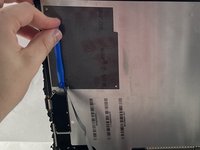
      • Using a plastic pick, slice underneath the edge of the screen.

      • Use a suction cup to carefully lift the screen and create separation between the screen and frame.

      • Take care not to insert the tool too far to avoid cutting the ribbon cables.

      • Slowly make your way around the screen, and carefully cut the adhesive that secures the screen to the frame.

      • Don't use a metal tool, that could damage the screen or internal parts.

      添加评论

    5. Microsoft Surface Book 2 15" Rear Camera Replacement: 步骤 5 中的图像 1,2 Microsoft Surface Book 2 15" Rear Camera Replacement: 步骤 5 中的图像 2,2
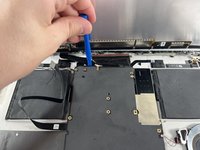
      • Lift up the screen.

      • Detach the ribbon cables connecting the underside of the screen to the motherboard.

      询问修复机器人

      添加评论

    6. Microsoft Surface Book 2 15" Rear Camera Replacement: 步骤 6 中的图像 1,2 Microsoft Surface Book 2 15" Rear Camera Replacement: 步骤 6 中的图像 2,2
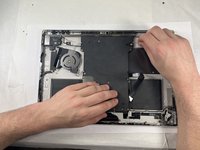
      • Use a T3 Torx screwdriver to remove eleven 4 mm screws from the motherboard.

      • Use a T3 Torx screwdriver to remove the ten 2.5 mm screws from the top bar.

      询问修复机器人

      添加评论

    7. Microsoft Surface Book 2 15" Rear Camera Replacement: 步骤 7 中的图像 1,1
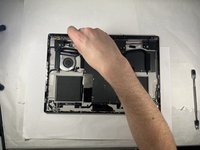
      • Once the screws are removed from the top bar, gently lift up and remove it.

      • Be careful not to damage any ribbon cables or wires.

      • Gently lift up on the motherboard to remove it.

      询问修复机器人

      添加评论

    1. Microsoft Surface Book 2 15" Rear Camera Replacement, Front Camera: 步骤 8 中的图像 1,1
      • After lifting the motherboard, locate the two cameras near the center of the motherboard.

      • Unplug front camera (right side) from the motherboard (lift carefully).

      询问修复机器人

      添加评论

    1. Microsoft Surface Book 2 15" Rear Camera Replacement, Rear Camera: 步骤 9 中的图像 1,1
      • In the top left-hand corner of the tablet is where the camera sits.

      • Unscrew the T3 torx screw.

      询问修复机器人

      添加评论

    2. Microsoft Surface Book 2 15" Rear Camera Replacement: 步骤 10 中的图像 1,1
      • Unplug the camera from the connector and remove.

      询问修复机器人

      添加评论

结论

To reassemble your device, follow these instructions in reverse order.

取消:我没有完成这个指南。

另外一个人完成了本指南。

Colton Almeida

于03/13/23注册

172 声望

创作了2篇指南

团队

UMass Dartmouth, Team 3-3, Petersen Spring 2023 UMass Dartmouth, Team 3-3, Petersen Spring 2023 的会员

UMASSD-PETERSEN-S23S3G3

4 名成员

创作了54篇指南

0指南评论

添加评论

浏览统计数据:

过去 24 小时: 0

过去 7 天: 4

过去 30 天: 22

总计 662