跳转到主内容
加入维修社区 - 创建账户

此翻译由机器生成,尚未经过人工审核。 会说这种语言吗? 查看评论

MacBook Pro 13" 一体成型机身 2012 年中版 风扇更换

你所需要的

    1. MacBook Pro 13" 一体成型机身 2012 年中版 风扇更换, 底盖: 步骤 1 中的图像 1,1
      • 拆除以下的这十个螺丝:

      • 三颗 14.4 毫米的菲利普氏 #00 型螺丝

      • 三颗 14.4 毫米的 PThree 3.5 毫米的菲利普斯 #00 螺丝

      • 四颗 3.5 毫米带肩的 Phillips #00 螺丝

      • 装回小螺丝时,将其垂直于外壳的轻微弯曲对齐(不是直着往下对齐的)。

      添加评论

    2. MacBook Pro 13" 一体成型机身 2012 年中版 风扇更换: 步骤 2 中的图像 1,2 MacBook Pro 13" 一体成型机身 2012 年中版 风扇更换: 步骤 2 中的图像 2,2
      • 用手指将笔记本电脑底部靠近通风口处的外壳部分撬开。

      • 移走背盖

      询问修复机器人

      添加评论

    1. MacBook Pro 13" 一体成型机身 2012 年中版 风扇更换, 电池连接: 步骤 3 中的图像 1,2 MacBook Pro 13" 一体成型机身 2012 年中版 风扇更换, 电池连接: 步骤 3 中的图像 2,2
      • 使用撬棒边缘处来将电池连接器从逻辑板插座上撬起。

      • 使用撬棒撬起连接器的两个“短边”有助于断开连接。 小心对连接器进行操作,连接器很容易断开。

      添加评论

    2. MacBook Pro 13" 一体成型机身 2012 年中版 风扇更换: 步骤 4 中的图像 1,1
      • 稍微弯折连接器,使其远离逻辑板,来确保您进行其他操作时不会意外的重新连接。

      添加评论

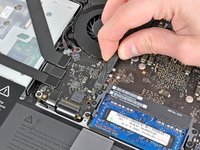
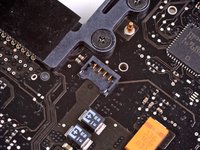
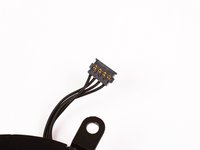
    1. MacBook Pro 13" 一体成型机身 2012 年中版 风扇更换, 风扇: 步骤 5 中的图像 1,3 MacBook Pro 13" 一体成型机身 2012 年中版 风扇更换, 风扇: 步骤 5 中的图像 2,3 MacBook Pro 13" 一体成型机身 2012 年中版 风扇更换, 风扇: 步骤 5 中的图像 3,3
      • 使用撬棒的边缘,将风扇插头从逻辑板上的插座中撬出。

      • 在线缆下扭动,可以更加轻松分离连接插头。

      • 风扇的插座和插头可以参考第二三张图片。 确保在您径直撬动插头时不要将塑料插座从逻辑板上弄下来。 第二张逻辑板布局的俯视图有可能和您的机器有些许不同,因为机器的生产时间不同。 但是插座是相同的。

      添加评论

    2. MacBook Pro 13" 一体成型机身 2012 年中版 风扇更换: 步骤 6 中的图像 1,1
      • 移除下列三颗将风扇与逻辑板固定的螺丝。

      • 一颗7.2mm T6梅花螺丝

      • 两颗5.3mm T6梅花螺丝

      添加评论

    3. MacBook Pro 13" 一体成型机身 2012 年中版 风扇更换: 步骤 7 中的图像 1,1
      • 将风扇从逻辑板上的凹槽中提出,注意可能被卡住的电缆。

      添加评论

结论

要重新组装设备,请按相反顺序执行这些说明。

取消:我没有完成这个指南。

178等其他人完成本指南。

团队

iFixit iFixit 的会员

Staff

123 名成员

创作了78,179篇指南

7指南评论

Repair done as presented. The fan connection was a little tricky to get out but apart from that non eventful. New fan working nicely.

Paul Lukabyo - 回复 分享

Hi! Thank you for very understandable and good guides!

After successfully changing the fan and battery in my Mac, the screen light changes from time to time, sometimes it is more yellow and sometimes it is more blue. Have I accidentally changed some cable, or what it is that could have happened?

Many thanks,

Maja

Maja - 回复 分享

You described the colors very well, and that leads me to believe that your display preferences in the System Preferences Control Panel may simply have switched to automatic. It changes the hues to what they think are easier on the eyes for day and night. Go to

“Apple Menu”

“System Preferences” (it’s also in the Dock by default)

“Displays”

“Night Shift”

and adjust it the way you like. BTW, if it seems to be happening at times other than Sunrise and Sunset, make sure the Time Zone is set for your local area and proper Daylight Savings (if applicable) or Standard Time.

Good Luck,

Beowulf

Beowulf Grendel - 回复 分享

Thanks, job done nicely

Ahmed Mahran - 回复 分享

my fan wont work with the back cover installed, i replaced, and again it doesnt stay working, if i tap the case sometimes it starts when using macs fan control full blast

A S - 回复 分享

添加评论

浏览统计数据:

过去 24 小时: 3

过去 7 天: 46

过去 30 天: 201

总计 100,404