简介
The real-time clock (RTC) battery maintains the computer time in the HP Z2 Mini G3 (Model No. 1LE81UP#ABA). In case of malfunction or damage, this guide can direct end users to steps required to replace this battery.
Before starting this replacement, check out our troubleshooting guide to ensure the component actually needs replaced.
Be sure to turn off the device and disconnect the A/C power cord when working on the interior components.
Components inside the device are also subject to static damage, so try and work on a hard surface to reduce this risk.
-
-
-
-
Rotate the device so the back-side is facing you and locate the RTC battery.
-
-

 询问修复机器人



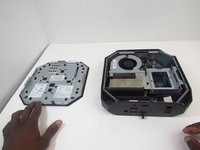


To reassemble your device, follow these instructions in reverse order.

团队

Embry-Riddle Aeronautical University, Team S16-G4, Branham Spring 2020 Embry-Riddle Aeronautical University, Team S16-G4, Branham Spring 2020 的会员
ERAU-BRANHAM-S20S16G4
3 名成员
创作了38篇指南
