跳转到主内容
加入维修社区 - 创建账户

Garmin Vivoactive Motherboard Replacement

你所需要的

  1. Garmin Vivoactive Motherboard Replacement, Wristband: 步骤 1 中的图像 1,1
    • Hold the the metal screwdriver, with a T5 Torx bit, in your dominant hand.

    • Hold the rubber screwdriver, with a Hex T6 Torx bit, in your other hand.

    • While holding the rubber screwdriver in place, simultaneously unscrew the pin (counterclockwise) with the metal screwdriver in your dominant hand.

    询问修复机器人
  2. Garmin Vivoactive Motherboard Replacement: 步骤 2 中的图像 1,2 Garmin Vivoactive Motherboard Replacement: 步骤 2 中的图像 2,2
    • Once the 1mm screw is removed, reinsert the metal screwdriver in that same hole.

    • Gently push the strap's pin out. It will begin to protrude from the other end.

    • Use your fingers to grab the exposed pin and slide it free. The strap should now be disconnected from the device.

    询问修复机器人
  3. Garmin Vivoactive Motherboard Replacement, Display Unit: 步骤 3 中的图像 1,1
    • Place a heated iOpener over the display to loosen the adhesive.

    • After about a minute, the iOpener may be removed.

    • For more in depth instructions on using the iOpener, refer to the iOpener guide.

    询问修复机器人
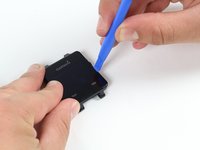
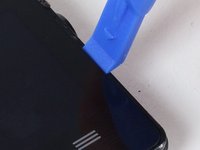
  4. Garmin Vivoactive Motherboard Replacement: 步骤 4 中的图像 1,2 Garmin Vivoactive Motherboard Replacement: 步骤 4 中的图像 2,2
    • Place the blue plastic opening tool in-between the screen and plastic casing of the watch and slowly pry up one side of the screen.

    询问修复机器人
  5. Garmin Vivoactive Motherboard Replacement: 步骤 5 中的图像 1,1
    • Once the first side has come free, wedge the blue pick in between the screen and watch unit on that side.

    • Complete one pass around the perimeter of the screen to break the adhesive bond on all four sides.

    • Insert it a minimal distance to avoid damaging internal components.

    询问修复机器人
  6. Garmin Vivoactive Motherboard Replacement: 步骤 6 中的图像 1,1
    • Use the blue plastic opening tool to pry up the side of the glass. Raise it to a point where your fingernail can fit in the gap.

    • Do the same on the opposite side of the device until you have a good grip of the screen.

    询问修复机器人
  7. Garmin Vivoactive Motherboard Replacement: 步骤 7 中的图像 1,1
    • Obtain a careful grip of the screen from two of its sides.

    • Slowly lift the screen off of the case. Separate it just enough so as not to damage the connection to the motherboard.

    询问修复机器人
  8. Garmin Vivoactive Motherboard Replacement: 步骤 8 中的图像 1,1
    • Detach the orange tab that connects the screen to the motherboard with a gentle uplift using a plastic opening tool.

    • Upon completing this step, the screen should be free from the rest of the device.

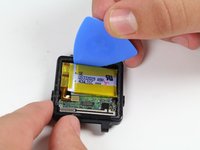
  9. Garmin Vivoactive Motherboard Replacement, Battery: 步骤 9 中的图像 1,2 Garmin Vivoactive Motherboard Replacement, Battery: 步骤 9 中的图像 2,2
    • Follow previous guides until you've exposed the battery as shown.

    • Begin by removing the battery connector tab.

    • Be sure not to use a metal implement or your fingers to remove this tab. Doing so may cause personal harm or damage to the electrical components.

    询问修复机器人
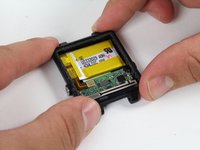
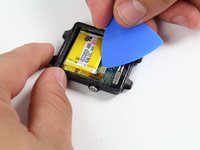
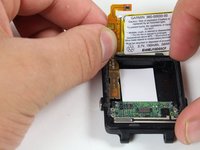
  10. Garmin Vivoactive Motherboard Replacement: 步骤 10 中的图像 1,2 Garmin Vivoactive Motherboard Replacement: 步骤 10 中的图像 2,2
    • Use a plastic opening pick to gently pry out the battery as shown.

    • The battery is Lithium Polymer, follow safe handling procedures and DO NOT deform it upon removal.

    询问修复机器人
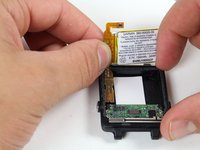
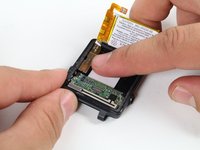
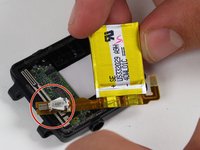
  11. Garmin Vivoactive Motherboard Replacement: 步骤 11 中的图像 1,3 Garmin Vivoactive Motherboard Replacement: 步骤 11 中的图像 2,3 Garmin Vivoactive Motherboard Replacement: 步骤 11 中的图像 3,3
    • With the battery loose from the case, rotate it to expose the attached tab

    • Gently pry up the attached tab with a fingernail.

    • Keep the vibrator, circled in red, as you may need to solder it to the new battery upon re-installation later.

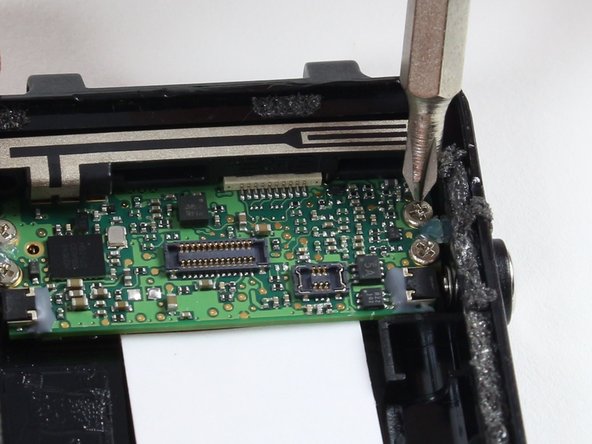
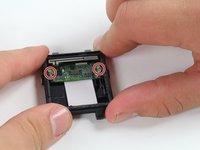
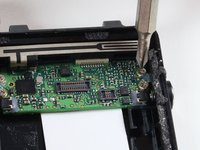
  12. Garmin Vivoactive Motherboard Replacement, Motherboard: 步骤 12 中的图像 1,2 Garmin Vivoactive Motherboard Replacement, Motherboard: 步骤 12 中的图像 2,2
    • Remove the four 2.4 mm screws with a PH00 Phillips head screwdriver.

    • Make an effort not to damage any nearby components of the motherboard with the screwdriver.

    询问修复机器人
  13. Garmin Vivoactive Motherboard Replacement: 步骤 13 中的图像 1,2 Garmin Vivoactive Motherboard Replacement: 步骤 13 中的图像 2,2
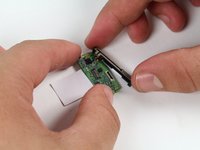
    • Use the spudger to pry up the board from the case.

    • Insert the spudger a minimum distance beneath the board as there are components below.

    • Wiggle the exposed side of the board from each end until it comes free.

    • Use proper electrostatic discharge safety when removing and handling the board.

    询问修复机器人
  14. Garmin Vivoactive Motherboard Replacement: 步骤 14 中的图像 1,2 Garmin Vivoactive Motherboard Replacement: 步骤 14 中的图像 2,2
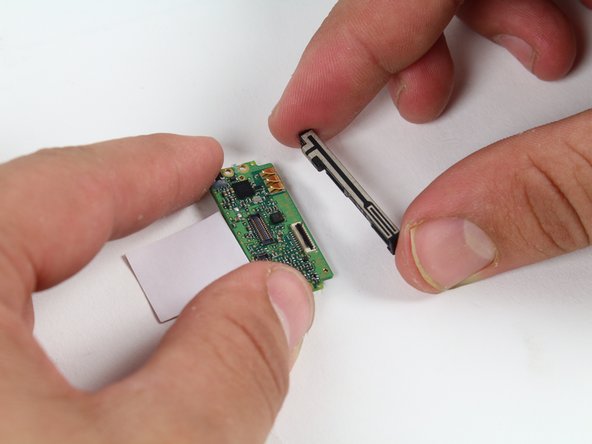
    • Remove the GPS antenna by sliding it away from the board.

    • Keep track of the antenna and add it to the new board upon replacement.

    询问修复机器人
结论

To reassemble your device, follow these instructions in reverse order.

2等其他人完成本指南。

团队

Cal Poly, Team 1-21, Maness Fall 2015 Cal Poly, Team 1-21, Maness Fall 2015 的会员

CPSU-MANESS-F15S1G21

4 名成员

创作了17篇指南

2指南评论

Any tips on where to buy a motherboard?

Breener - 回复 分享
Only <3 months, the motherboard is gone?

Do you have any service shop where I can mail for repairing? I am not going to mail order a motherboard and install by myself every 3 months.

Ming

Yong-Ming Yu - 回复 分享
添加评论

浏览统计数据:

过去 24 小时: 0

过去 7 天: 12

过去 30 天: 75

总计 14,928