跳转到主内容
加入维修社区 - 创建账户

Fujifilm X-M1 LCD Screen Replacement

你所需要的

    1. Fujifilm X-M1 LCD Screen Replacement, Battery: 步骤 1 中的图像 1,2 Fujifilm X-M1 LCD Screen Replacement, Battery: 步骤 1 中的图像 2,2
      • Turn the camera upside down to locate the battery compartment.

      • Slide the button up to open the compartment.

      • Slide the orange button up to release the battery.

      • The battery is not shown in these photos.

      询问修复机器人

      添加评论

    1. Fujifilm X-M1 LCD Screen Replacement, Lens Assembly: 步骤 2 中的图像 1,3 Fujifilm X-M1 LCD Screen Replacement, Lens Assembly: 步骤 2 中的图像 2,3 Fujifilm X-M1 LCD Screen Replacement, Lens Assembly: 步骤 2 中的图像 3,3
      在这个步骤中使用的工具:
      Tweezers
      $4.99
      • Twist the lens cap to remove it from the camera.

      • Remove the six 6.5 mm Phillips screws from the front of the lens assembly.

      • Use tweezers to remove the top metal ring and the thin metal ring below it .

      添加评论

    2. Fujifilm X-M1 LCD Screen Replacement: 步骤 3 中的图像 1,1
      • Remove the four 4.3 mm Phillips screws inside the lens assembly.

      询问修复机器人

      添加评论

    1. Fujifilm X-M1 LCD Screen Replacement, Back Case: 步骤 4 中的图像 1,1
      • Remove the six 2.5 mm Phillips screws from the bottom of the camera.

      询问修复机器人

      添加评论

    2. Fujifilm X-M1 LCD Screen Replacement: 步骤 5 中的图像 1,1
      在这个步骤中使用的工具:
      Tweezers
      $4.99
      • Use tweezers or a finger nail to peel back the rubber cover on the left handgrip.

      • Remove the 3.4 mm Phillips screw.

      • Remove the 3.7 mm screw.

      询问修复机器人

      添加评论

    3. Fujifilm X-M1 LCD Screen Replacement: 步骤 6 中的图像 1,1
      • Use tweezers or a fingernail to peel back the rubber cover on the right handgrip.

      • Remove the 3.2 mm Phillips screw.

      • Remove the 3.8 mm Phillips screw.

      • Remove the 2.8 mm Phillips screw.

      询问修复机器人

      添加评论

    4. Fujifilm X-M1 LCD Screen Replacement: 步骤 7 中的图像 1,2 Fujifilm X-M1 LCD Screen Replacement: 步骤 7 中的图像 2,2
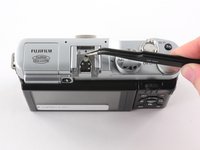
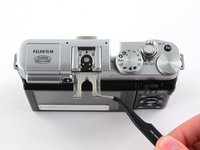
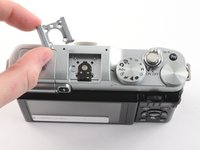
      • Use tweezers to slide the metal shield straight out of the external flash mount.

      询问修复机器人

      添加评论

    5. Fujifilm X-M1 LCD Screen Replacement: 步骤 8 中的图像 1,3 Fujifilm X-M1 LCD Screen Replacement: 步骤 8 中的图像 2,3 Fujifilm X-M1 LCD Screen Replacement: 步骤 8 中的图像 3,3
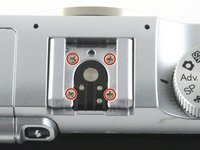
      • Remove the four 4.6 mm Phillips screws from the external flash mount.

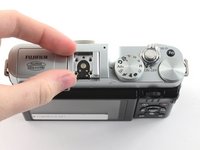
      • Use tweezers or two fingers to remove the mount clip.

      询问修复机器人

      添加评论

    6. Fujifilm X-M1 LCD Screen Replacement: 步骤 9 中的图像 1,1
      • Extend the LCD.

      • Remove the two black 4.3 mm Phillips screws from the back case.

      询问修复机器人

      添加评论

    7. Fujifilm X-M1 LCD Screen Replacement: 步骤 10 中的图像 1,2 Fujifilm X-M1 LCD Screen Replacement: 步骤 10 中的图像 2,2
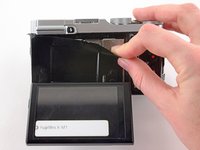
      • Use two fingers to peel back and remove the black plastic cover from behind the LCD.

      询问修复机器人

      添加评论

    8. Fujifilm X-M1 LCD Screen Replacement: 步骤 11 中的图像 1,3 Fujifilm X-M1 LCD Screen Replacement: 步骤 11 中的图像 2,3 Fujifilm X-M1 LCD Screen Replacement: 步骤 11 中的图像 3,3
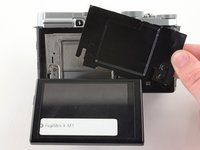
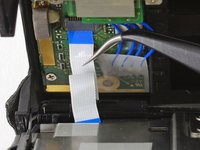
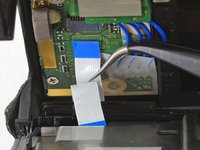
      • Slowly pull the back frame away from the camera.

      • Do not attempt to remove the frame, as it is attached to the camera by a ribbon cable.

      • Use tweezers to pull the white and blue ribbon cable out of the connector.

      询问修复机器人

      添加评论

    9. Fujifilm X-M1 LCD Screen Replacement: 步骤 12 中的图像 1,1
      • Slide the frame around the LCD to remove it from the camera.

      询问修复机器人

      添加评论

    10. Fujifilm X-M1 LCD Screen Replacement: 步骤 13 中的图像 1,1
      • Remove the two 2.6 mm Phillips screws from the right side of the metal frame.

      询问修复机器人

      添加评论

    11. Fujifilm X-M1 LCD Screen Replacement: 步骤 14 中的图像 1,2 Fujifilm X-M1 LCD Screen Replacement: 步骤 14 中的图像 2,2
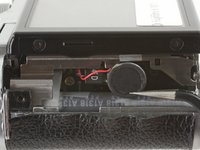
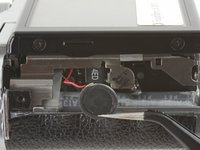
      • Use tweezers to unhook the speaker near the left handgrip.

      询问修复机器人

      添加评论

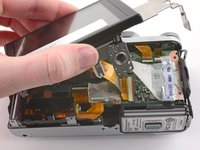
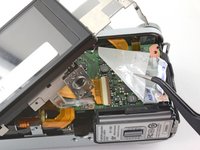
    12. Fujifilm X-M1 LCD Screen Replacement: 步骤 15 中的图像 1,2 Fujifilm X-M1 LCD Screen Replacement: 步骤 15 中的图像 2,2
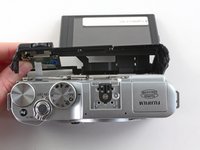
      • Slowly lift the metal frame away from the motherboard.

      • Do not attempt to remove the frame, as it is attached to the motherboard by a large ribbon cable.

      • Use tweezers to remove the plastic covering the motherboard.

      询问修复机器人

      添加评论

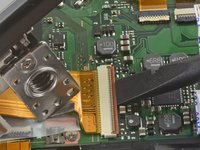
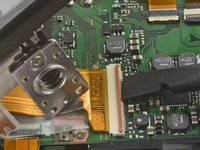
    13. Fujifilm X-M1 LCD Screen Replacement: 步骤 16 中的图像 1,3 Fujifilm X-M1 LCD Screen Replacement: 步骤 16 中的图像 2,3 Fujifilm X-M1 LCD Screen Replacement: 步骤 16 中的图像 3,3
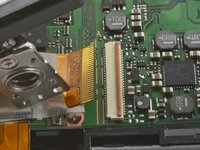
      • To remove the ribbon cable, flip back the orange lock on the large ZIF connector with the flat end of a spudger.

      • If the ribbon cable does not pop out on its own, use tweezers to pull it out of the connector.

      • Remove the back case.

      询问修复机器人

      添加评论

    1. Fujifilm X-M1 LCD Screen Replacement, LCD Screen: 步骤 17 中的图像 1,2 Fujifilm X-M1 LCD Screen Replacement, LCD Screen: 步骤 17 中的图像 2,2
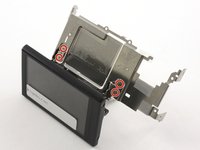
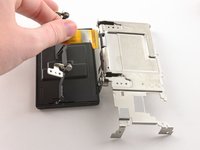
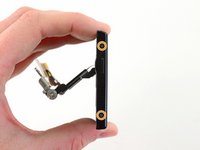
      • Remove the four 2.6 mm Phillips screws from the LCD hinges.

      • Tilt the LCD away from the metal frame.

      • Do not attempt to remove the LCD, as it is attached to the metal frame by a ribbon cable.

      询问修复机器人

      添加评论

    2. Fujifilm X-M1 LCD Screen Replacement: 步骤 18 中的图像 1,2 Fujifilm X-M1 LCD Screen Replacement: 步骤 18 中的图像 2,2
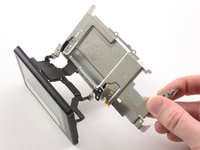
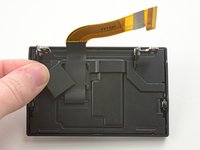
      • Use two fingers to pull the ribbon through the hole in the metal frame.

      • Remove the LCD from the metal frame.

      询问修复机器人

      添加评论

    3. Fujifilm X-M1 LCD Screen Replacement: 步骤 19 中的图像 1,2 Fujifilm X-M1 LCD Screen Replacement: 步骤 19 中的图像 2,2
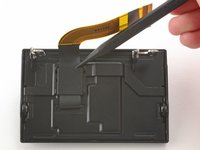
      • Use the pointed end of a spudger to remove the ribbon cover on the back of the LCD.

      询问修复机器人

      添加评论

    4. Fujifilm X-M1 LCD Screen Replacement: 步骤 20 中的图像 1,2 Fujifilm X-M1 LCD Screen Replacement: 步骤 20 中的图像 2,2
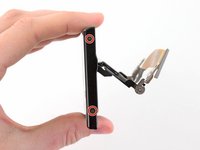
      • Remove the two 2.6 mm Phillips screws from the right hand side of the LCD screen.

      • Remove the two 2.6 mm Phillips screws from the left hand side of the LCD screen.

      询问修复机器人

      添加评论

    5. Fujifilm X-M1 LCD Screen Replacement: 步骤 21 中的图像 1,3 Fujifilm X-M1 LCD Screen Replacement: 步骤 21 中的图像 2,3 Fujifilm X-M1 LCD Screen Replacement: 步骤 21 中的图像 3,3
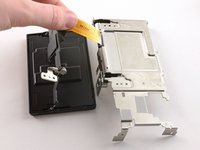
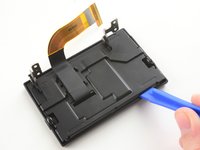
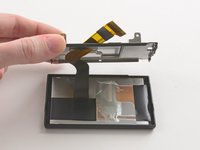
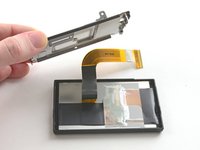
      • Use a plastic opening tool to pry the LCD case open.

      • Once the case is open, pull the ribbon through the hole on the back case.

      询问修复机器人

      添加评论

    6. Fujifilm X-M1 LCD Screen Replacement: 步骤 22 中的图像 1,1
      • Remove the LCD from the screen cover.

      询问修复机器人

      添加评论

结论

To reassemble your device, follow these instructions in reverse order.

取消:我没有完成这个指南。

另外一个人完成了本指南。

Kelsea Weber

于11/12/15注册

21,464 声望

创作了32篇指南

0指南评论

添加评论

浏览统计数据:

过去 24 小时: 1

过去 7 天: 18

过去 30 天: 82

总计 6,426