跳转到主内容
加入维修社区 - 创建账户

Droid Ultra XT1080 Front assembly with frame Replacement

你所需要的

    1. Droid Ultra XT1080 Front assembly with frame Replacement, Front assembly with frame: 步骤 1 中的图像 1,1
      • Start by removing the Sim card tray, which also happens to be your volume button

      询问修复机器人

      添加评论

    2. Droid Ultra XT1080 Front assembly with frame Replacement: 步骤 2 中的图像 1,1
      • I personally used an iSesamo tool to unclip the tabs off the back housing, You can also use the Jimmy or some plastic prying tools.

      • Do Not pry the back housing around the bottom of the screen. Pry on the left, right, and top. After that the back housing should slide off on the bottom.

      添加评论

    3. Droid Ultra XT1080 Front assembly with frame Replacement: 步骤 3 中的图像 1,3 Droid Ultra XT1080 Front assembly with frame Replacement: 步骤 3 中的图像 2,3 Droid Ultra XT1080 Front assembly with frame Replacement: 步骤 3 中的图像 3,3
      • T5 Torx screws

      • T3 Torx screw

      • T5 Torx screws

      • T5 Torx screws

      • When putting back together, do not tighten the screws too tight.

      询问修复机器人

      添加评论

    4. Droid Ultra XT1080 Front assembly with frame Replacement: 步骤 4 中的图像 1,1
      • T5 Torx screws

      询问修复机器人

      添加评论

    5. Droid Ultra XT1080 Front assembly with frame Replacement: 步骤 5 中的图像 1,2 Droid Ultra XT1080 Front assembly with frame Replacement: 步骤 5 中的图像 2,2
      • T5 Torx screws

      询问修复机器人

      添加评论

    6. Droid Ultra XT1080 Front assembly with frame Replacement: 步骤 6 中的图像 1,3 Droid Ultra XT1080 Front assembly with frame Replacement: 步骤 6 中的图像 2,3 Droid Ultra XT1080 Front assembly with frame Replacement: 步骤 6 中的图像 3,3
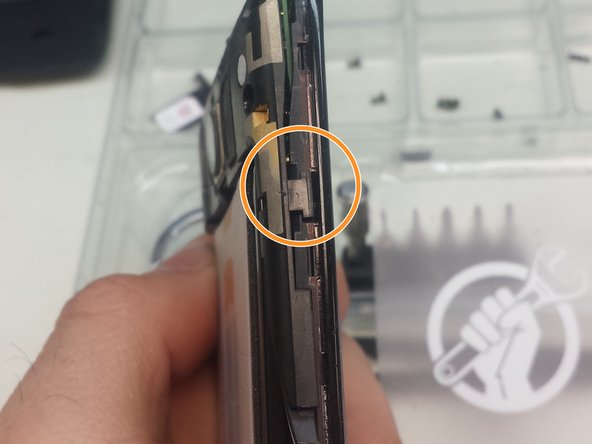
      • With the iSesamo tool, or a prying tool, unclip the tabs on the left and right side of the phone.

      询问修复机器人

      添加评论

    7. Droid Ultra XT1080 Front assembly with frame Replacement: 步骤 7 中的图像 1,3 Droid Ultra XT1080 Front assembly with frame Replacement: 步骤 7 中的图像 2,3 Droid Ultra XT1080 Front assembly with frame Replacement: 步骤 7 中的图像 3,3
      • Using a Spudger lift the motherboard from right to left.

      • After lifting the motherboard from the frame remove the tape, and lift the black tab with your Spudger to remove the flex cable.

      • When you place the new screen remember to replace the tape over the flex cable.

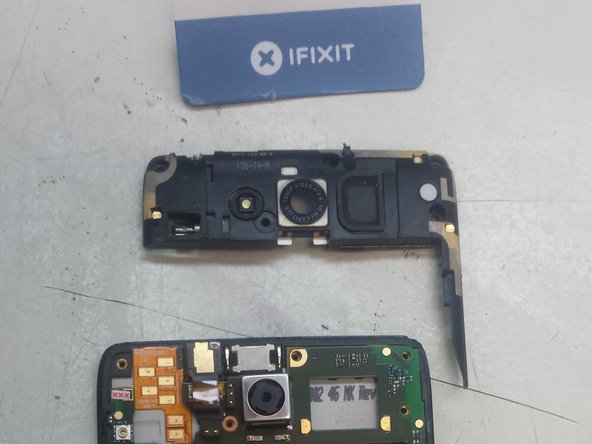
      • Before putting the mother board on remember to transfer your ear speaker from the old frame to the new one.

      询问修复机器人

      添加评论

    8. Droid Ultra XT1080 Front assembly with frame Replacement, And you are done...: 步骤 8 中的图像 1,1
      • .... as long as you work your way backwards to put it back together.

      询问修复机器人

      添加评论

结论

To reassemble your device, follow these instructions in reverse order.

取消:我没有完成这个指南。

17等其他人完成本指南。

8指南评论

I want to repair the scencor

Atihussan82 Hussain - 回复 分享

I want to repair the XT1080 sciencer

Atihussan82 Hussain - 回复 分享

Repair screen on droid ultra XT 1080

churchy dezign - 回复 分享

I want to repair the camera on Droid turbo XT1080

King Bash - 回复 分享

My Android 1080 screen is frozen. How can I get my photos?

Madeline Rutledge - 回复 分享

添加评论

浏览统计数据:

过去 24 小时: 3

过去 7 天: 22

过去 30 天: 104

总计 5,384