跳转到主内容
加入维修社区 - 创建账户

Disassembling Soundmates V2 Case

你所需要的

    1. Disassembling Soundmates V2 Case, Soundmates V2 Case: 步骤 1 中的图像 1,2 Disassembling Soundmates V2 Case, Soundmates V2 Case: 步骤 1 中的图像 2,2
      • Flip open the cover and insert a thin flathead screwdriver in the seam by the hinge

      • Rotate the screwdriver just enough to create a gap between the two halves of the case

      • If this doesn't work very well, try the other side

      • Insert a spudger or another flathead bit into the new gap

      • This may cause some cosmetic damage

      询问修复机器人

      添加评论

    2. Disassembling Soundmates V2 Case: 步骤 2 中的图像 1,3 Disassembling Soundmates V2 Case: 步骤 2 中的图像 2,3 Disassembling Soundmates V2 Case: 步骤 2 中的图像 3,3
      • Once you've created a small gap, the lid should come off fairly easily

      • Run the spudger around the case until the two halves separate

      • If the top half doesn't come straight up and out, it may break off the charging port, like it did with mine. Go slowly and use caution

      询问修复机器人

      添加评论

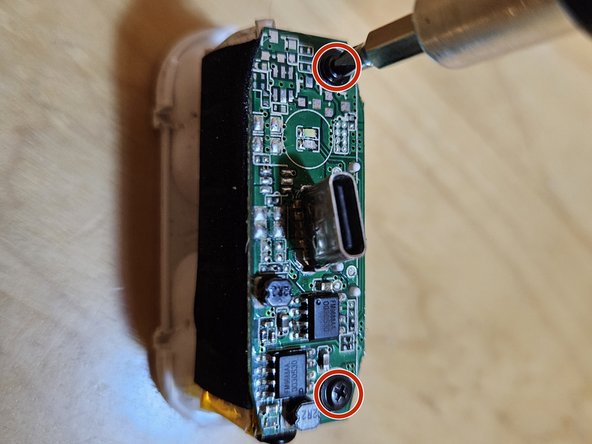
    3. Disassembling Soundmates V2 Case: 步骤 3 中的图像 1,1
      • Remove the two Philips #00 screws securing the board

      询问修复机器人

      添加评论

    4. Disassembling Soundmates V2 Case: 步骤 4 中的图像 1,1
      • Gently lift the circuitboard off. Not too high; it's still wired to the battery

      • Now just pull off the battery; it's only held down by a sticky foam pad

      询问修复机器人

      添加评论

    5. Disassembling Soundmates V2 Case: 步骤 5 中的图像 1,1
      • Done! Hope you didn't break anything like I did.

      询问修复机器人

      添加评论

结论

To reassemble your device, follow these instructions in reverse order.

取消:我没有完成这个指南。

2等其他人完成本指南。

darth mango

于03/13/23注册

3,814 声望

创作了3篇指南

0指南评论

添加评论

浏览统计数据:

过去 24 小时: 0

过去 7 天: 9

过去 30 天: 58

总计 1,243