跳转到主内容
加入维修社区 - 创建账户

Dell Inspiron 13-7352 System Board Replacement

浏览量: 2323

浏览统计数据:

过去24小时
3
过去 7 天:
17
过去 30 天:
85
总计
2,323
评论: 1

1 comment on steps.

已完成: 3

3 人已将本指南标记为“已完成”。你会是下一个完成的人吗?

收藏: 1

1 人收藏(并订阅)了本指南。你会是下一个吗?

所需时间: 10分钟
难度: 中等
需要更好的图片

更好的照片将改善本指南。请帮助拍摄,编辑,或上传新的图片​​!

Dell Inspiron 13-7352 System Board Replacement

This guide will show users through the steps required to replace the main system board.

你所需要的

配件

工具

    1. Dell Inspiron 13-7352 System Board Replacement, Battery: 步骤 1 中的图像 1,3 Dell Inspiron 13-7352 System Board Replacement, Battery: 步骤 1 中的图像 2,3 Dell Inspiron 13-7352 System Board Replacement, Battery: 步骤 1 中的图像 3,3
      • Before you begin, be sure to turn off your laptop and unplug it from the outlet.

      • Use a Phillips screwdriver to remove the ten 7.5mm screws that securing the back panel.

      • Use the plastic opening tool to pry up and loosen the back panel.

      • Remove the back panel.

      询问修复机器人

      添加评论

    2. Dell Inspiron 13-7352 System Board Replacement: 步骤 2 中的图像 1,2 Dell Inspiron 13-7352 System Board Replacement: 步骤 2 中的图像 2,2
      • Use a Phillips screwdriver to remove the two 3 mm screws securing the battery.

      • Unclip the hard drive wire from the battery.

      询问修复机器人

      添加评论

    3. Dell Inspiron 13-7352 System Board Replacement: 步骤 3 中的图像 1,1
      • Gently remove the battery from the rest of the device.

      添加评论

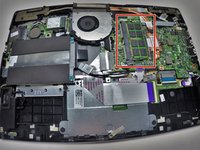
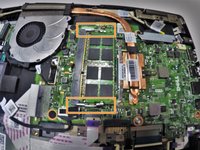
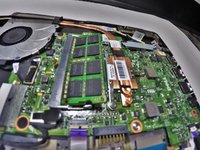
    1. Dell Inspiron 13-7352 System Board Replacement, Memory Module (RAM): 步骤 4 中的图像 1,3 Dell Inspiron 13-7352 System Board Replacement, Memory Module (RAM): 步骤 4 中的图像 2,3 Dell Inspiron 13-7352 System Board Replacement, Memory Module (RAM): 步骤 4 中的图像 3,3
      • Locate your memory module (RAM).

      • Release the clips from the Memory Module by gently pushing down. This should cause the Memory Module to pop up and separate from the device base.

      询问修复机器人

      添加评论

    2. Dell Inspiron 13-7352 System Board Replacement: 步骤 5 中的图像 1,1
      • Pull the Memory Module from its slot by grasping each side with thumb and middle or index finger to pull from the rest of the device.

      询问修复机器人

      添加评论

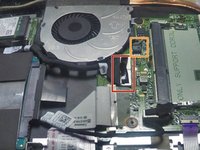
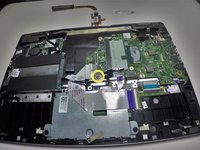
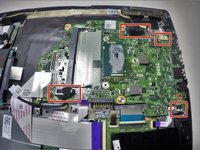
    1. Dell Inspiron 13-7352 System Board Replacement, System Board: 步骤 6 中的图像 1,3 Dell Inspiron 13-7352 System Board Replacement, System Board: 步骤 6 中的图像 2,3 Dell Inspiron 13-7352 System Board Replacement, System Board: 步骤 6 中的图像 3,3
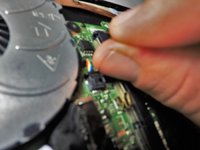
      • Remove cord that runs from system board to the I/O board.

      • Remove connecting wire that runs from fan to system board.

      询问修复机器人

      添加评论

    2. Dell Inspiron 13-7352 System Board Replacement: 步骤 7 中的图像 1,1
      • Remove the 3mm and 4mm screws using the Phillips #0 head for both that hold down the fan

      询问修复机器人

      添加评论

    3. Dell Inspiron 13-7352 System Board Replacement: 步骤 8 中的图像 1,1
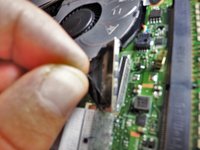
      • Lift the fan from the system board by using your thumb and index or middle finger to gently pull away from the rest of the device.

      询问修复机器人

      添加评论

    4. Dell Inspiron 13-7352 System Board Replacement: 步骤 9 中的图像 1,3 Dell Inspiron 13-7352 System Board Replacement: 步骤 9 中的图像 2,3 Dell Inspiron 13-7352 System Board Replacement: 步骤 9 中的图像 3,3
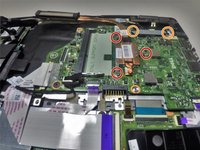
      • Remove the three 4mm screws with the Phillips #0 holding down the heat sink.

      • Remove the two 4mm screws with the Phillips #0 holding down the metal bracket.

      • Unscrew the single 3mm screw using the Phillips #0 head securing the system board.

      询问修复机器人

      添加评论

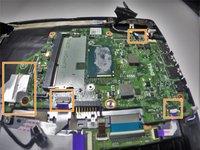
    5. Dell Inspiron 13-7352 System Board Replacement: 步骤 10 中的图像 1,2 Dell Inspiron 13-7352 System Board Replacement: 步骤 10 中的图像 2,2
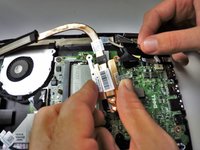
      • Remove the wire connections attached to the system board.

      • Remove the tape wires from the system board.

      询问修复机器人

      添加评论

    6. Dell Inspiron 13-7352 System Board Replacement: 步骤 11 中的图像 1,1
      • Carefully remove the system board from the base by grasping with thumb and index or middle finger and pulling away from the rest of the device.

      询问修复机器人

      添加评论

结论

To reassemble your device, follow these instructions in reverse order.

取消:我没有完成这个指南。

3等其他人完成本指南。

Chris Monte

于09/30/15注册

411 声望

创作了2篇指南

团队

0指南评论

添加评论

浏览统计数据:

过去 24 小时: 3

过去 7 天: 17

过去 30 天: 85

总计 2,323