跳转到主内容
加入维修社区 - 创建账户

Comfort Zone CZ6C Switch Replacement

你所需要的

  1. Comfort Zone CZ6C Switch Replacement, Switch: 步骤 1 中的图像 1,3 Comfort Zone CZ6C Switch Replacement, Switch: 步骤 1 中的图像 2,3 Comfort Zone CZ6C Switch Replacement, Switch: 步骤 1 中的图像 3,3
    • Make sure to unplug the Comfort Zone CZ6C before cutting any wires.

    • Before replacing your switch, learn how to solder using the How To Solder and Desolder Connections Guide.

    • Start with the fan on its back. Unscrew the back panel to expose the internal wiring.

    询问修复机器人

    添加评论

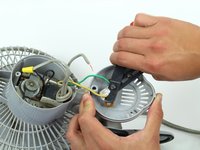
  2. Comfort Zone CZ6C Switch Replacement: 步骤 2 中的图像 1,2 Comfort Zone CZ6C Switch Replacement: 步骤 2 中的图像 2,2
    • Remove the plastic cover on the switch by pulling it apart from the the back panel.

    询问修复机器人

    添加评论

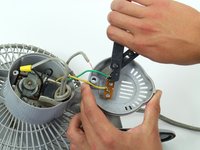
  3. Comfort Zone CZ6C Switch Replacement: 步骤 3 中的图像 1,1
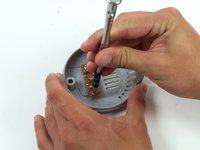
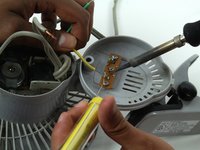
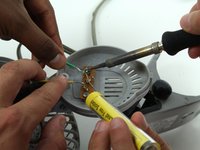
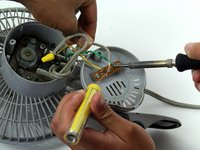
    • Use the soldering iron with caution. Don't touch the tip of the soldering iron to avoid the risk of injury.

    • This step can be made easier with the help of a partner to hold the wiring while you desolder the connection.

    • Disconnect the gray power wire from the switch by desoldering the connection.

    询问修复机器人

    添加评论

  4. Comfort Zone CZ6C Switch Replacement: 步骤 4 中的图像 1,2 Comfort Zone CZ6C Switch Replacement: 步骤 4 中的图像 2,2
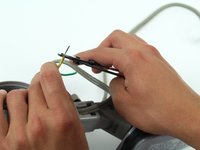
    • Cut the green and yellow wire as close to the switch connection as possible.

    询问修复机器人

    添加评论

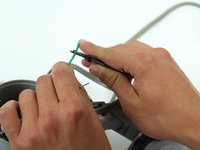
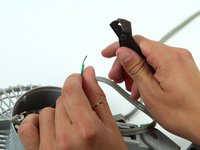
  5. Comfort Zone CZ6C Switch Replacement: 步骤 5 中的图像 1,3 Comfort Zone CZ6C Switch Replacement: 步骤 5 中的图像 2,3 Comfort Zone CZ6C Switch Replacement: 步骤 5 中的图像 3,3
    • Strip the green and yellow wire about two centimeters from where it was just cut.

    询问修复机器人

    添加评论

  6. Comfort Zone CZ6C Switch Replacement: 步骤 6 中的图像 1,3 Comfort Zone CZ6C Switch Replacement: 步骤 6 中的图像 2,3 Comfort Zone CZ6C Switch Replacement: 步骤 6 中的图像 3,3
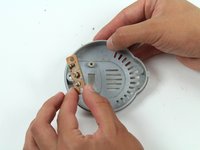
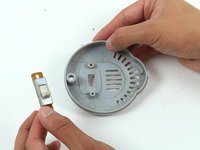
    • Unscrew the switch from the back panel and remove it.

    询问修复机器人

    添加评论

  7. Comfort Zone CZ6C Switch Replacement: 步骤 7 中的图像 1,3 Comfort Zone CZ6C Switch Replacement: 步骤 7 中的图像 2,3 Comfort Zone CZ6C Switch Replacement: 步骤 7 中的图像 3,3
    • After replacing the switch, resolder the gray power cord, the green wire, and the yellow wire.

    询问修复机器人

    添加评论

结论

To reassemble your device, follow these instructions in reverse order.

取消:我没有完成这个指南。

另外一个人完成了本指南。

团队

Cal Poly, Team 17-5, Forte Spring 2015 Cal Poly, Team 17-5, Forte Spring 2015 的会员

CPSU-FORTE-S15S17G5

4 名成员

创作了7篇指南

1指南评论

I need a replacement switch for a Comfort Zone CZ40 heater. Can you help?

Michael Drasic - 回复 分享

添加评论

浏览统计数据:

过去 24 小时: 1

过去 7 天: 9

过去 30 天: 50

总计 2,745