跳转到主内容
加入维修社区 - 创建账户

Check Account Information.

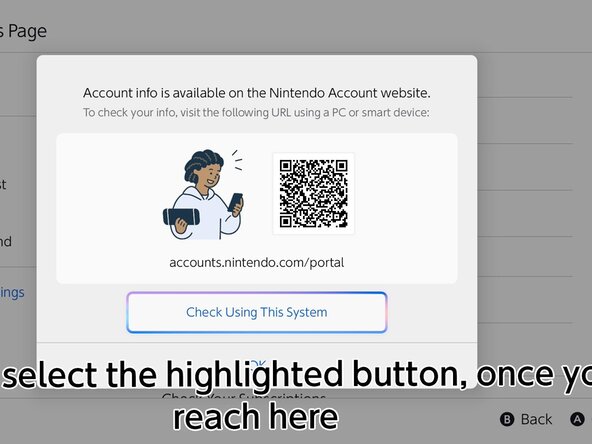
  1. Check Account Information., Head over to the website: 步骤 1 中的图像 1,3 Check Account Information., Head over to the website: 步骤 1 中的图像 2,3 Check Account Information., Head over to the website: 步骤 1 中的图像 3,3
    • Go to the HOME menu, select your user page, then go to User Settings > Nintendo Account (your email) > Check Your Account Information, then click "Check Using This System"

    • Sign in to your Nintendo Account using one of the following methods shown on the system.

    • If your Nintendo Account is automatically filled in, skip this step.

结论

Press B to end the portal.

redratchet21

于01/29/26注册

1,789 声望

创作了13篇指南

0指南评论

添加评论

浏览统计数据:

过去 24 小时: 0

过去 7 天: 8

过去 30 天: 34

总计 121