跳转到主内容
加入维修社区 - 创建账户

Canon PowerShot A3400 LCD Display Replacement

你所需要的

    1. Canon PowerShot A3400 LCD Display Replacement, Battery: 步骤 1 中的图像 1,1
      • Place thumb on area right next to where it says open and slide to the right to open.

      询问修复机器人

      添加评论

    2. Canon PowerShot A3400 LCD Display Replacement: 步骤 2 中的图像 1,1
      • Remove the battery by pushing the orange object outwards; the battery will spring up and out.

      询问修复机器人

      添加评论

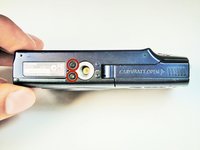
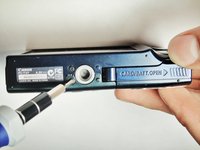
    1. Canon PowerShot A3400 LCD Display Replacement, Plastic Case: 步骤 3 中的图像 1,2 Canon PowerShot A3400 LCD Display Replacement, Plastic Case: 步骤 3 中的图像 2,2
      • Remove the two 5.00 mm screws in the bottom of the casing with a Philips #000 screwdriver

      询问修复机器人

      添加评论

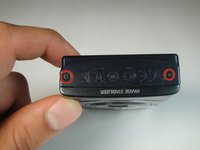
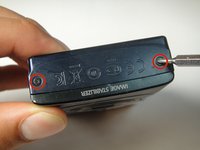
    2. Canon PowerShot A3400 LCD Display Replacement: 步骤 4 中的图像 1,2 Canon PowerShot A3400 LCD Display Replacement: 步骤 4 中的图像 2,2
      • Place the camera on to the side that has the image stabilizer label.

      • Remove the 5.00 mm screws that are on this side using the screwdriver.

      询问修复机器人

      添加评论

    3. Canon PowerShot A3400 LCD Display Replacement: 步骤 5 中的图像 1,1
      • Place camera on to the side with the A/V Out Digital Cover facing up.

      • Remove this visible 5.00 mm screw.

      • Pull the A/V Out Digital cover back to uncover the next step.

      询问修复机器人

      添加评论

    4. Canon PowerShot A3400 LCD Display Replacement: 步骤 6 中的图像 1,1
      • Remove the 5.00 mm screw from behind the cover.

      询问修复机器人

      添加评论

    5. Canon PowerShot A3400 LCD Display Replacement: 步骤 7 中的图像 1,1
      • Make sure the battery cover is open.

      询问修复机器人

      添加评论

    6. Canon PowerShot A3400 LCD Display Replacement: 步骤 8 中的图像 1,2 Canon PowerShot A3400 LCD Display Replacement: 步骤 8 中的图像 2,2
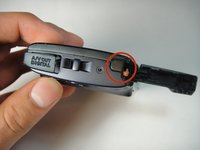
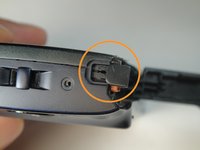
      • Turn the camera onto the side with the A/V out Digital cover.

      • Use your finger to pull this tab to the right.

      询问修复机器人

      添加评论

    7. Canon PowerShot A3400 LCD Display Replacement: 步骤 9 中的图像 1,3 Canon PowerShot A3400 LCD Display Replacement: 步骤 9 中的图像 2,3 Canon PowerShot A3400 LCD Display Replacement: 步骤 9 中的图像 3,3
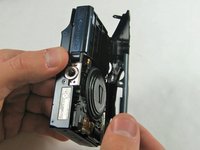
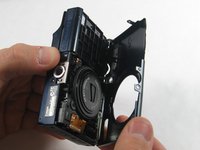
      • Remove the lens side by using your fingers or a spudger to pry it gently open.

      • Try to pry it loose all around that side so that it is easier to pull off.

      询问修复机器人

      添加评论

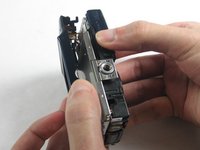
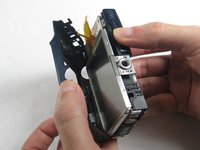
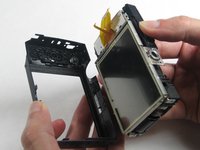
    8. Canon PowerShot A3400 LCD Display Replacement: 步骤 10 中的图像 1,3 Canon PowerShot A3400 LCD Display Replacement: 步骤 10 中的图像 2,3 Canon PowerShot A3400 LCD Display Replacement: 步骤 10 中的图像 3,3
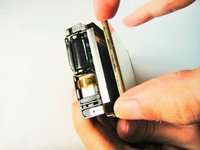
      • Using your fingers, pull the screen side gently off.

      • Try to loosen it all around that side so that it is easier to try and pull it off.

      询问修复机器人

      添加评论

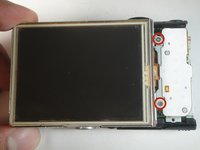
    1. Canon PowerShot A3400 LCD Display Replacement, Lens: 步骤 11 中的图像 1,3 Canon PowerShot A3400 LCD Display Replacement, Lens: 步骤 11 中的图像 2,3 Canon PowerShot A3400 LCD Display Replacement, Lens: 步骤 11 中的图像 3,3
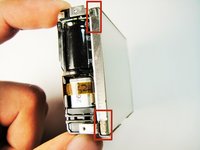
      • Remove the three 5 mm screws

      询问修复机器人

      添加评论

    2. Canon PowerShot A3400 LCD Display Replacement: 步骤 12 中的图像 1,3 Canon PowerShot A3400 LCD Display Replacement: 步骤 12 中的图像 2,3 Canon PowerShot A3400 LCD Display Replacement: 步骤 12 中的图像 3,3
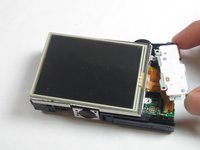
      • Pull the screen away from the main components.

      • Do not pull hard as there are some ribbons still attached to the motherboard that could be damaged if you use too much force.

      询问修复机器人

      添加评论

    3. Canon PowerShot A3400 LCD Display Replacement: 步骤 13 中的图像 1,2 Canon PowerShot A3400 LCD Display Replacement: 步骤 13 中的图像 2,2
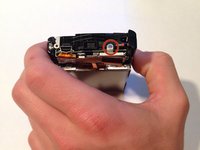
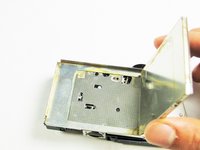
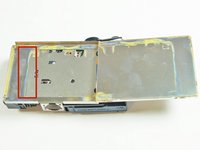
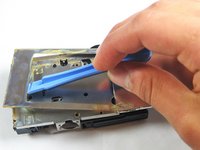
      • Lift the metal plate with the plastic opening tool.

      询问修复机器人

      添加评论

    4. Canon PowerShot A3400 LCD Display Replacement: 步骤 14 中的图像 1,1
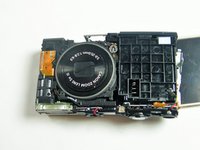
      • Remove all of these 5 mm screws

      询问修复机器人

      添加评论

    5. Canon PowerShot A3400 LCD Display Replacement: 步骤 15 中的图像 1,3 Canon PowerShot A3400 LCD Display Replacement: 步骤 15 中的图像 2,3 Canon PowerShot A3400 LCD Display Replacement: 步骤 15 中的图像 3,3
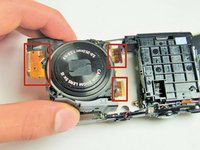
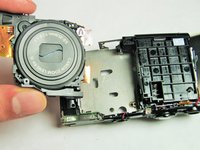
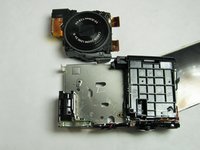
      • Gently remove the lens componenet.

      • The orange flex cables are connected to ZIF connectors. Be sure to disconnect and reconnect them properly by first unlocking the retaining flap on each connector.

      询问修复机器人

      添加评论

    1. Canon PowerShot A3400 LCD Display Replacement, LCD Display: 步骤 16 中的图像 1,3 Canon PowerShot A3400 LCD Display Replacement, LCD Display: 步骤 16 中的图像 2,3 Canon PowerShot A3400 LCD Display Replacement, LCD Display: 步骤 16 中的图像 3,3
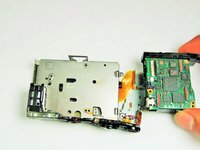
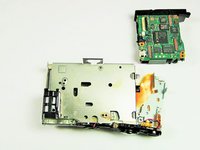
      • Detach the Motherboard, and then gently pull the motherboard away from the screen.

      询问修复机器人

      添加评论

结论

To reassemble your device, follow these instructions in reverse order.

取消:我没有完成这个指南。

另外一个人完成了本指南。

Matt Mullins

于01/13/15注册

104 声望

撰写一个指南

团队

USF Tampa, Team 1-1, Sullivan Spring 2014 USF Tampa, Team 1-1, Sullivan Spring 2014 的会员

USFT-SULLIVAN-S14S1G1

1 名成员

创作了2篇指南

1指南评论

useless if you try to do it reverse.. Don't even try it.

The Heat - 回复 分享

添加评论

浏览统计数据:

过去 24 小时: 6

过去 7 天: 12

过去 30 天: 32

总计 1,254