跳转到主内容
加入维修社区 - 创建账户

Autosampler Programming (For Old & New Versions)

    1. Autosampler Programming  (For Old & New Versions), Turn on battery and autosampler: 步骤 1 中的图像 1,2 Autosampler Programming  (For Old & New Versions), Turn on battery and autosampler: 步骤 1 中的图像 2,2
      • 1. Switch battery "ON".

      • 2. Autosampler: Push "ON" button.

      • It will say ...STANDBY...

      询问修复机器人

      添加评论

    2. Autosampler Programming  (For Old & New Versions), Select Program Mode: 步骤 2 中的图像 1,2 Autosampler Programming  (For Old & New Versions), Select Program Mode: 步骤 2 中的图像 2,2
      • 3. Push "ENTER/PROGRAM" button to see the "[PROGRAM, CONFIGURE] SAMPLER" screen. Push “ENTER/PROGRAM” button to select "PROGRAM".

      • 4. This will bring up the "[TIME, FLOW] PACED SAMPLING" screen. Use arrow to select "FLOW" then push “ENTER/PROGRAM” button.

      询问修复机器人

      添加评论

    3. Autosampler Programming  (For Old & New Versions), Set Number, Type, and Size of Samples: 步骤 3 中的图像 1,3 Autosampler Programming  (For Old & New Versions), Set Number, Type, and Size of Samples: 步骤 3 中的图像 2,3 Autosampler Programming  (For Old & New Versions), Set Number, Type, and Size of Samples: 步骤 3 中的图像 3,3
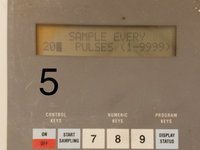
      • 5. New screen shows: "SAMPLE EVERY __ PULSES." Press 20. Then push the “ENTER/PROGRAM” button.

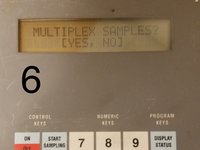
      • 6. New screen will read: "MULTIPLEX SAMPLES?" Use arrow to select "NO". Then push the “ENTER/PROGRAM” button.

      • 7. New screen will read: "SAMPLE VOLUMES OF "____" ML". Press 1000. Then push the “ENTER/PROGRAM” button.

      询问修复机器人

      添加评论

    4. Autosampler Programming  (For Old & New Versions), Starting Sampling: 步骤 4 中的图像 1,3 Autosampler Programming  (For Old & New Versions), Starting Sampling: 步骤 4 中的图像 2,3 Autosampler Programming  (For Old & New Versions), Starting Sampling: 步骤 4 中的图像 3,3
      • 8. New screen will read: "ENTER START TIME?" Use arrow to select "NO". Then push the “ENTER/PROGRAM” button. New screen: "PROGRAMMING SEQUENCE COMPLETE...". Then screen will read: "PROGRAM HALTED".

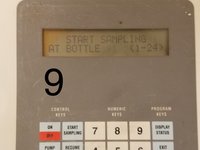
      • 9. Push "START SAMPLING" button. Screen will read: "[START, RESUME] SAMPLING PROGRAM?" Push "ENTER/PROGRAM" button to "START". Then push "ENTER/PROGRAM" button again to "START SAMPLING AT BOTTLE 1".

      • 10. Then should see on screen: "START FLOW COUNT AT __:__" (time).

      • It will take some time before it starts sampling.

      • Eventually screen will show: " BOTTLE 1 AFTER 20 PULSES".

      询问修复机器人

      添加评论

终点

取消:我没有完成这个指南。

另外一个人完成了本指南。

Brooke Mason

于05/29/19注册

2,958 声望

创作了17篇指南

团队

Open-Storm Open-Storm 的会员

Community

14 名成员

创作了49篇指南

0指南评论

添加评论

浏览统计数据:

过去 24 小时: 2

过去 7 天: 6

过去 30 天: 23

总计 492