简介
This guide will help you replace the RAM in an Asus A53S.
Random-Access Memory (RAM) stores the short-term data that the laptop needs to operate properly.
Before using this guide, make sure to review the troubleshooting page.
If your laptop is running slow, you may want to upgrade your RAM. The Asus A53S can be upgraded to up to 8GB of memory.
Make sure to power off your laptop completely, disconnect from any external power source, and remove the battery before beginning the process.
你所需要的


 询问修复机器人


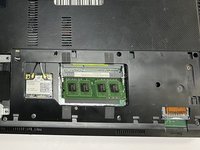
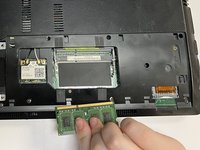
To reassemble your device, follow these instructions in reverse order.
2等其他人完成本指南。

团队

University of North Texas, Team 3-1, Saru Jimmy Fall 2022 University of North Texas, Team 3-1, Saru Jimmy Fall 2022 的会员
UNT-SARU JIMMY-F22S3G1
4 名成员
创作了40篇指南
