跳转到主内容
加入维修社区 - 创建账户

Astro Mixamp USB Port Replacement

你所需要的

    1. Astro Mixamp USB Port Replacement, Panel Dial: 步骤 1 中的图像 1,2 Astro Mixamp USB Port Replacement, Panel Dial: 步骤 1 中的图像 2,2
      • Grip the dial tightly and pull straight off the device.

      • Repeat for the second dial

      询问修复机器人

      添加评论

    2. Astro Mixamp USB Port Replacement: 步骤 2 中的图像 1,2 Astro Mixamp USB Port Replacement: 步骤 2 中的图像 2,2
      在这个步骤中使用的工具:
      Tweezers
      $4.99
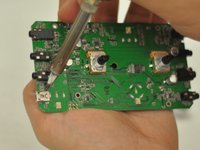
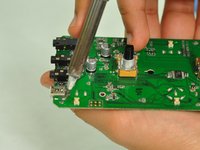
      • Using tweezers, remove the spacer nuts and washers from each dial post.

      询问修复机器人

      添加评论

    1. Astro Mixamp USB Port Replacement, Outer Casing: 步骤 3 中的图像 1,2 Astro Mixamp USB Port Replacement, Outer Casing: 步骤 3 中的图像 2,2
      • Before opening your device, ensure the device is not on or connected to the charging cable.

      • Insert a plastic opening tool into the seam between the rubber foot and plastic casing.

      • Pull the rubber foot free of the plastic casing.

      询问修复机器人

      添加评论

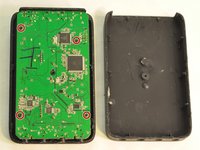
    2. Astro Mixamp USB Port Replacement: 步骤 4 中的图像 1,1
      • Use a screwdriver to remove the screw from the rear casing.

      询问修复机器人

      添加评论

    3. Astro Mixamp USB Port Replacement: 步骤 5 中的图像 1,1
      • Gently lift the rear casing from the device.

      添加评论

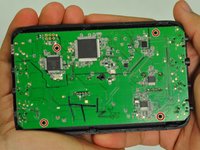
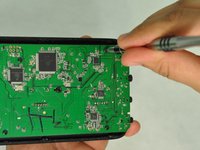
    1. Astro Mixamp USB Port Replacement, Motherboard: 步骤 6 中的图像 1,3 Astro Mixamp USB Port Replacement, Motherboard: 步骤 6 中的图像 2,3 Astro Mixamp USB Port Replacement, Motherboard: 步骤 6 中的图像 3,3
      • Remove the four screws that hold the motherboard in place.

      • Only touch the edges of the motherboard. Touching the surface can damage the motherboard.

      询问修复机器人

      添加评论

    2. Astro Mixamp USB Port Replacement: 步骤 7 中的图像 1,1
      • Gently pull the motherboard from the front cover.

      询问修复机器人

      添加评论

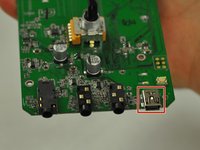
    1. Astro Mixamp USB Port Replacement, USB Port: 步骤 8 中的图像 1,3 Astro Mixamp USB Port Replacement, USB Port: 步骤 8 中的图像 2,3 Astro Mixamp USB Port Replacement, USB Port: 步骤 8 中的图像 3,3
      • Press the tip of a hot soldering iron to the USB connection to melt the solder.

      • Use a nylon spudger to lift the USB from the solder.

      • Repeat for each of the four USB connections.

      • For more help on soldering, refer to this guide: 如何焊接和拆焊

      询问修复机器人

      添加评论

结论

To reassemble your device, follow these instructions in reverse order.

取消:我没有完成这个指南。

2等其他人完成本指南。

Hope Burns

于10/29/16注册

769 声望

创作了5篇指南

4指南评论

What port is used as a replacement?

jonescoleman1738 - 回复 分享

Did you ever identify an appropriate replacement port?

Lepec - 回复 分享

something was broken out of the port of the USB connection

MoreZemtor - 回复 分享

Will this method work with the 2015 tr mixamp?

jeffreyalvarez9 - 回复 分享

添加评论

浏览统计数据:

过去 24 小时: 1

过去 7 天: 17

过去 30 天: 78

总计 8,856