跳转到主内容
加入维修社区 - 创建账户

Altec Lansing inMotion iM9 Tweeter Replacement

你所需要的

    1. Altec Lansing inMotion iM9 Tweeter Replacement, Battery: 步骤 1 中的图像 1,1
      • Gently push down on the two tabs at the top of the battery door.

      • While holding them down, slowly pull the door towards you.

      询问修复机器人

      添加评论

    2. Altec Lansing inMotion iM9 Tweeter Replacement: 步骤 2 中的图像 1,1
      • Once the door is open, use your hand to pull out the four batteries.

      询问修复机器人

      添加评论

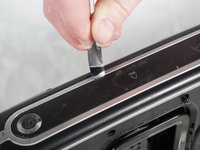
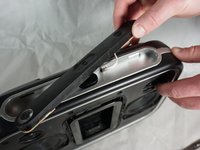
    1. Altec Lansing inMotion iM9 Tweeter Replacement, Volume and Power Buttons: 步骤 3 中的图像 1,2 Altec Lansing inMotion iM9 Tweeter Replacement, Volume and Power Buttons: 步骤 3 中的图像 2,2
      • Pry off the control panel on top of the speaker using the metal spudger. You may need to use a lot of force.

      • Start in the middle and work your way around the perimeter.

      询问修复机器人

      添加评论

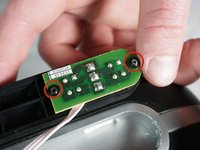
    2. Altec Lansing inMotion iM9 Tweeter Replacement: 步骤 4 中的图像 1,2 Altec Lansing inMotion iM9 Tweeter Replacement: 步骤 4 中的图像 2,2
      • Using a Phillips #1 screwdriver, remove the two 7mm screws that hold the volume button circuit board to the control panel.

      • Also remove the single 7mm screw from the power button circuit board on the opposite side.

      • There will be a little plastic piece under the eject button that you can just remove and set aside.

      询问修复机器人

      添加评论

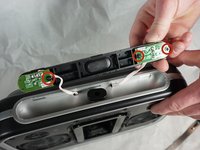
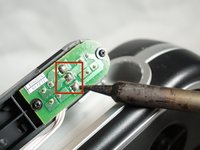
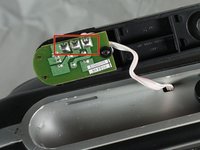
    3. Altec Lansing inMotion iM9 Tweeter Replacement: 步骤 5 中的图像 1,2 Altec Lansing inMotion iM9 Tweeter Replacement: 步骤 5 中的图像 2,2
      • Desolder the three solders joints connecting the wires to the volume button circuit board.

      • Do the same to the power button circuit board on the other side (the board with only one screw).

      • Pull out the wires using a lot of force.

      • If you are not familiar or comfortable with soldering, use this guide

      询问修复机器人

      添加评论

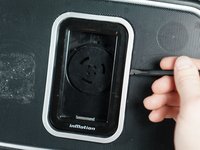
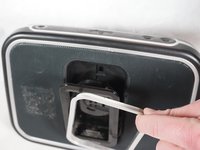
    1. Altec Lansing inMotion iM9 Tweeter Replacement, Case Opening: 步骤 6 中的图像 1,2 Altec Lansing inMotion iM9 Tweeter Replacement, Case Opening: 步骤 6 中的图像 2,2
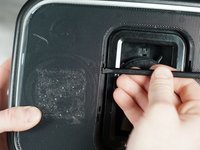
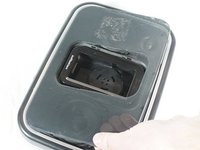
      • Gently pry open the silver plastic lining of the iPod dock using the plastic spudger.

      • It is best to start from the top or bottom, then work your way around if it has not popped out yet.

      • Remove the silver lining.

      询问修复机器人

      添加评论

    2. Altec Lansing inMotion iM9 Tweeter Replacement: 步骤 7 中的图像 1,2 Altec Lansing inMotion iM9 Tweeter Replacement: 步骤 7 中的图像 2,2
      • Pry open the metal mesh by working the plastic spudger around the inside of the mesh.

      • Once loose, lift up the metal mesh.

      询问修复机器人

      添加评论

    3. Altec Lansing inMotion iM9 Tweeter Replacement: 步骤 8 中的图像 1,1
      • Remove the fourteen 30mm screws with Phillips #1 Screwdriver.

      • Remove the 7mm screw with the Phillips #1 Screwdriver.

      询问修复机器人

      添加评论

    4. Altec Lansing inMotion iM9 Tweeter Replacement: 步骤 9 中的图像 1,1
      • Carefully separate the front and back case plates at a corner of the speaker.

      • Lots of cables are still connected, so be very gentle when separating case plates.

      询问修复机器人

      添加评论

    5. Altec Lansing inMotion iM9 Tweeter Replacement: 步骤 10 中的图像 1,1
      • Guide the white button cables through the hole on the top of speaker case.

      询问修复机器人

      添加评论

    6. Altec Lansing inMotion iM9 Tweeter Replacement: 步骤 11 中的图像 1,1
      • Use your fingers to peel the glue off of the red and black cables.

      询问修复机器人

      添加评论

    7. Altec Lansing inMotion iM9 Tweeter Replacement: 步骤 12 中的图像 1,1
      • Careful not to touch the green capacitors or you might shock yourself.

      询问修复机器人

      添加评论

    1. Altec Lansing inMotion iM9 Tweeter Replacement, Tweeter: 步骤 13 中的图像 1,1
      • Remove the speaker cables by desoldering the two solder joints on opposite sides of the tweeter.

      询问修复机器人

      添加评论

    2. Altec Lansing inMotion iM9 Tweeter Replacement: 步骤 14 中的图像 1,1
      • To fully remove the tweeter from the device, unscrew the two 7mm screws and the tweeter will be free.

      询问修复机器人

      添加评论

    3. Altec Lansing inMotion iM9 Tweeter Replacement: 步骤 15 中的图像 1,1
      • Follow the previous instructions to remove the second tweeter on the opposite side of the speaker.

      询问修复机器人

      添加评论

结论

To reassemble your device, follow these instructions in reverse order.

取消:我没有完成这个指南。

Shaun Steele

于02/02/15注册

279 声望

创作了2篇指南

团队

Cal Poly, Team 17-33, Amido Winter 2015 Cal Poly, Team 17-33, Amido Winter 2015 的会员

CPSU-AMIDO-W15S17G33

4 名成员

创作了63篇指南

1指南评论

Where do you buy the replacement tweeters?

Fred Schneider - 回复 分享

添加评论

浏览统计数据:

过去 24 小时: 0

过去 7 天: 9

过去 30 天: 30

总计 1,344