跳转到主内容
加入维修社区 - 创建账户

Alcatel 1B 2020 Screen Replacement

你所需要的

  1. Alcatel 1B 2020 Screen Replacement, Battery: 步骤 1 中的图像 1,3 Alcatel 1B 2020 Screen Replacement, Battery: 步骤 1 中的图像 2,3 Alcatel 1B 2020 Screen Replacement, Battery: 步骤 1 中的图像 3,3
    • For your safety, unplug all peripherals, discharge the battery below 25%, and power down your device before beginning disassembly.

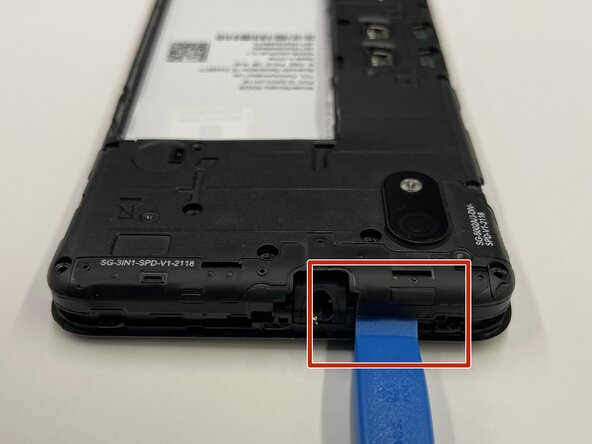
    • Insert the opening tool into the seam between the back plastic case and the front screen.

    • Slide it around the edge of the phone to release the clips holding them together.

    • Remove the bottom case by hand.

    询问修复机器人

    添加评论

  2. Alcatel 1B 2020 Screen Replacement: 步骤 2 中的图像 1,3 Alcatel 1B 2020 Screen Replacement: 步骤 2 中的图像 2,3 Alcatel 1B 2020 Screen Replacement: 步骤 2 中的图像 3,3
    • Place the pry tool between the bottom of the battery and the bracket.

    • Lift the battery using the pry tool to remove it.

    询问修复机器人

    添加评论

  3. Alcatel 1B 2020 Screen Replacement, Rear Camera: 步骤 3 中的图像 1,3 Alcatel 1B 2020 Screen Replacement, Rear Camera: 步骤 3 中的图像 2,3 Alcatel 1B 2020 Screen Replacement, Rear Camera: 步骤 3 中的图像 3,3
    • Use a Phillips #000 screwdriver to remove sixteen 3.0 mm screws that secure the black plastic bracket.

    询问修复机器人

    添加评论

  4. Alcatel 1B 2020 Screen Replacement: 步骤 4 中的图像 1,3 Alcatel 1B 2020 Screen Replacement: 步骤 4 中的图像 2,3 Alcatel 1B 2020 Screen Replacement: 步骤 4 中的图像 3,3
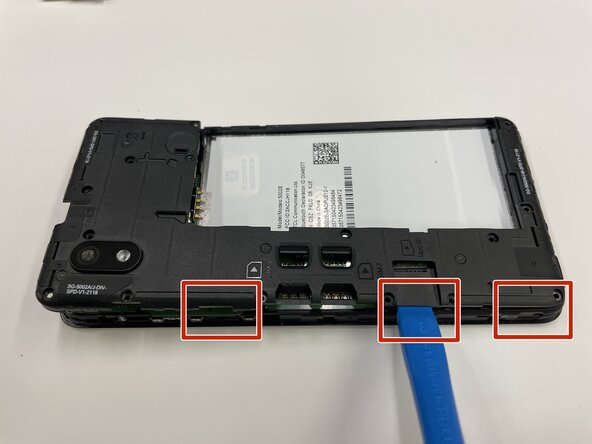
    • Use a plastic opening tool to pry the midframe from the bottom case.

    • Slide the end of the opening tool around the perimeter of the device to release the clips holding the midframe and bottom case together.

    • Be careful, the motherboard is located right beneath the midframe.

    • Remove the midframe from the phone.

    询问修复机器人

    添加评论

  5. Alcatel 1B 2020 Screen Replacement: 步骤 5 中的图像 1,3 Alcatel 1B 2020 Screen Replacement: 步骤 5 中的图像 2,3 Alcatel 1B 2020 Screen Replacement: 步骤 5 中的图像 3,3
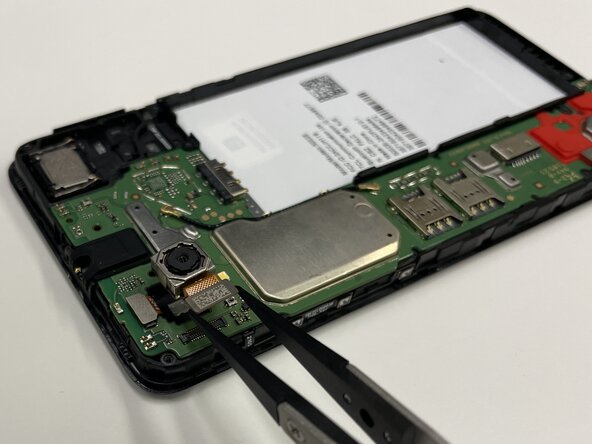
    • Place a spudger or an opening tool under the camera press connector edge and pry straight up to disconnect it.

    • Make sure to pry under the edge of the connector itself, and not under the socket on the board. Otherwise, you risk permanently damaging the socket.

    • Use the tweezers to pull the rear camera out.

    询问修复机器人

    添加评论

  6. Alcatel 1B 2020 Screen Replacement, Motherboard: 步骤 6 中的图像 1,2 Alcatel 1B 2020 Screen Replacement, Motherboard: 步骤 6 中的图像 2,2
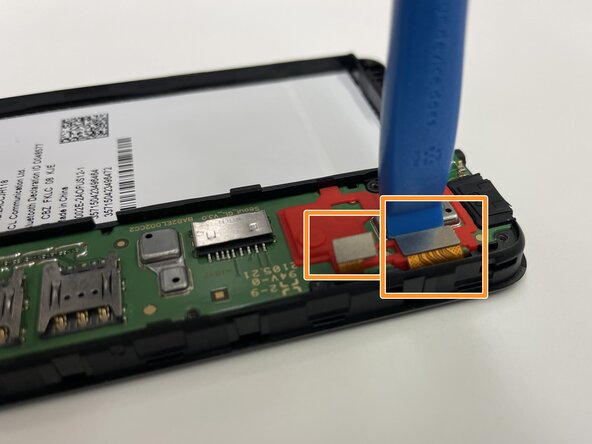
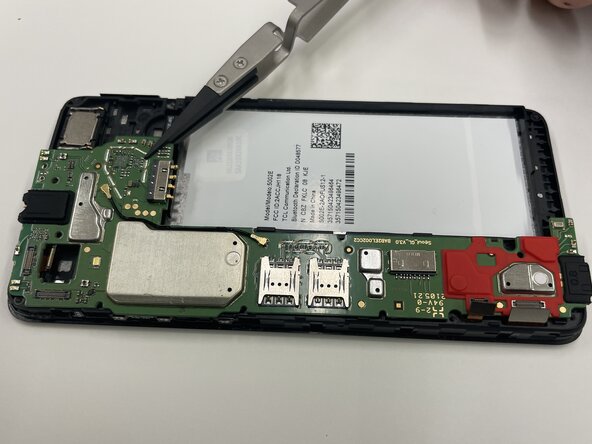
    • Insert a spudger or opening tool under the edge of the front camera cable connector and pry straight up to disconnect it.

    • Disconnect the other two press connectors near the red part of the motherboard.

    询问修复机器人

    添加评论

  7. Alcatel 1B 2020 Screen Replacement: 步骤 7 中的图像 1,3 Alcatel 1B 2020 Screen Replacement: 步骤 7 中的图像 2,3 Alcatel 1B 2020 Screen Replacement: 步骤 7 中的图像 3,3
    • Use tweezers to remove the motherboard from the phone.

    询问修复机器人

    添加评论

  8. Alcatel 1B 2020 Screen Replacement, Front Camera: 步骤 8 中的图像 1,3 Alcatel 1B 2020 Screen Replacement, Front Camera: 步骤 8 中的图像 2,3 Alcatel 1B 2020 Screen Replacement, Front Camera: 步骤 8 中的图像 3,3
    • Place the motherboard to the side.

    • The front camera ribbon connector was already removed in the previous step.

    • Use tweezers to pull the front-facing camera from the smartphone.

    询问修复机器人

    添加评论

  9. Alcatel 1B 2020 Screen Replacement, Screen: 步骤 9 中的图像 1,3 Alcatel 1B 2020 Screen Replacement, Screen: 步骤 9 中的图像 2,3 Alcatel 1B 2020 Screen Replacement, Screen: 步骤 9 中的图像 3,3
    • Flip your Alcatel 1B 2020 face up so the screen is facing you.

    • Slide the edge of the Jimmy between the case and the screen to pry it from the phone.

    • Insert opening picks under the screen as you work around the edge with the Jimmy to keep the adhesive from reattaching.

    询问修复机器人

    添加评论

  10. Alcatel 1B 2020 Screen Replacement: 步骤 10 中的图像 1,3 Alcatel 1B 2020 Screen Replacement: 步骤 10 中的图像 2,3 Alcatel 1B 2020 Screen Replacement: 步骤 10 中的图像 3,3
    • The screen will eventually lift with enough prying.

    • Flip the device over.

    • Place a spudger or an opening tool under the edge of the press connector and pry straight up to disconnect it.

    • Make sure to pry under the edge of the connector itself, and not under the socket on the board. Otherwise, you risk permanently damaging the socket.

    • Carefully slide the ribbon cable out from the opening at the edge of the frame.

    询问修复机器人

    添加评论

  11. Alcatel 1B 2020 Screen Replacement: 步骤 11 中的图像 1,3 Alcatel 1B 2020 Screen Replacement: 步骤 11 中的图像 2,3 Alcatel 1B 2020 Screen Replacement: 步骤 11 中的图像 3,3
    • Flip the device back over.

    • The LCD screen is very fragile. Be careful when prying and handling it.

    • The ribbon connector for the LCD screen was disconnected in the previous step, so the screen will pop up using the Jimmy.

    • Slide the Jimmy between the LCD and the digitizer to separate the two components.

    • Lift the LCD screen out with tweezers or your hands.

    询问修复机器人

    添加评论

结论

To reassemble your device, follow these instructions in reverse order. Take your e-waste to an R2 or e-Stewards certified recycler.

取消:我没有完成这个指南。

0指南评论

添加评论

浏览统计数据:

过去 24 小时: 1

过去 7 天: 3

过去 30 天: 24

总计 61