Button
|
9个答案 10 分 |
Why are the blender blades not rotating? |
|
4个答案 7 分 |
Why will my NJ600 not turn on? |
|
1个答案 0 分 |
The blender sparked and stopped working |
|
1个答案 1 分 |
Why is my food not being blended properly? |
文档
工具
下方列出了维修此类别设备所需的主要工具。当然,并不是所有维修流程都需要备齐这个清单。
Background
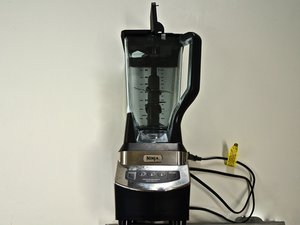
The NJ600 Professional Blender is only available in one distinct color scheme: a black plastic body with a silver panel. Each button, excluding the "PULSE" button, has an LED light underneath it that lights up when the button is activated. The "Power" button will light up when the device is turned on. The NJ600 also features a three-level blade column (two blades on either side of the column at each level).
Identification
To find the model (NJ600) of your Ninja Professional Blender, look at the small information section at the bottom of the base of the blender.
Additional Information
Ninja NJ600 Professional device home page.
Some spare parts and accessories are available from the manufacturer.
User reviews and some other helpful information.