维修指南
通过我们的分步骤指南了解如何解决任何问题。
应用程序
你的口袋维修助手
修复机器人
友好的人工智能维修助手
可修复性
了解为什么可修复产品有意义。
拆解
最新电子设备内部,先睹为快。
论坛
分享解决方案并获得朋友的帮助。
寻找您的社区
查找团队、活动和同行修理工。
伸出援手
帮助所有人免费获取维修知识。
Right to Repair
了解维修权利运动以及如何成为倡导者。
iFixit 精选
我们终生保证的优质零件和工具。
工具
购买我们精选的精密工具。
配件
获得我们有质量承诺的配件。
iPhone 电池
电池经过测试,质量有保证,还提供一套所需的工具。
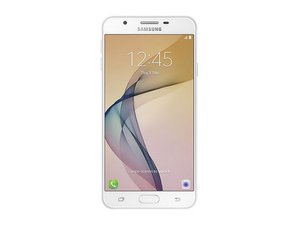
2016 年 9 月发布。 型号为 SM-G610。
J7 prime @j7prime41875
声誉积分: 1
发帖于: 2025年9月1日
My phone does not detecting SIM
这是一个好问题吗?
1条评论:
Basic troubleshooting for a Samsung Galaxy J7 Prime not detecting SIM:
1. Test the SIM card in another phone – if it works there, the issue is with your phone.
2. Clean the SIM card and tray – use a dry cloth or a cotton swab with isopropyl alcohol.
3. Restart the phone – sometimes the SIM is detected only after reboot.
4. Check SIM settings – go to Settings → Connections → SIM card manager.
5. Try another SIM card – to rule out a faulty SIM.
6. Software – update the phone, or perform a factory reset (back up data first).
7. Hardware – if none of the above works, the SIM reader may be worn out or defective. Fixing it requires replacing the SIM slot or motherboard.
由 Markus Norstrøm 完成的 2025年9月1日
过去 24 小时: 0
过去 7 天: 2
过去 30 天: 11
总计 114


Basic troubleshooting for a Samsung Galaxy J7 Prime not detecting SIM:
1. Test the SIM card in another phone – if it works there, the issue is with your phone.
2. Clean the SIM card and tray – use a dry cloth or a cotton swab with isopropyl alcohol.
3. Restart the phone – sometimes the SIM is detected only after reboot.
4. Check SIM settings – go to Settings → Connections → SIM card manager.
5. Try another SIM card – to rule out a faulty SIM.
6. Software – update the phone, or perform a factory reset (back up data first).
7. Hardware – if none of the above works, the SIM reader may be worn out or defective. Fixing it requires replacing the SIM slot or motherboard.
由 Markus Norstrøm 完成的