
跳转到主内容

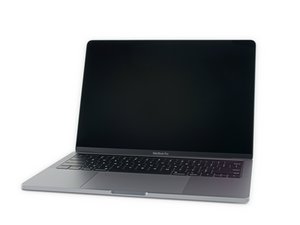
Model A2159, EMC 3301. A refresh of the entry-level 13" MacBook Pro. Available in Silver and Space Gray. Released July 2019.

Is my connector lock missing?! How to workaround

Hello!

First time here.

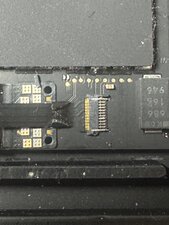
I started to replace the battery on my daughter's 13" MBP A2159 laptop. I got to about the 2nd step - removing the battery daughter board flex cable - and discovered that I either have a different connector (unlikely) or the lock on this one might have broken off when replacing the screen several years ago?

Any advice gratefully received on what to do - how should I get the cable out now? And anything I should do when I connect it again?

Many thanks for the help!
Block Image
回答此问题 我也有这个问题

这是一个好问题吗?

得分 1
添加一条评论

1个答案

@red24631 yes, it sure looks like it is missing. See step 11 on this guide 2019年款13寸 MacBook Pro 带双 Thunderbolt 端口电池更换

You could try and get a replacement connector and see if you can remove that lock from the new one and lever it into the existing connector. If not, then you would need to replace the connector by de-soldering the old one and re-soldering a new one. If you do not have the tools or the experience to solder that, you will need to have someone else do the soldering for you ;-)

The connector is a FF18-10A-R11AD-B-3H and the Apple part number is 518S00014. they are available at places like this (example only, not an endorsement for the seller)

这个答案有帮助吗?

得分 0

2条评论:

Thanks for the info!

For now, I just pushed it in and it seems fairly tight, so we'll see if it stays. Will have to dig deeper if not.

完成的

@red24631 awesome! Hope it stays put and will continue to work for you. Repair is War on Entropy

完成的

添加一条评论

添加你的答案

Red 将永远感激不已
浏览统计数据:

过去 24 小时: 0

过去 7 天: 3

过去 30 天: 9

总计 62
