跳转到主内容

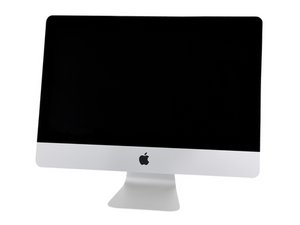
A1418/EMC3069/2017/3.0GHz四核心Intel Core i5、3.4GHz四核心Intel Core i5或3.6GHz四核心Intel Core i7处理器。于2017年6月8日发布。

Identify circuits on logic board - bumped while ugrading

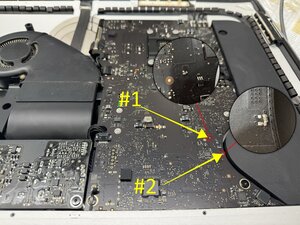
While disassembling my old 2017 iMac for a SSD upgrade I accidentally bumped the logic board and 2 small circuits got damaged. I completed the upgrade and now when I'm trying to boot it up the screen stays black and only the first 3 diagnostic lights on the logic board light up. would these circuits be the reason for that or is there some other problem as well?

heres a picture of the damage

Block Image
已回答! 显示答案 我也有这个问题

这是一个好问题吗?

得分 1
添加一条评论

1个答案

已选择的解决方案

@kyler61164 looks like your board is a 820-00629 (if not let us know ASAP) and there are no boardviews available for this. Some sections on the 820-00597 are somewhat similar but not identical for the whole board. In the case of your components and verifying with the schematics at hand, the one marked

Block Image

#1 is a 2.2µF 20% 25V capacitor in a 0402 package

The next one is a 1000 PF 20% 25V Capacitor in a 0402 package.

You do have a torn solder pad which may complicate the repair. Scrape the solder mask a bit more so that you can possibly rebuild the pad. #1 is on the GPUCore rail and #2 is on the VReg 3.3V S5/5V S4 rail

If unsure and since you still have the components, use a capacitance meter and check the two components values. You can then resolder those or replace them if need should be.

这个答案有帮助吗?

得分 1

1条评论:

@oldturkey03 Thanks! I believe the board is the 820-00597. Those capacitors will be my problem then. I don't quite trust myself with that delicate soldering, so I'll have to look into getting it repaired.

This will teach me to be more careful when disassembling computers...

完成的

添加一条评论

添加你的答案

Kyler 将永远感激不已
浏览统计数据:

过去 24 小时: 0

过去 7 天: 2

过去 30 天: 5

总计 96