跳转到主内容

2015年3月更新的 13 英寸 MacBook Pro 配备 Retina 显示屏,型号为A1502,采用第五代英特尔酷睿 i5 和 i7 处理器,并配备 Force Touch触控板。

Screen has black squares and flashing when typing

I ran the diagnostics on the laptop and it works fine and had no issues reported. But when i went to use my computer yesterday, all of a sudden there are black squares on the screen and when typing there are lines that fly across the screen. I am guessing the LCD panel is broken? The back area where the computer folds is also hotter than I recall- but that may be because I'm looking for an issue. How do I know if the LCD panel is the issue?

Block Image
Block Image

Update (12/30/24)

I hooked it up to an external monitor and the squares were still there, but not on the laptop screen when using the program

Block Image
回答此问题 我也有这个问题

这是一个好问题吗?

得分 1

3条评论:

Can you tell us the exact model as that can have a bearing on what’s needed here.

完成的

Hi Dan, It's a Macbook Pro 13 inch and it says early 2015 in the about section. I know that it is older however it still works great. This was my work computer until I got a new one and now use it for crafting. In the Design Space program I don't see the black squares although it does have some delay or streaking when typing.

完成的

@deniset - You don’t need to apologize, I have two 15” models that I still use! And even an older Mac Pro.

完成的

添加一条评论

2个答案

If the images you attached are screenshots, than I would say that it’s a Graphical issue

这个答案有帮助吗?

得分 0
添加一条评论

Did you get system wet or run it hot not getting enough cooling?

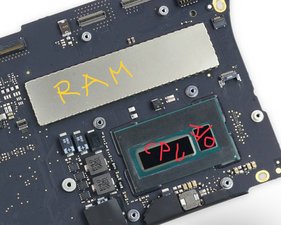
Black pixilation snow often tends to be a corrupted RAM buffer the Intel Iris iGPU is using which it a segment of your main memory.

Double check by connecting to an external display if the problem is not present on it then the displays T-CON logic within the display has failed requiring a new display assembly MacBook Pro (13英寸, 带有Retina显示屏, 2015早期) 显示组件更换

If you have access to a hot air rework station you could try touching up the RAM chips solder joints by carefully lifting the shield as well as inspect the CPU module after lifting the heat sink off and the thermal paste. Here the I/O chip may be physically damaged (cracked)

Block Image

Sadly, either one will require a new logic board 替换MacBook Pro 13‘’Retina显示器2015年早期版本的主板

MacBook Pro 13" Retina Display Early 2015 主板图片

指南

替换MacBook Pro 13‘’Retina显示器2015年早期版本的主板

难度:

中等

20 minutes - 1 hour

MacBook Pro 13" Retina Display Early 2015 显示组件图片

指南

MacBook Pro (13英寸, 带有Retina显示屏, 2015早期) 显示组件更换

难度:

中等

30 minutes - 1 hour

这个答案有帮助吗?

得分 0

4条评论:

I didn't get it wet- the only thing that I did was put it on the floor when taking down the table that I use in the crafting room. I was doing it quickly and don't recall dropping it at all or putting anything on top of it. When I am using the Design Space program for my cricut, the black squares don't show though. I will check other programs. The streaks across the screen when using the keyboard do happen at times though.

完成的

@deniset - Do you have a external display or TV? If you do try connecting it to see if the issue is in the display it’s self.

完成的

I added a new photo on the original post to show that it’s not on screen in the program I’m using

完成的

@deniset - OK, I think I get it. This is a display issue within the T-CON logic. What is confusing things is the display is switching between different scan rates. Your program is expecting a different resolution than what the OS desktop wants. The blurring is also related to this scan mis-match.

完成的

添加一条评论

添加你的答案

DeniseT 将永远感激不已
浏览统计数据:

过去 24 小时: 0

过去 7 天: 3

过去 30 天: 22

总计 169