跳转到主内容
加入维修社区 - 创建账户

Laptop Won't Turn On - No Signs Of Life

Hello,

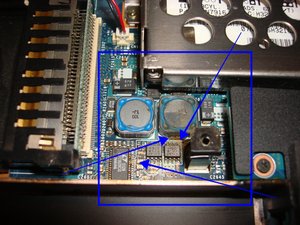
I recently acquired an old Sony Vaio PCG-993L laptop, but when I went to test it out, it shows absolutely no signs of life. I have checked that the power adapter works. Are there any common issues with this laptop not turning on, or what could this problem be? Additionally, I have included some photos of the top of the motherboard.

Block Image
Block Image
Block Image
Block Image
Block Image

Thanks!

回答此问题 我也有这个问题

这是一个好问题吗?

得分 1
添加一条评论

1个答案

@leofeldman any device without a history is hard to fix. You got to start from the beginning.

Start off with the easy things. Disconnect the power from the computer by unplugging the power cord from your computer. Disconnect all external devices from the computer. Now hold the power button depressed for about 30sec-1min. Reapply the AC power adapter and see if your computer does show any sign of life.

First you want to check your power supply. Make sure it has the proper voltages. Check to make sure that the connectors are not bend etc. Check the DC-in jack of your laptop. Make sure there is no corrosion, debris etc. that prevents it from working. Clean it of any debris etc, use a few puffs of air to clean it out. If none of this works, get a ammeter and see if your laptop draws any amperage from the charger. After that, you need to check and see if your motherboard even gets power. For that of course, you need to open it up. Post Some good pictures of what you see. That way we can see what you see.

It is also possible that this is a bad RAM module or a bad LCD. So remove the RAM, clean the contacts with a pencil eraser. Do it gentle so as to not destroy the module. Replace it and restart. If you have more than one module, remove it and just leave one connected.

Of course, you may also have to consider replacing the battery. A depleted battery can no longer be charged. However, it should not prevent your computer from coming on, if it is connected to the AC adapter.

在已经存在的问题里加入图片

Update 12/17/2024

@leofeldman take a closer look around the area of the inductor. Looks like there is some leakage or spillage. It is also possible that it is just my old eyes. Time to remove the motherboard and to check it closer, then clean it with some 90%+ isopropyl alcohol. Let us know what exact number s are printed on your motherboard. That way we can check for schematics.

Block Image

这个答案有帮助吗?

得分 0

5条评论:

@oldturkey03

I have updated my original post to include pictures of the motherboard. Even though I couldn't test current with an ammeter (I couldn't get mine to work), I did feel some warmth around the area where the power adapter plugs into the computer, and once I got it apart, the metal enclosure surrounding the power jack.

Thank you!

完成的

@oldturkey03

I'm sorry for such a long delay in communication; I have been away from the laptop for a while! However, during my travels, I came across another very similar model of Vaio, and picked it up for a couple of dollars. It was missing a lot of its parts, so I transferred some from the laptop mentioned in this thread, but there were no signs of life on this one either. Thank you for all of the help along the way, but I have decided that I want take a break from the project, and store it away for another time.

完成的

@wozmon absolutely understandable. Whenever you are going to work on it again, just let us know and we will continue to support your efforts. Take care and as always, stay safe!

完成的

@oldturkey03 I have one that works perfectly but am trying to find the hard drive or how to erase it. Any help?? Had it since new.

Still in new condition. All RecoveryCD's, Instruction Book and power cord and Linksys Network card (don't know if they still exist??) No Battery. Let know if you want it. But still need to clean it first.

完成的

@cleaningmyjunk I have no objections:)

完成的

添加一条评论

添加你的答案

_nec6678 将永远感激不已
浏览统计数据:

过去 24 小时: 1

过去 7 天: 10

过去 30 天: 29

总计 231