
跳转到主内容
加入维修社区 - 创建账户

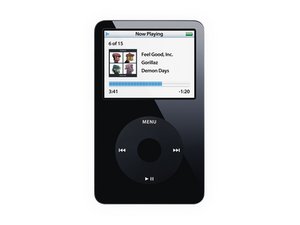
型号 A1136 / 30, 60, 或 80 GB 硬盘 / 黑色或白色塑料面板

Isolating a specific problem

Ok been using website to troubleshoot ipod given to me by friend. At startup I'm gettin the sad ipod contact support icon. Using apples, and this site troubleshooting still leaves some question. After a reset, and hard reset no response. Tried going into disk mode just get same icon. Apple said disk mode is easier for software download. Have checked battery, harddisk, and logicboard connections. Even pulled ribbons out examined and reattached checking for solid connection. At this point when plugged into pc does not seem like itunes recognizes it to upgrade, or restore software. I do have the most recent itunes which i just recently downloaded. I assume as before when plugged in it should find the ipod connected. So with this any further advice on isolating the problem to harddrive, logic board , or battery.( I say battery, but it seems to taking charge ok.)

已回答! 显示答案 我也有这个问题

这是一个好问题吗?

得分 0
2条评论

Have you tried the diagnostic mode? What results did you get? you say iTunes does not recognize it; what about your computer? Does your OS recognize it when you plug it into your computer?

完成的

didn't know about a diagnostic mode. Computer does not recognize it as well as itunes. I plugged it in last night before leaving to work just to keep batt. charged, and see what computer would do. So after being plugged in all that time computer still did not recognize it but display was reading batt. extremley low please wait like it was thinking. Would still try to startup showing apple logo, but then back to sad ipod contact support display. Maybe I do have a batt. problem. Or maybe start there they are pretty inexpensive. Showing that warning after charging over 8 hrs is weird.

完成的

添加一条评论

1个答案

已选择的解决方案

Carlin, If your iPod does not charge the battery, or if it says "Battery Low" Start with that problem. Check the dock connector for any bend, broken, or corroded pins. Clean it with some isopropyl alcohol and some compressed air. See if that makes a difference. You also want to try cto charge your iPod on an AC wall charger. reason for that is that a computer USB port may not supply enough power to charge a battery that is discharged below its threshold. If that does not work, replace the battery. Follow this guide and the battery is available here iPod Video 30 GB Battery as well as many other places. Watch the battery connector when you remove the cable, it does have the tendency to break of the board if you do not pull the clip straight up. When you replace the battery, make sure the cable is inserted up to the marking on the cable. See if that makes a difference. If it still does not charge, you may have problems with the IC on the logic board. Check it for any damaged (overheated) IC's as well as missing SMD components.

then you still have the hard drive issue. I would go ahead and replace it as well. The drives are easy to change and not very expensive. Here is the guide for that. You can of course get the hard drive from here and you can also check for parts here. the total cost of this will only be a fraction of what a new iPOD will cost you, and well worth the repair. Hope this helsp, good luck.

Replace a broken or damaged 30 GB hard drive for your iPod Video with this part.图片

产品

iPod Video 30 GB Hard Drive

$13.99

Replace a compatible with an iPod Video 30 GB. Model #616-0229. 580 mAh.图片

产品

iPod Video 30 GB Battery

$13.99

iPod 5th Generation (Video) 电池图片

指南

iPod第五代(视频版)电池更换

难度:

中等

20 minutes

iPod 5th Generation (Video) Hard Drive图片

指南

iPod 5th Generation (Video) Hard Drive Replacement

难度:

中等

30 - 50 minutes

这个答案有帮助吗?

得分 2
添加一条评论

添加你的答案

Carlin 将永远感激不已
浏览统计数据:

过去 24 小时: 0

过去 7 天: 2

过去 30 天: 3

总计 730