跳转到主内容
加入维修社区 - 创建账户

BLU TANK II T193 超长续航电池,待机时长可达 30 天 由 BLU 在迈阿密设计 | 在中国组装 www.bluproducts.com

sim card help installing

CAN NOT FIND WHERE TO PUT SIM CARD, AFRAID MIGHT BREAK IT BLU TANK 2 Do I have to unscrew anything after taking back cover off and removing battery kmcsims@juno.com

Update (02/02/2021)

The picture is ideal but I don’t have that, that is why I wondered if the small screws need to be removed to get to another part in the phone. Thank you

回答此问题 我也有这个问题

这是一个好问题吗?

得分 0
添加一条评论

1个答案

Hi,

The SIM is just slid into the SIM card slot.

Here’s the section of the user manual that describes how to insert the SIM card. Take note of where the beveled edge is on the SIM card so that you know it is in the correct way.

Update (02/02/2021)

Hi,

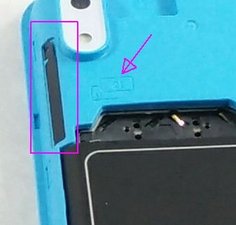
It looks like the phone has a SIM card tray that just pops out of the side and you lay the card in that. The tray takes two SIM cards (I think)

Here’s and image taken from the ifixit BLU Tank II 电池更换 guide, to show where it is.

Looks like there is a small pin hole that is like with most SIM card trays in that you insert a tray ejector tool to pop out the tray.

There should be an image or an outline of the card on the tray which shows the beveled edge and that it has to go face down to connect with the phone

图片

(click on image to enlarge for better viewing)

这个答案有帮助吗?

得分 0
添加一条评论

添加你的答案

karen mcsims 将永远感激不已
浏览统计数据:

过去 24 小时: 1

过去 7 天: 4

过去 30 天: 20

总计 1,475